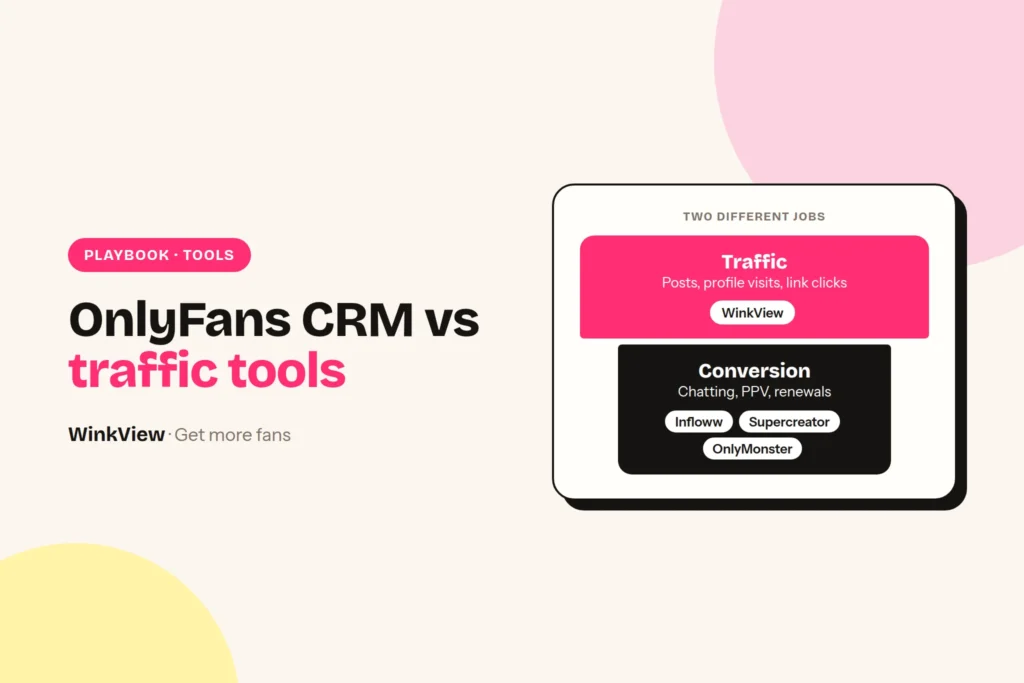
An OnlyFans CRM runs everything that happens inside the paid platform: the chat inbox, chatters, the vault, mass messages, fan data and revenue reports. Infloww, Supercreator, OnlyMonster and CreatorHero are the main options, and all four bill per creator account, mostly on a scale tied to what that creator earns. A traffic tool does a different job: it works on public social platforms before a fan exists. If you are searching for an Infloww alternative because revenue is flat, check first whether the problem is chat or traffic, because a second CRM cannot fix a traffic problem.
The short answer
- Choose Infloww if you run creators on several paid platforms and want shift scheduling and employee reports in the same tool. From $40 per creator profile a month, rising with her earnings.
- Choose Supercreator if you want AI to do more of the chatting. The CRM Lite plan is free for up to 10 accounts; the AI plan adds 5% of AI net sales on top of the monthly fee.
- Choose OnlyMonster if you want the lowest published per-account price at most earnings levels, shift tools and an open API. From $30 per account a month, cheaper on 3 or 6-month terms.
- Choose CreatorHero if you want one predictable base fee plus a success fee, with traffic-source analysis inside the CRM. $39.99 per creator plus a fee that rises with revenue.
- None of them brings new people to the creator’s link. That is a traffic job, done on Instagram, TikTok, Reddit, X and the rest. You need one CRM and one traffic system, not two CRMs.
Disclosure
We make WinkView, a traffic tool for agencies. It is not a CRM and we do not rank it against the four CRMs below. We describe Infloww, Supercreator, OnlyMonster and CreatorHero from their own websites and documentation, not from our own testing. Prices checked 28 September 2026. All four change plans often, so confirm on their pages before you buy.
OnlyFans CRM vs traffic tool: two different jobs
Every paying fan passes through two zones. The first is public: someone sees a Reel or a Reddit post, visits the profile and taps the link. The second is private: she subscribes, gets a welcome message, opens chats and maybe buys PPV.
A traffic tool works on steps 1 to 3. A CRM works on steps 4 and 5. The CRM connects to the creator’s paid account and gives your team what the platform itself does not: one inbox across creators, chatter roles and permissions, a searchable vault, segmented mass messages, notes on each fan and revenue broken down by chatter, message and source.
Nothing in a CRM puts a post in front of a stranger on Instagram. Nothing in a traffic tool sends a PPV. So “Infloww vs Supercreator” is a real decision; “Infloww vs a traffic tool” is not.
One rule applies whichever CRM you pick. OnlyFans’ Terms of Service say that if someone else assists a creator with the operation of her account, “this does not affect your legal responsibility. Our relationship is with you, and not with any third-party.” In plain terms: the creator stays responsible for everything your team and your software do on her account, so put your CRM choice and your chat rules in writing with her.
Infloww vs Supercreator vs OnlyMonster vs CreatorHero: the facts
Every line below comes from the vendor’s own pricing page, homepage or help documentation. Where a site does not say something, the table says so rather than guessing. All prices are in US dollars per month.
| CRM | You pay per | Published price | Free trial |
|---|---|---|---|
| Infloww | Creator profile, by her monthly earnings | OnlyFans and Fansly: $40 (under $500 earned) to $500 (over $75,000), 12 bands. MYM and Fanvue: from $50 | Yes; length not stated on the pricing page |
| Supercreator | Account, by earnings. No charge for chatters or devices | CRM Lite: free, up to 10 accounts. CRM Premium: $15 to $249. Super AI: $99 to $299 plus 5% of AI net sales. Over 20 accounts: on request | 14 days, no card |
| OnlyMonster | Account, by its last 30 days of earnings | $30 (up to $2,500 earned) to $250 ($50,000 and above), 7 bands. Discounts on 3 and 6-month terms | 7 days per connected account (per its help docs) |
| CreatorHero | Creator, base fee plus revenue-based success fee | $39.99 base plus $0 to $260 success fee: total $39.99 to $299.99 | 7 days |
| CRM | Platforms listed | AI chat features | Team and chatter tools |
|---|---|---|---|
| Infloww | OnlyFans, Fansly, MYM, Fanvue (Fansly, MYM and Fanvue plans list fewer features than OnlyFans) | AI Copilot on the OnlyFans plan, marked “in beta”, which learns the creator’s style | Roles and permissions, employee reports, shift scheduling, message dashboard |
| Supercreator | OnlyFans only, as far as its site states | Message, inbox and pricing copilots on Premium (capped at 500 AI messages a month). Super AI adds “Izzy”, an AI chatter, plus message flows and an auto follow-back for expired fans | Chatter analytics, payout calculation for chatters, password-less team access |
| OnlyMonster | OnlyFans (full features), Fansly (inbox, templates, fan notes), plus basic team access for Fanvue, LoyalFans, Telegram, Reddit, Snapchat and others, per its docs | AI smart replies, fan scoring, translator, AI credits included; you can connect your own AI model by API key | Shifts and shift-based access, over 20 permissions, open API, webhooks, CSV or JSON export |
| CreatorHero | OnlyFans; other platforms not stated on its homepage | AI chat-history summaries, AI translator, AI analysis of which traffic sources send paying fans | Chatter performance tracking, vault labels for used media, mass messages to online fans |
Two things are worth reading closely. First, “per account” really means per account: Supercreator’s FAQ says a creator’s free and paid pages are billed separately. Second, the bands move as a creator’s earnings change; OnlyMonster lets you lock a rate for up to 6 months by prepaying. OnlyMonster’s platform list is from its supported platforms page.
What each CRM costs for 1, 5 and 10 creators
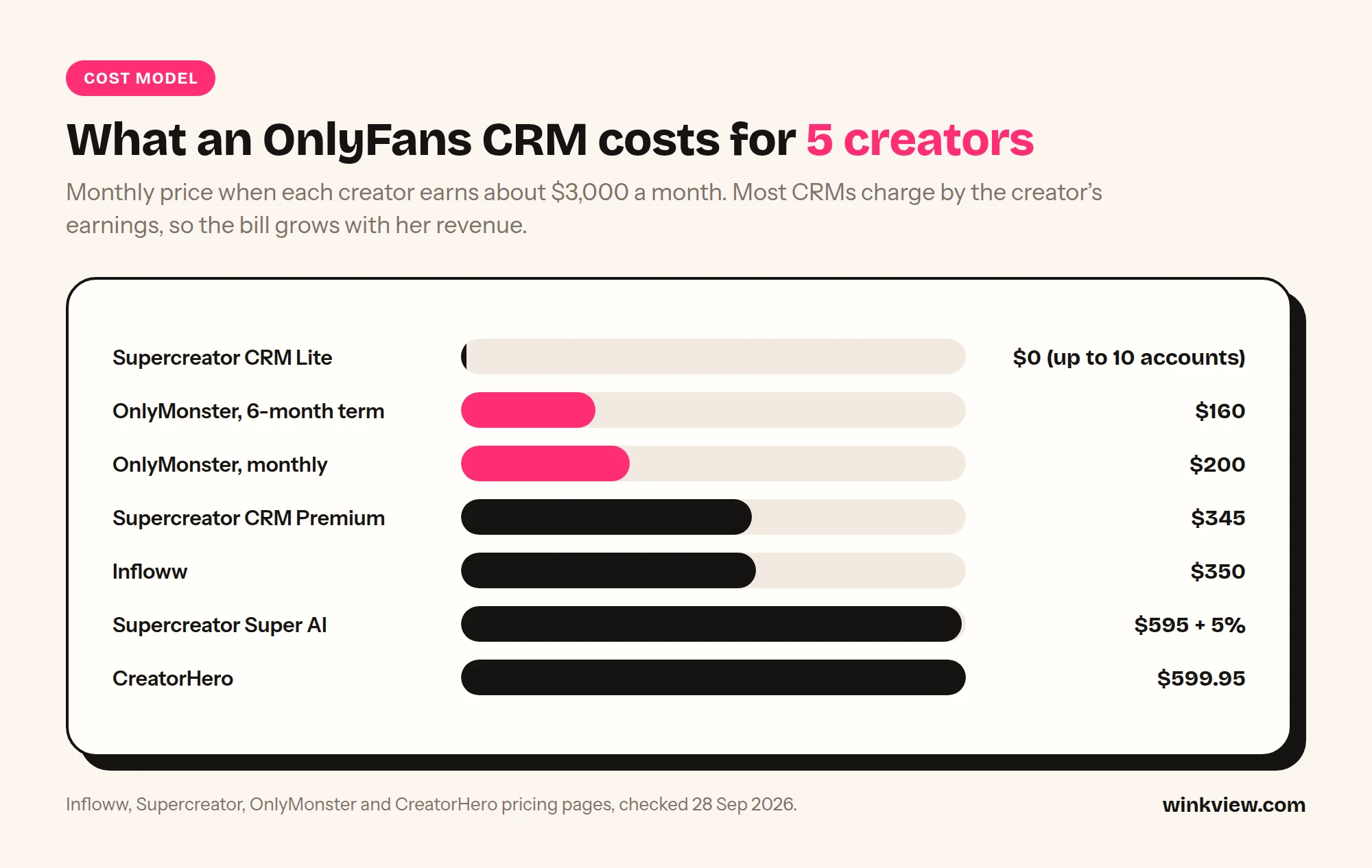
Because the bands depend on earnings, a fair comparison needs one assumption. Illustrative assumption: every creator earns $3,000 a month on OnlyFans. That puts her in these bands: Infloww $2,000.01 to $5,000 ($70), Supercreator $1,000 to $15,000 (Premium $69, Super AI $119), OnlyMonster $2,500 to $5,000 ($40 monthly, or $192 for 6 months, which is $32 a month), CreatorHero $2,500 to $5,000 ($39.99 base plus $80 success fee = $119.99).
| CRM plan (creator earning $3,000) | 1 creator | 5 creators | 10 creators |
|---|---|---|---|
| OnlyMonster, 6-month term | $32 | $160 | $320 |
| OnlyMonster, monthly | $40 | $200 | $400 |
| Supercreator CRM Premium | $69 | $345 | $690 |
| Infloww | $70 | $350 | $700 |
| Supercreator Super AI | $119 + 5% of AI net sales | $595 + 5% | $1,190 + 5% |
| CreatorHero | $119.99 | $599.95 | $1,199.90 |
| Supercreator CRM Lite | $0 | $0 | $0 (limit is 10 accounts) |
The maths is band price times number of creators. Change the assumption and the order changes: at under $500 a month, Supercreator Premium is $15, OnlyMonster $30, Infloww $40 and CreatorHero $49.99. The cheapest line is also not the full picture. Super AI is built to take over part of the chatting itself, which none of the other rows are sold as, and its 5% only applies to sales its AI makes.
Best OnlyFans CRM for your agency
Infloww. Priced plans for four paid platforms (OnlyFans, Fansly, MYM, Fanvue), with shift scheduling and employee reports built in. Choose it if some creators sell on Fansly, MYM or Fanvue and you want one inbox. Skip it if every creator is OnlyFans-only and price per account is your main filter; OnlyMonster’s published bands are lower than Infloww’s at every earnings level.
Supercreator. A plan built around an AI chatter (Izzy), and the only permanent free plan on the four pricing pages. Choose it if hiring and training chatters is your bottleneck, or if you want to try a CRM on up to 10 accounts at no cost. Skip it if you need Fansly, or if you are not comfortable with a revenue share on AI sales.
OnlyMonster. Low published prices, prepay discounts, shifts, and an open API with data export. Choose it if you want to pull CRM data into your own dashboards or pay less per account. Skip it if your team needs deep Fansly or Fanvue features: its own docs show those platforms get fewer tools than OnlyFans.
CreatorHero. A fixed base fee with a success fee on top, and AI that looks at which traffic sources send paying fans. Choose it if attribution of traffic sources is the report you look at most. Skip it if you run many high earners: at $50,000 and above it is $299.99 per creator.
If you already use one of these and it does its job, switching means moving your team to a new inbox and retraining chatters, often for a price difference of tens of dollars per creator. Switch for a missing feature, not because revenue stalled. If revenue stalled, read the next section first.
Is your problem traffic or conversion?
Before you buy anything, split each creator’s month into three numbers you can pull from your CRM’s tracking-link and message reports:
- Link clicks: clicks on her tracking links or bio link. This is traffic.
- New subscribers per 1,000 link clicks: new subs divided by clicks, times 1,000. This is her page and offer.
- First-purchase rate and mass message purchase rate: the share of new subscribers who buy anything within 30 days, and purchases divided by recipients for each mass message. This is chat and selling, the part a CRM and your chatters own.
Compare each creator against her own last month and against your other creators. We do not publish “good” benchmarks, because they depend on price, niche and free-trial use, and anyone quoting one universal figure is guessing.
Worked example (illustrative)
Example: Linden Management, a made-up agency with three creators, compares August with September.
- Creator A: 4,000 clicks and 120 new subs (30 per 1,000), then 2,500 clicks and 76 new subs (30.4 per 1,000). Conversion held; clicks fell by more than a third. Traffic problem.
- Creator B: 3,000 clicks and 90 new subs (30 per 1,000), then 3,200 clicks and 58 new subs (18.1 per 1,000). More people arrived and fewer subscribed. Page or offer problem: price, bio, pinned post, free trial.
- Creator C: new subs flat at around 100, but first-purchase rate fell from 40 in 100 to 22 in 100 after a chatter change. Chat problem, and the only one of the three a CRM report points straight at.
Buying a second CRM helps Creator C at best. It does nothing for A or B.
If clicks are healthy and subscribers still do not come, read why OnlyFans views are not turning into subscribers, which covers the page-side fixes. If followers are not clicking at all, how to convert followers into subscribers covers bio links and calls to action.
Copy this diagnostic sheet
TRAFFIC OR CONVERSION? (one sheet per creator, per month)
Creator: [name]      Month: [ ]      CRM: [name]

1. TRAFFIC
Link clicks this month:                [ ]
Link clicks last month:                [ ]
Change:                                [+ / - %]
Main click sources (tracking links):   [IG / TikTok / Reddit / X / other]

2. PAGE AND OFFER
New subscribers this month:            [ ]
Subs per 1,000 clicks = subs / clicks x 1,000:  [ ]
Last month:                            [ ]
Price or free-trial change this month? [yes / no, what]

3. CHAT AND SELLING (from CRM reports)
New subs who bought within 30 days:    [ ] of [ ]  = [ %]
Mass messages sent:                    [ ]
Purchases / recipients (average):      [ %]
Revenue per new subscriber:            [ ]
Chatter or script change this month?   [yes / no, what]

VERDICT (tick one)
[ ] Clicks down, subs per 1,000 steady   -> TRAFFIC. Fix posting and outreach.
[ ] Clicks steady or up, subs per 1,000 down -> PAGE/OFFER. Fix price, bio, trial.
[ ] Subs steady, purchase rates down     -> CHAT. Fix chatters, scripts, CRM use.
[ ] Cannot fill section 3                -> You need CRM reporting first.

Action this month: [one line]    Owner: [name]    Check date: [ ]
What fills the top of the funnel: WinkView
If the sheet says traffic, the fix is more of the right people seeing the creator on public platforms, every day, for every creator. That is the job WinkView does, and it works alongside whichever CRM you use. The two do not need to talk to each other: WinkView sends people to the link in her bio, and your CRM measures what happens after they click. Put a tracking link in her bio so the CRM can show you which platform the new subscribers came from.
WinkView has two parts, priced per creator, and every plan includes both. The Video Editor takes the raw phone clips your team drops in and turns each one into a ready-to-post vertical video: best moment first, dead air cut, hook text on screen, music. Nothing posts until a manager ticks it. Posting uses each platform’s official posting API, accounts connect through the official connect screens, and WinkView never sees or stores passwords.
Reposting then writes a fresh caption per platform in her language and posts every approved clip to Instagram Reels, Trial Reels, a daily Story, TikTok, YouTube Shorts, Facebook Reels, Threads and X, spread through the day in her time zone, and posts her best clips again. Unlimited posts, no per-post fees.
WinkView does (steps 1 to 3)
- Posts her clips daily to Reels, Trial Reels, a Story, TikTok, Shorts, Facebook Reels, Threads and X
- Writes captions per platform in her language and voice
- Edits her raw clips: best moment first, dead air cut, hook text, music
- Posts her best clips again and flags accounts that need reconnecting
Your CRM does (steps 4 and 5)
- Chat inbox and chatters on the paid platform
- Vault, mass messages and PPV
- Fan notes and spending data
- Revenue, tracking-link and chatter reports
- Shifts and payouts, where the CRM offers them
Honest limits. WinkView does not post to or message on OnlyFans, Fansly or Fanvue, send PPV, handle checkout, post to Reddit, or follow and like on any platform; on Instagram its only automated replies are link DMs to people who write “link”. If a creator’s traffic comes mainly from Reddit, WinkView will not do that work, and real comment and DM conversations stay with your team. Posting through official APIs keeps the risk low; a creator’s own content still has to follow each platform’s rules.
For the full list of traffic channels, including the ones WinkView does not cover, see how to get traffic to OnlyFans, and for the rest of the stack, the best OnlyFans agency software, sorted by job.
The decision rule: one CRM, one traffic system
Use the diagnostic sheet for every creator, then apply this in order:
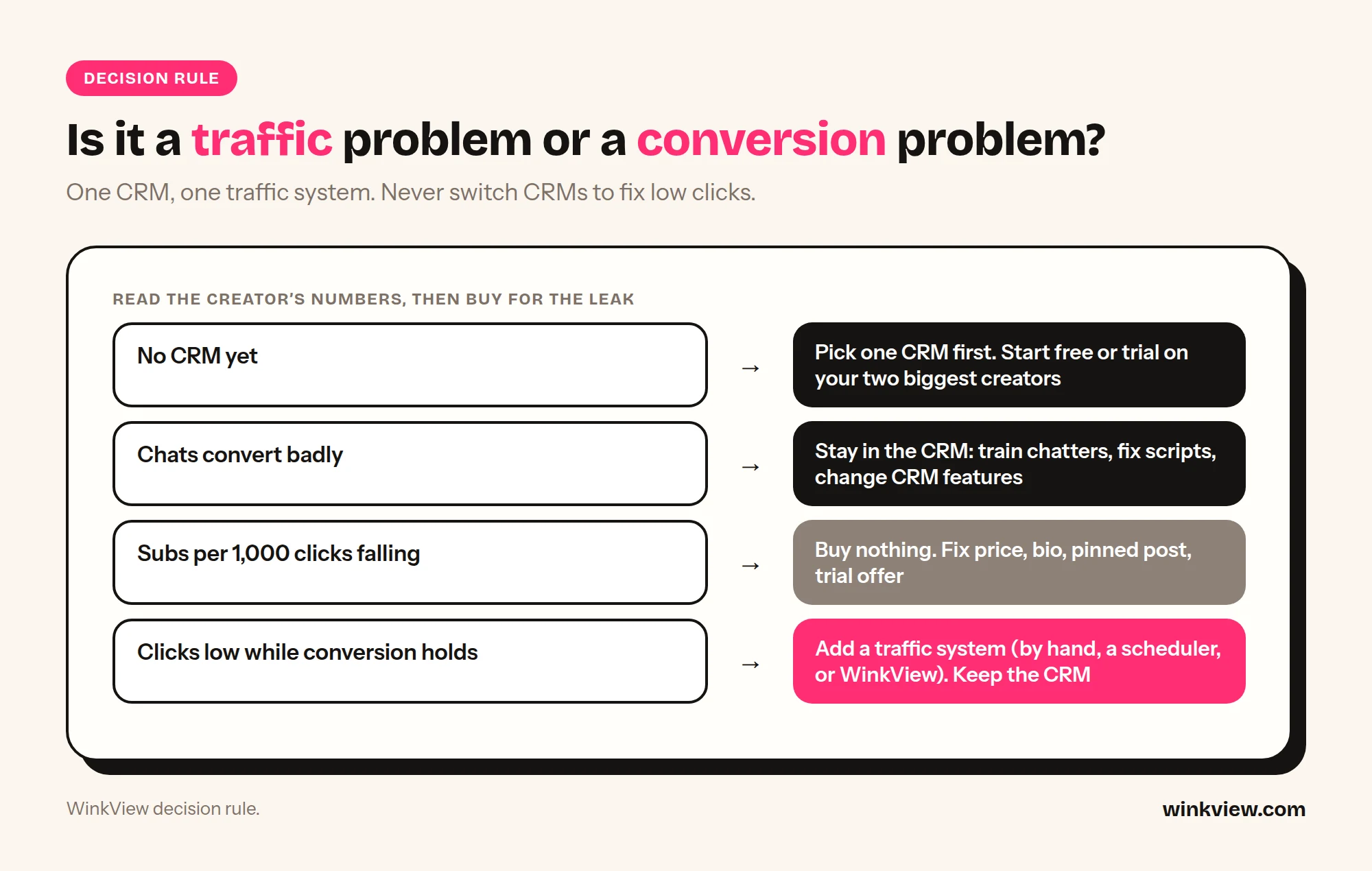
- No CRM yet, or you cannot fill section 3 of the sheet: pick one CRM first. Start with Supercreator CRM Lite (free) or a trial of OnlyMonster, Infloww or CreatorHero on your two biggest creators.
- Section 3 is weak (chat problem): stay in the CRM world. Train chatters, fix scripts, or move to a CRM with the missing feature, such as AI chatting or shift tracking.
- Subs per 1,000 clicks is falling (page problem): buy nothing. Fix price, bio, pinned post and free-trial offer, then measure again for a month.
- Clicks are low or falling while conversion holds (traffic problem): add a traffic system. That can be your own team posting by hand, a scheduler, or a tool like WinkView. Do not switch CRMs. The by-hand option is costed in what an OnlyFans social media manager costs per creator.
Worked example: full stack for 5 creators (illustrative)
Example: Linden Management grows to five creators, each earning about $3,000 a month, and the sheet shows a traffic problem on three of them.
- CRM: OnlyMonster on monthly billing, 5 x $40 = $200 a month (or $160 a month on the 6-month term).
- Traffic: WinkView Growth at €189 a month excluding VAT, which covers up to 6 creators, so all five get their raw clips edited and posted daily everywhere, with one place free.
- Not bought: a second CRM. Moving from OnlyMonster to Infloww would cost 5 x $70 = $350 a month and leave clicks where they were.
The bills are in different currencies, so add them at your own exchange rate. One tool per zone, each judged by its own line on the sheet.
Running socials for several creators at once? The guide to managing multiple creators’ social media has a tracker that pairs with the sheet above.
Frequently asked questions
What is the best OnlyFans CRM?
It depends on your bottleneck. Infloww has priced plans for OnlyFans, Fansly, MYM and Fanvue plus shift scheduling, Supercreator sells an AI chatter plan and has a free tier, OnlyMonster has the lowest published per-account prices and an open API, and CreatorHero pairs a flat base fee with traffic-source analysis. Trial your top two on the same two creators for a week and compare the chat numbers on the diagnostic sheet.
Is WinkView an Infloww alternative?
No. WinkView does not connect to OnlyFans, Fansly or Fanvue, has no chat inbox and does not send PPV or mass messages. It edits her raw clips and posts them on public social platforms to bring people to the creator’s link. If you are replacing Infloww, look at Supercreator, OnlyMonster or CreatorHero; if you want more fans arriving, WinkView sits next to whichever CRM you keep.
Do WinkView and my CRM need to be connected?
No. WinkView works only on public social platforms and never logs in to the paid platform. It sends people to the link in the creator’s bio. Put a CRM tracking link there and your CRM will show how many of those clicks became subscribers and buyers.
Do these CRMs charge extra for chatters?
All four bill per creator account, not per chatter seat. Supercreator states it outright: the licence is tied to each OnlyFans account, with unlimited devices and team members. The others price per creator profile or account on their pricing pages and do not list per-seat fees; confirm team limits with them before a large rollout.
Does OnlyFans allow agencies to use a CRM?
OnlyFans’ Terms of Service accept that someone else may assist a creator with her account, but they make the creator legally responsible for all use of it, whoever operates it. We could not find a clause in the Terms that names or approves specific third-party CRMs, so treat any “officially approved” claim with care and agree the rules for your team with each creator in writing.
Should I switch CRMs if revenue has stalled?
Only if the diagnostic sheet shows a chat problem and your current CRM lacks the feature that would fix it. If clicks are falling while subscribers per 1,000 clicks hold steady, the problem is traffic, and a new CRM will not change it. Fix the traffic first and measure again after a month.