OFM tools are the software an OnlyFans management agency runs on: a chatting CRM for the paid page, an editor and posting tool for social traffic, an Instagram DM tool, antidetect browsers for team logins, content protection, a link-in-bio page and the docs your team works from. Below are 20 OFM tools sorted into those seven jobs, with what each one does, what you pay per and the starting price from the vendor’s own page.
The short answer
Chatting and fan CRM: Infloww (from $40 per creator profile a month) or Supercreator (free CRM Lite for up to 10 accounts).
Video editing and daily posting: WinkView (from €39 per creator a month) edits raw clips and posts them to six platforms. CapCut if your team edits by hand; Buffer if your team writes every caption.
Instagram DMs: Manychat (from $14 a month billed annually) or Inrō (free plan; Pro from €12.99 a month).
Account safety: an antidetect browser such as Multilogin, GoLogin or Dolphin Anty for every login your team opens by hand.
Content protection: BranditScan (from $69 a month) or Rulta for DMCA takedowns of leaked content.
Start with two: a CRM and a posting tool. Everything else gets added when a specific problem shows up.
Disclosure
We make WinkView, one of the tools on this page. Every other tool is described from its own pricing and product pages, not from our own testing. Prices for Infloww, Supercreator, OnlyMonster, CreatorHero, Buffer, Metricool, Manychat, Multilogin, GoLogin and Notion were checked 28 September 2026; Inrō, Dolphin Anty, BranditScan and Linktree on 31 October 2026. Vendors change plans often, so confirm on their pages before you buy.
What are OFM tools?
OFM stands for OnlyFans management: running creators’ accounts as an agency, from chatting with fans to bringing in new ones from social media. OFM tools are the software that makes that work for more than one creator at a time. They fall into two halves. Some work inside the paid platform (OnlyFans, Fansly, Fanvue), where chatters sell PPV and renew subscriptions. The rest work on public platforms like Instagram, TikTok, Reddit and X, where new fans come from. No single tool covers both halves well, which is why every agency runs a stack.
Prices are the lowest published plan, per month, excluding VAT. The CRMs charge more as a creator earns more, so treat their starting price as a floor.
1. Chatting and fan CRM: Infloww, Supercreator, OnlyMonster, CreatorHero
This is where your chatters work all day: one inbox across creators, fan notes, scripts, mass messages, PPV and sales tracking per chatter. It is the tool that earns the money on the paid page, so most agencies buy it first.
Infloww: lists OnlyFans, Fansly, Fanvue and MYM, with shift scheduling, a message dashboard and employee reports. OnlyFans and Fansly cost $40 (under $500 earned) to $500 (over $75,000) per creator profile a month.
Supercreator: CRM Lite is free for up to 10 accounts; CRM Premium is $15 to $249 per account by earnings, with AI copilots and chatter analytics. Its pricing page names OnlyFans only.
OnlyMonster: $30 a month (under $2,500 earned) to $250 (over $50,000) per account, with primary proxies on every Pro plan and cheaper 3 and 6 month terms.
CreatorHero: a $39.99 base fee per creator plus a success fee of $0 to $260 that rises with revenue, so $39.99 to $299.99 a month in total.
Every earnings band and a cost table for 1, 5 and 10 creators are in our OnlyFans CRM comparison.
2. Video editing and daily posting: WinkView, CapCut, Buffer, Metricool
New fans come from short videos on Instagram, TikTok, YouTube Shorts and the rest, posted every day. The cost that matters here is not the licence. It is the hours your team spends editing clips, uploading them to each app and writing a caption for each one, for every creator.
WinkView
Upload her raw clips; the AI Video Editor puts the best moment first, cuts dead air and adds text and music
Posts every day to Instagram Reels, TikTok, YouTube Shorts, Facebook Reels, Threads and X, with a caption per platform in her language and voice
A weekly filming brief with 15 video ideas per creator
€39 for 1 creator, €99 for 3, €189 for 6, €279 for 10 a month (excl. VAT); unlimited posts
Does not post to Reddit or work inside the paid platform
CapCut, Buffer, Metricool
CapCut: the default editor for cutting and captioning clips by hand, with a free online editor
Buffer: free for 3 channels; Essentials is $5 per channel a month on yearly billing. Your team writes and schedules every caption
Metricool: €20 a month for up to 5 brands on monthly billing; best for the monthly report you send each creator
Billing unit: Buffer counts every platform of every creator as a channel, so 5 creators on 3 platforms is 15 channels
Once her posts reach people, the DMs fill up with the same question: where is the link? These tools use Meta’s official messaging API to answer keyword comments and DMs with a scripted reply and her link. They only answer people who wrote first.
Manychat: Essential is $14 a month billed annually with 250 active contacts; Pro is $29 a month billed annually with 2,500 contacts. Contacts above the allowance cost extra.
Inrō: a free plan with no card; Pro starts at €12.99 a month on monthly billing and scales with the contacts you activate.
WinkView also has Automated DMs: when someone writes “link” in a story reply, DM or comment, her link goes out a few minutes later with a short line in her language. Templates and costs for each route are in our Instagram DM automation guide.
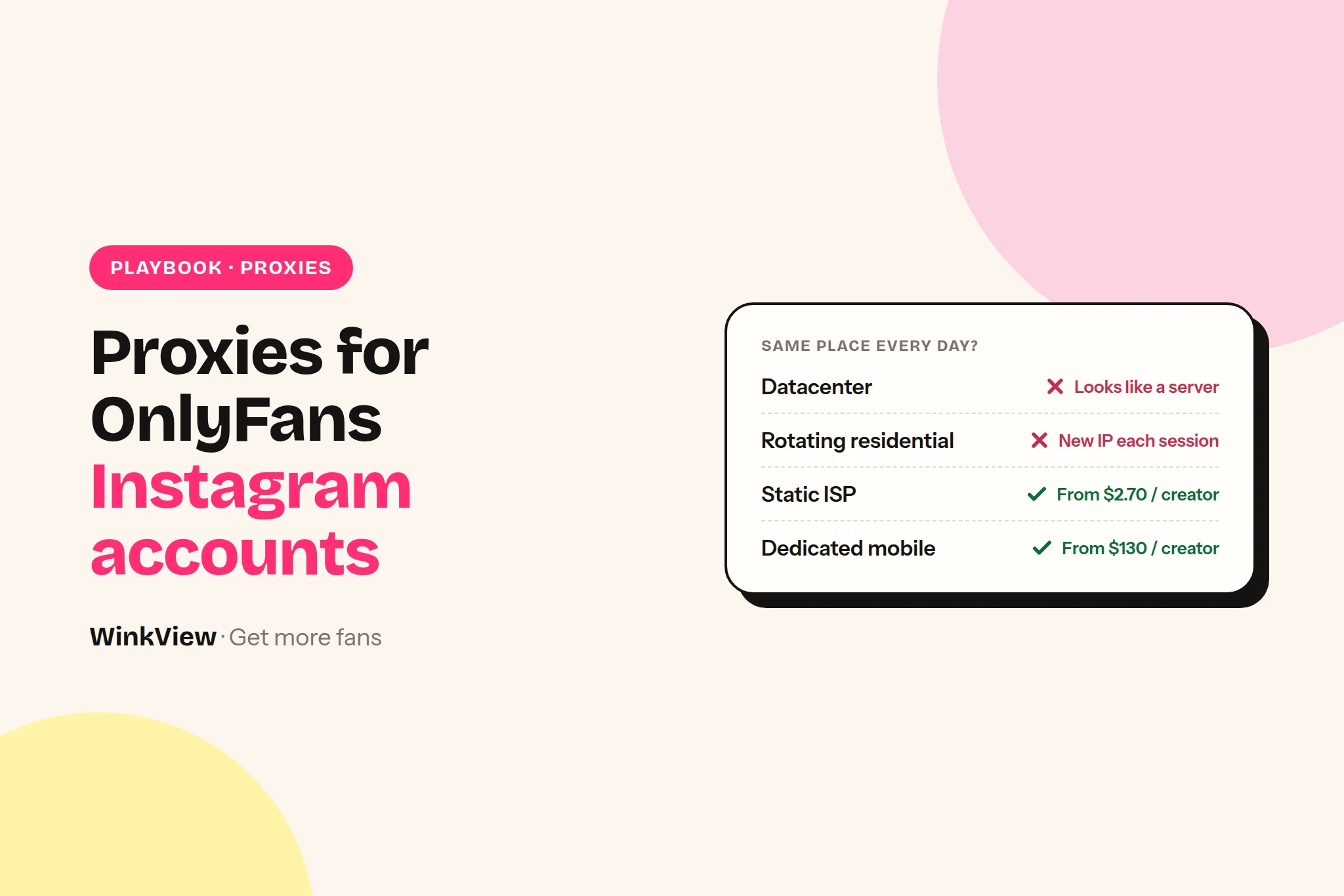
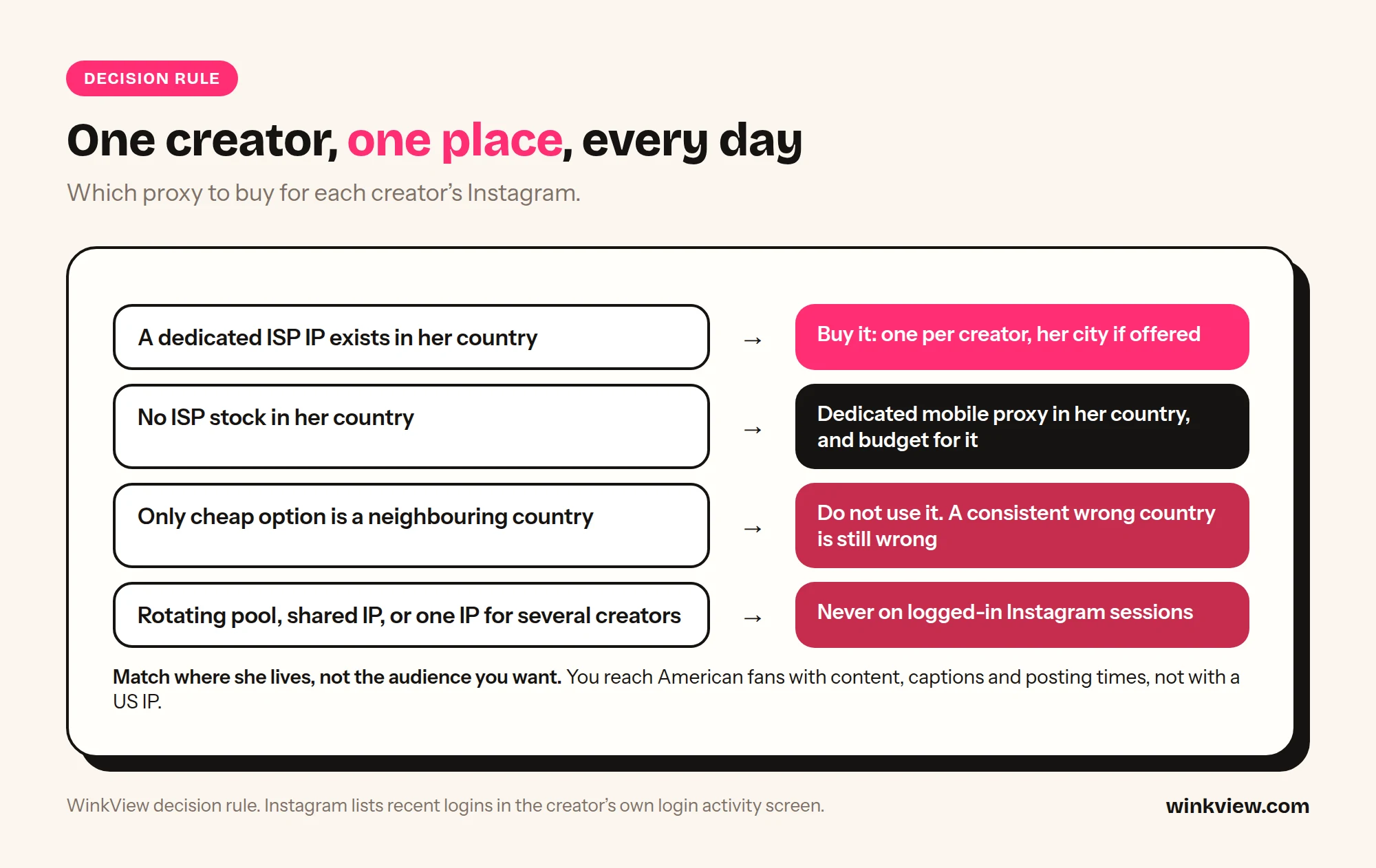
An agency with ten creators can hold forty logins: Instagram, TikTok, Reddit, X, email and backups. When many of them open from one laptop on one office IP, platforms can link them. An antidetect browser gives each login its own browser profile, and a residential proxy gives each one its own IP.
Multilogin: Pro is $11 a month for 10 profiles on monthly billing, with 1 GB of proxy traffic; Business starts at $40 a month for 100 profiles.
GoLogin: free for 3 profiles; Professional is $9 a month for 10 profiles on monthly billing.
Dolphin Anty: free for 3 profiles; Starter is $10 a month (20 to 60 profiles, selectable); Base is $89 a month for 100 profiles. Longer terms are 20 to 40% off.
Your CRM usually handles the paid-platform login with its own proxies, and tools that post through official connections, like WinkView, Buffer and Metricool, need no browser profile at all. The antidetect browser is for the logins your team opens by hand.
5. Content protection: BranditScan, Rulta
Leaks cost creators sales. Content protection services scan the web for her content and send DMCA takedown requests to the sites and to Google.
BranditScan: Premium is $69 a month ($690 a year) with automated DMCA takedowns, Google delisting, hourly scans with facial recognition and 3 stage names. White Glove is $149 a month with a personal concierge. The first scan is free.
Rulta: a DMCA takedown service built for creators. We could not load its pricing page, so check the current plans on its site.
6. Link in bio: Linktree, Beacons
Every post points to one place: the link in her bio. A link-in-bio page holds her OnlyFans link next to her other socials.
Linktree: a free plan with unlimited basic links; paid plans add analytics, custom designs and link rules.
Beacons: a link-in-bio storefront with email capture.
Check each tool’s rules on adult content before you add an OnlyFans link. Instagram also flags some links in bios, which is why many agencies now send the link by DM instead; see how to promote OnlyFans on Instagram.
7. Team ops: Notion, Google Workspace, Telegram
These do not bring in fans or sales on their own, but they keep a growing team working the same way.
Notion: chatter scripts, creator briefs and onboarding docs. Plus is $10 per member a month.
Google Workspace: one email per creator account and a shared Drive for her content.
Telegram: free team chat for shift handovers, and a fan channel for creators who run one (see Telegram for OnlyFans creators). Keep creator logins out of chat.
Which OFM tools to buy first
A chatting CRM, once a creator has any paying fans. With one creator, Supercreator’s free CRM Lite may be enough.
Daily posting, when the creator posts less than once a day on each short-video platform. Flat subscriber numbers usually mean too few posts, not a bad inbox.
A DM tool, once posting is steady and the same “link?” messages arrive every day.
An antidetect browser, the day your team opens more than one creator’s Reddit, X or backup accounts from the same machine.
Content protection, as soon as her content shows up on leak sites.
Docs and team chat last. They make a working system tidier; they do not make it work.
One rule keeps the stack clean: one tool owns each job for each creator, so nothing gets posted twice and no fan gets two replies. Starting from zero? How to start an OnlyFans agency covers the first creator.
Frequently asked questions
What does OFM mean?
OFM means OnlyFans management: an agency running one or more creators’ accounts, usually for a share of what they earn. It covers chatting with fans on the paid page and bringing in new fans from social media. OFM tools are the software agencies use to do both for many creators at once.
What OFM tools do I need to start an agency?
Two: a chatting CRM for the paid page and a tool that posts her videos every day. Supercreator’s CRM Lite is free for up to 10 accounts, and WinkView starts at €39 a month for one creator. Add a DM tool, an antidetect browser and content protection when a specific problem shows up.
How much does an OFM tool stack cost?
For one creator, from about €39 plus $0 to $40 a month: WinkView Solo plus Supercreator’s free CRM Lite or Infloww’s lowest band. The CRM line grows with each creator’s earnings, so a top earner costs far more than a new creator. Costed stacks for 1, 5 and 20 creators are in our agency stack guide.
Is WinkView a CRM?
No. WinkView works on public social platforms: it edits her raw clips, posts them to six platforms every day and writes the captions. It does not log into OnlyFans, Fansly or Fanvue, chat with fans there or send PPV. You run it next to your CRM, not instead of it.
Does WinkView post to Reddit?
No. WinkView posts to Instagram, TikTok, YouTube Shorts, Facebook, Threads and X. Most agencies post to Reddit by hand from an antidetect browser profile, one per account. Our Reddit guide for OnlyFans covers the routine.
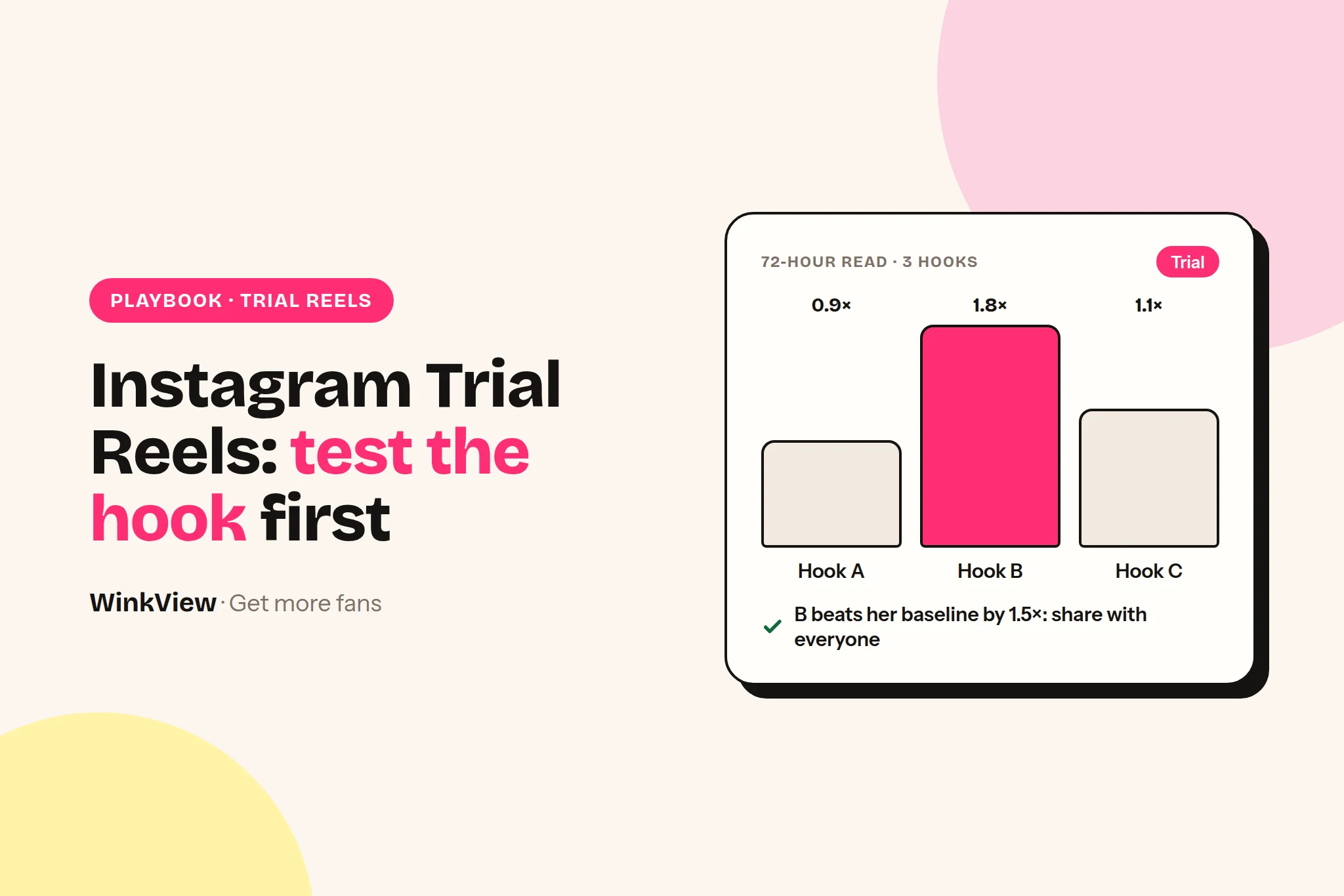
Instagram Trial Reels are Reels shown to people who do not follow the account first, so a creator can see how a clip performs with strangers before her followers or her profile grid ever see it. For an OnlyFans agency that makes them two things: a hook-testing lab, and a daily way to put every creator in front of new people. Below you get the verified facts, a weekly test protocol with a clear winner rule, a copyable test log, and how to automate Trial Reels across many creators so the habit does not depend on someone remembering a toggle.
The short answer
A Trial Reel goes to non-followers first. It does not appear in followers’ feeds, the Reels tab or the profile grid unless you share it.
You turn it on with the “Trial” toggle before sharing a reel. If the toggle is missing, the account is not eligible yet.
About 24 hours after posting you see views, likes, comments and shares. You can let Instagram share it with followers automatically if it performs well on views in the first 72 hours.
Testing method: one clip, three hooks, three Trial Reels a week, manual sharing only. Judge at 72 hours, promote only a variant that clearly beats the creator’s own trial baseline.
Automation: software on Meta’s official API can post trials. WinkView posts about 3 videos a day per creator, 1 or 2 of them as Trial Reels, and reposts best performers as Trial Reels now and then.
Trial Reels are free. The real cost is team time, or the tool that saves it.
Disclosure
We make WinkView, whose Reposting Agent posts Trial Reels as part of a creator’s daily schedule. The Trial Reels facts on this page come from Instagram’s and Meta’s own pages, linked in each section. Facts and prices checked 30 September 2026. Instagram changes features often, so check the app before you build a process on any single detail.
What Instagram Trial Reels are: the verified facts
Instagram announced Trial Reels on 10 December 2024 on its Instagram for Creators blog and in Meta’s newsroom, as a way to “try content with non-followers first”. Its Help Center page on Trial Reels describes them as a way to share reels with, and get feedback from, people who do not follow you. Here is what those official pages say, and nothing more.
Question
What Instagram says
Who sees it first
People who do not follow the account.
Do followers see it
Not in their feed or the Reels tab unless you share it. They can still come across it through a DM, or on a page for the same audio, location or filter.
Profile grid
Not on the grid or the Reels tab unless shared. It sits in your profile next to drafts, and only you see the trial label.
How to turn it on
Create a reel as normal, then tap the “Trial” toggle before sharing.
Auto-share
Optional. Instagram shares it with followers automatically if it judges it is performing well based on views in the first 72 hours. You can change this setting later.
Manual share
Tap “share with everyone” to show it to followers and across Instagram.
Metrics
About 24 hours after posting: views, likes, comments and shares, plus a comparison with your previous trials.
Can software post one
Yes. Meta’s publishing API has a trial setting for Reels (see below).
Tools that publish through Meta’s official API can post a Trial Reel too. Meta’s Instagram media publishing reference lists a trial setting for Reels with two options: manual, where you share the trial yourself in the app, or automatic sharing if the trial performs well. Publishing through the API needs a professional account. Neither official page publishes a daily cap on the number of Trial Reels, so we do not quote one.
Two rules from Instagram’s recommendation tips for creators matter more for OnlyFans teams than anything else on this page, because non-followers only see a trial if Instagram is willing to recommend it:
Suggestive content is not recommended. Instagram names “content that may be sexually explicit or suggestive, such as pictures of people in see-through clothing”. A trial of a clip like that goes nowhere, however good the hook.
Reuploads lose reach. The same page says “Avoid reuploading reels that are already on Instagram”. Keep that in mind when you give a strong clip a second run (more on that in the automation section).
How to use Trial Reels: eligibility and setup
Eligibility has changed since launch. The December 2024 announcement said “eligible creators” and pointed to the Help Center without listing the criteria. In July 2025 access widened, and trade press and social media consultants reported the bar as a public professional account with at least 1,000 followers. We could not confirm that exact bar on a page Instagram publishes, so treat it as reported, not official.
The practical test is quicker than any article: open the reel composer on the creator’s account and look for the Trial toggle. If it is there, she is eligible. If not, switch the account to a public professional account and keep posting normal Reels until it appears.
Setup for one Trial Reel takes under a minute:
Start a reel as usual and add the clip, text and audio.
On the final screen, turn on the Trial toggle.
Decide on auto-share. For hook tests, leave it off (see the mistakes section for why).
Share. Open the reel after about 24 hours to read the first numbers.
Why a Trial Reels strategy suits OnlyFans agencies
A creator’s followers are the people most likely to subscribe. New subscribers, though, mostly come from people who have never seen her before, and every clip that only reaches followers found nobody new. Trial Reels move the experiment to strangers, so followers only see a version that has already held up with a cold audience.
That gives an agency three things a normal posting schedule does not:
A clean grid. Losing variants never appear on her profile, so the grid a new visitor sees is the best of her work, not the test bench.
Like-for-like comparisons. Three variants of the same clip, posted the same day to non-followers, differ mainly in the one thing you changed. That is the closest thing to an A/B test Instagram gives you.
Reach beyond her followers. Trial Reels only travel to people who do not follow her, which is exactly the audience a growth campaign needs to reach.
The catch is habit, not knowledge. A typical complaint (a composite, not a real customer): “We know Trial Reels work. Nobody uses them.” A manager with eight creators posts Reels from her phone between chats, and the Trial toggle is one more tap she forgets. When she does remember, nobody notes which trial did well, so the best clip of the month is posted once and never seen again. The protocol below fixes the learning; the automation section fixes the habit.
One limit to keep in mind: anything Instagram’s recommendation guidelines keep out of recommendations will look like a weak hook when it is really a distribution limit. If every variant of a clip gets tiny views, question the clip before the hook, and check the account’s standing first in Instagram’s Account Status, then see how Reposting shows failed posts and accounts that need reconnecting.
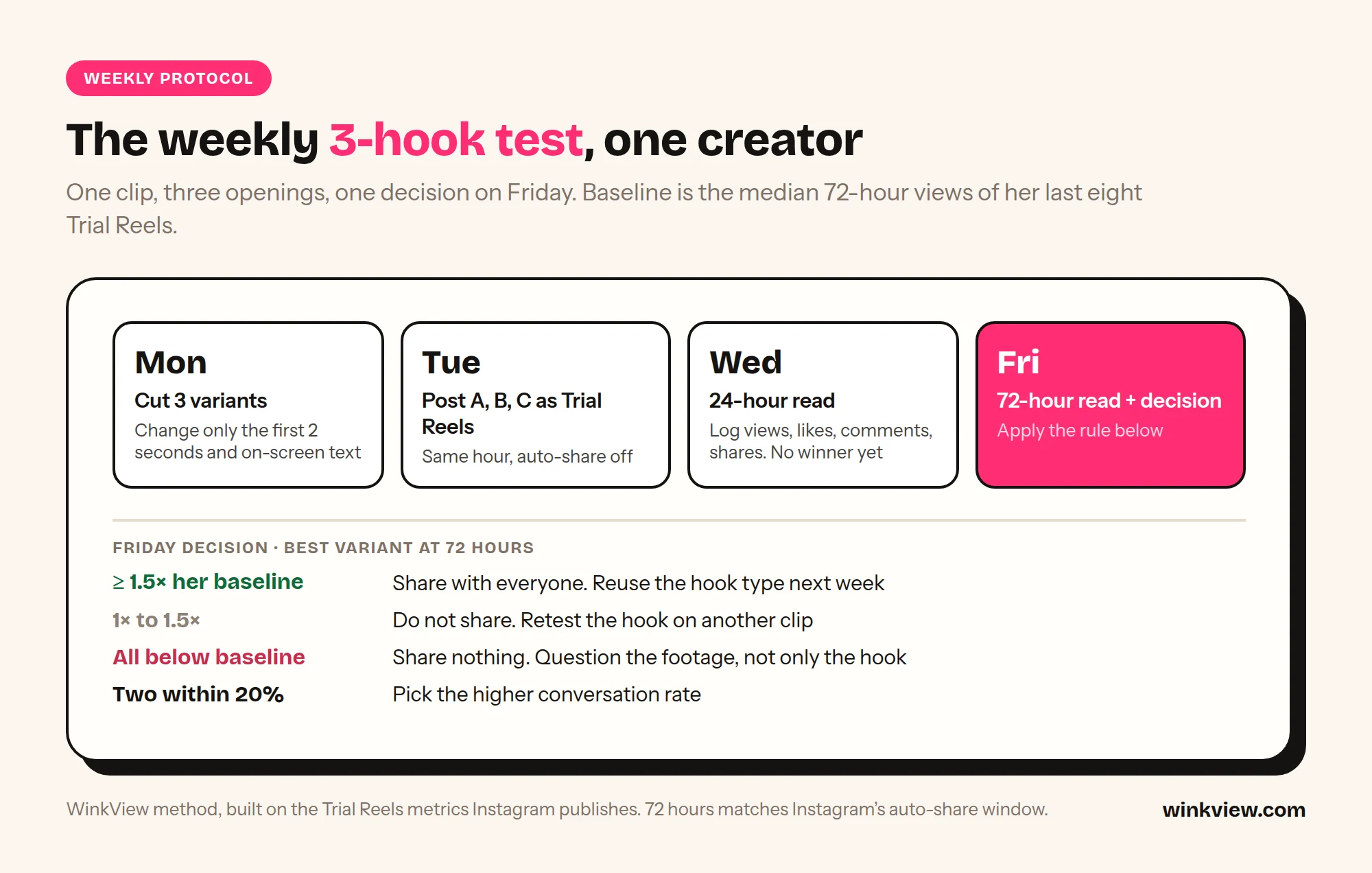
The weekly 3-hook test protocol
This is our method, built only on the numbers Instagram publishes for trials. One test per creator per week is enough to learn something every week without flooding the account.
One clip, three hooks, one decision on Friday.
Monday: cut three variants. Take one finished clip. Change only the first two seconds and the on-screen text, so you have variants A, B and C. Keep the audio, length and body of the clip identical. If you also change the caption, change it in only one variant and note it, or you will not know which change worked.
Tuesday: post all three as Trial Reels, within the same hour, with auto-share off. Same day and hour means the three variants compete for similar audiences. To pick the hour, use the free best time to post Reels checker.
Wednesday: 24-hour read. Log views, likes, comments and shares. Do not pick a winner yet: early numbers swing.
Friday: 72-hour read and decision. Log the same four numbers again, then apply the rule below. 72 hours matches the window Instagram itself uses for auto-share.
Two derived numbers make the variants comparable:
Baseline: the median 72-hour views of her last eight Trial Reels. Instagram’s own comparison with previous trials shows you roughly the same thing.
Conversation rate: (comments + shares) per 1,000 views. Shares and comments take more effort than a like, so they are the better sign that the hook made someone care.
72-hour result for the best variant
What you do
Views at least 1.5x her baseline
Share it with everyone. Reuse that hook type on next week’s clip.
Views between 1x and 1.5x baseline
Do not share. Keep the hook for a retest on a different clip.
Views below baseline on all three
Share nothing. Retire the clip and question the footage, not only the hook.
Two variants within 20% of each other on views
Pick the one with the higher conversation rate.
Why 1.5x: a variant that only matches her usual trial does not need a slot in her followers’ feed. The threshold is our starting rule; tighten it once you have a few months of logs.
Share the winning trial itself with “share with everyone” rather than uploading the clip again, so her grid does not end up with a duplicate and you stay clear of Instagram’s reupload guidance.
What to test for OnlyFans traffic
Test the parts of the clip that decide whether a stranger stops scrolling and then visits the profile. One variable per week.
Hook types (first 2 seconds)
Start mid-action, no text
A question on screen (“Which one for Friday?”)
A POV line that sets a situation
A reveal: before shown first, after held back
Direct to camera, first word spoken in second one
On-screen text and CTA
Text length: 3 words against 8 words
Text position: top third against centre
CTA: none, “more on my page” or “link in bio”
CTA timing: in the first seconds or the last
Pinned comment against no pinned comment
Keep every CTA inside Meta’s Community Standards, which apply to Instagram, including the rules on adult sexual solicitation. The safe pattern is to point to the profile, not to the paid platform: “more on my page” or “the rest is linked in my bio”. Do not name the paid site, do not use sexual wording and do not ask people to message for content. A Trial Reel that gets removed teaches you nothing, and removals show up in the account’s standing.
The bio link is where the test pays off. If a winning hook brings profile visits but the link gets few clicks, fix the bio and the pinned posts; the Instagram profile makeover for OnlyFans creators covers that step.
Worked example and weekly test log
Worked example (fictional, illustrative numbers)
Example: “Mila”, a fictional creator with a public professional Instagram account and the Trial toggle available. Her median 72-hour trial views over the last eight Trial Reels are 5,000. All numbers below are made up to show the maths, not real results.
The clip: a 12-second outfit change in a mirror. Three variants posted Tuesday at 19:00 her time, auto-share off.
A, question text “Which one for Friday?”: 72-hour views 4,200; 22 comments, 18 shares. Conversation rate (22 + 18) / 4.2 = 9.5 per 1,000.
B, starts mid-change, no text for 1 second: 24-hour views 6,900; 72-hour views 11,800; 35 comments, 61 shares. Conversation rate 96 / 11.8 = 8.1 per 1,000.
C, POV text line: 72-hour views 3,100; 9 comments, 6 shares. Conversation rate 15 / 3.1 = 4.8 per 1,000.
B’s views are 11,800 / 5,000 = 2.36x her baseline, above the 1.5x line, so the team shares B with everyone on Friday. A lost on views but had the best conversation rate, so next week’s test puts A’s question text on top of B’s mid-action opening. C’s POV hook gets retired for Mila.
Log every test in one place per creator. After a month you have a record of which hook types work for her.
To fit the test into the rest of her week, slot the three Trial Reels into the Tuesday row of your weekly OnlyFans content calendar and keep the Friday decision in the weekly review.
Common Trial Reels mistakes
Leaving auto-share on during a hook test. If two of three variants do well, Instagram can share both, and her followers get the same clip twice. Keep auto-share for single trials, not variant tests.
Changing several things at once. New hook, new audio and a new caption on one variant means you cannot say which change won.
Judging at 24 hours. The 24-hour number is a first read. Decide at 72 hours, the same window Instagram uses.
Comparing against another creator. A 5,000-view trial is poor for one creator and great for another. Always compare against her own baseline.
Treating trials as invisible. Followers can still reach a trial through a DM or an audio, location or filter page. Post nothing as a trial that you would not want a follower to see.
Testing clips that will not be recommended. If all three variants stall, the clip is likely the problem. Change the footage before you blame the hook.
Posting a winner once and never again. The best clip of the month deserves another run in front of people who missed it, spaced out and not every week.
Forgetting the paid page. A winning hook sends visitors to the bio link; if the page behind it is weak, the test only proves you can get clicks. See why views are not turning into subscribers.
Leaving the comments and DMs unanswered. A winning trial brings strangers who comment and message. Plan who answers them; Instagram DM automation for OnlyFans compares the options.
Platform rules
Trial Reels only reach people if Instagram is willing to recommend them. Keep clips safe for work: no nudity, no see-through clothing, no explicit wording in captions. Check the creator’s Account Status in Instagram settings, which shows whether her content is eligible for recommendation. Posting through the official connection keeps the publishing side inside Instagram’s rules, but Instagram still judges every clip.
Trial Reels automation for several creators
For one creator, the protocol above is a small weekly job. For ten, cutting variants, posting at the right hour in each time zone, flipping the Trial toggle every day and remembering which clip deserves a second run becomes a part-time job. Trial Reels themselves cost nothing, so the cost that matters is team time and any tool you use to post. Trial Reels automation means her clips are shown to non-followers every day without anyone on your team tapping the toggle.
WinkView’s Reposting Agent does this as part of each creator’s daily schedule, alongside her Instagram Reels, one Story a day, TikTok, YouTube Shorts, Facebook Reels, Threads and X. It posts through Instagram’s official posting API. Accounts connect through the official connect screens, and WinkView never sees or stores passwords.
1Upload her finished clips once
2Connect her Instagram officially
3About 3 videos a day go out
41 or 2 of them as Trial Reels
5Winners come back as trials
Fill her library. Your team uploads her clips once, finished or raw; raw ones go through the WinkView Video Editor first. WinkView does not film.
Connect her accounts through each platform’s official connection.
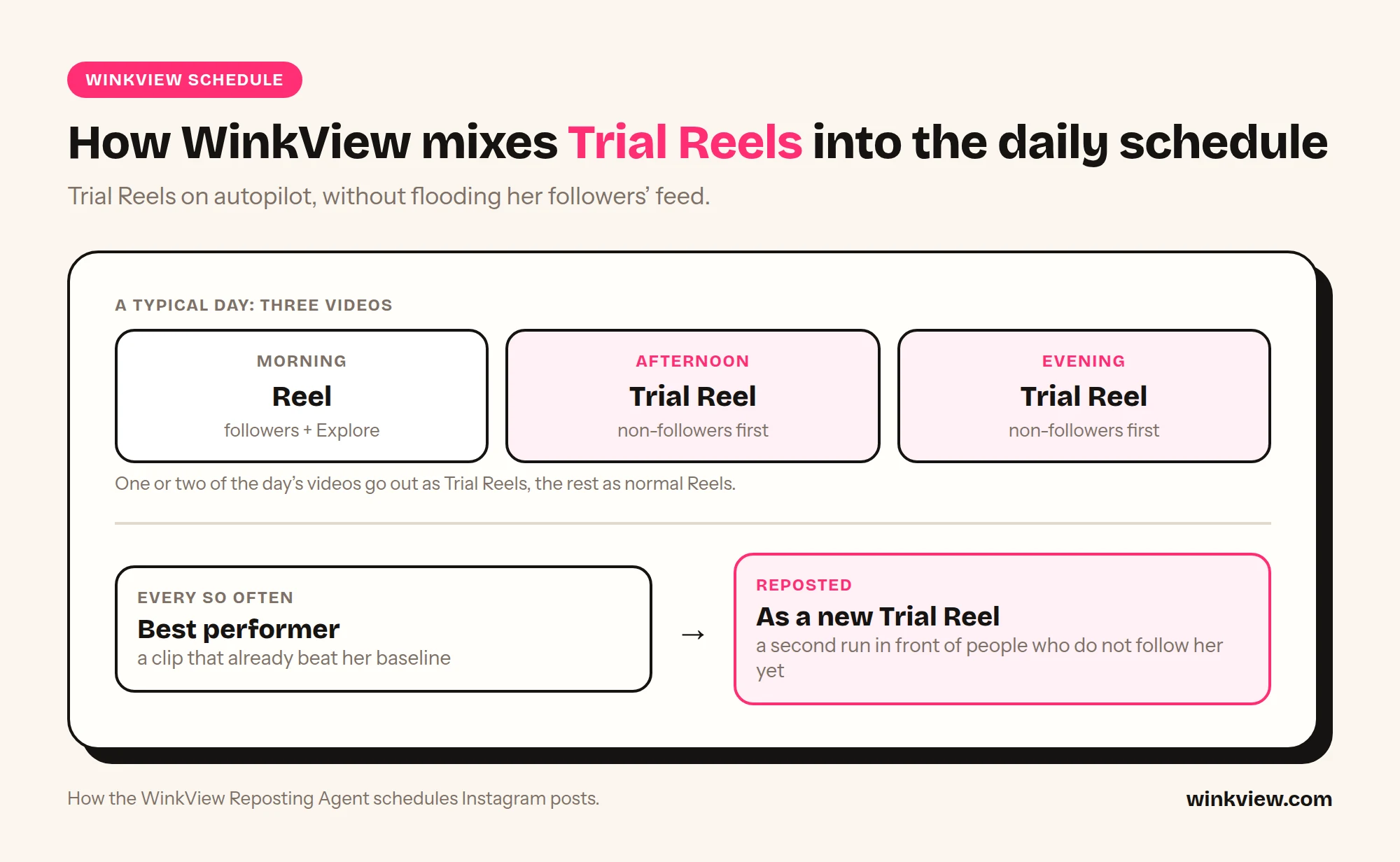
Posting runs daily. On a typical schedule of about 3 videos a day, 1 or 2 go out as Trial Reels and the rest as normal Reels, with AI-written captions for each platform, in her language and voice (EN, DE, SL, HR, SR or NO).
Best performers get a second run. Now and then, clips that did well are reposted as new Trial Reels, so a clip that already worked reaches people who do not follow her yet.
You check the numbers, not the toggle. The dashboard shows views, engagement, average views per post, followers gained and posts published or failed, plus “What WinkView sees”: best clip against typical, strongest platform, clips worth reposting and accounts needing reconnection.
Approvals are optional, and every post is logged in the posting history.
How WinkView mixes Trial Reels into a three-video day.
Why not post every clip as a Trial Reel? Because followers matter too. Normal Reels keep a creator in front of the people who already like her, and those people are closer to subscribing. Trials find new people. A mix of 1 or 2 trials a day does both jobs, and reposting strong clips as trials now and then, not every clip and not every week, gives them extra reach without spending new footage or running into Instagram’s reupload guidance.
Worked example: an automated week
Fictional creator, illustrative numbers. Lena is a fitness creator with 40 finished clips in her library: gym tips, outfit checks, a few funny outtakes. WinkView posts about 3 videos a day to her Instagram.
Monday to Sunday: 21 videos go out. 11 are Trial Reels, 10 are normal Reels. Nobody at the agency opens Instagram to post.
Thursday: the manager opens the dashboard. An outtake from Tuesday is her best clip of the week at roughly 9,000 views, against a typical clip of about 2,000.
The following week: that outtake goes out again as a Trial Reel and reaches another round of non-followers. The manager asks Lena to film two more outtakes in the same style.
Team time: about 15 minutes.
Real numbers come from our first customer, the agency WinkView was built for, run by a close friend of the founder. In 12 days across 15 accounts: 440,000 views, 238 of 241 posts published, about 2,000 average views per post. Instagram averaged about 4,300 per post, 6.2 times TikTok. That is one agency, not a promise. The full case study shows how it was set up.
Running the 3-hook test alongside automation
Because WinkView writes the captions, put your test variable into the clip itself (the first two seconds and the on-screen text) and upload A, B and C as separate clips. Open each trial in the Instagram app and check its share setting is what your test needs (Instagram lets you change it after posting). Read the results in Instagram’s own trial insights, then share the winner from the app. The daily schedule keeps her reach steady; the weekly test tells you which hooks to ask her to film next.
WinkView does
Posts 1 or 2 Trial Reels a day per creator on a typical 3 a day schedule
Posts the rest as normal Reels, plus one Story a day
Reposts best performers as Trial Reels now and then
AI-written captions for each platform, in her language and voice
Posts through Instagram’s official connection, unlimited posts
Shows what worked in one dashboard for every creator
WinkView does not
Film clips for her
Make an account eligible for Trial Reels if Instagram has not
Guarantee that any trial reaches a set number of people
Rescue clips Instagram will not recommend
Post to OnlyFans, Fansly or Fanvue, or touch Reddit or Telegram
Creators
WinkView plan
Per month (excl. VAT)
Per creator
1
Solo
€39
€39.00
3
Starter
€99
€33.00
5
Growth (6 places)
€189
€37.80 used (€31.50 if all 6 places filled)
10
Pro
€279
€27.90
The maths: €189 / 5 creators = €37.80 each while one place is empty. More than 10 creators: contact us. Every plan includes unlimited posts, the Video Editor and Reposting, and starts with a 7-day free trial (card required, nothing charged until day 8). See pricing for what each plan includes, or read about the Reposting Agent.
Where WinkView is not the right fit. If you want to hand-write every caption, or need all three test variants out in the same hour, post the test trials by hand in the Instagram app for that creator; an automated daily schedule is built for steady output, not for timing a test. Manual posting also costs nothing if you run one or two creators, like picking each trial by hand and have the time. WinkView saves time on daily posting across many creators and platforms; it does not replace reading the numbers and making the call on Friday.
Who runs it
WinkView runs the social side for agencies such as Nyvia, at about €30,000 a month, and Estrella, at about €40,000 a month, as well as the agency behind our 440,000-view case study.
Frequently asked questions
Do Trial Reels show up on the creator’s profile?
Not on the grid or the Reels tab unless you share them. Instagram keeps them in her profile next to drafts, and only she, or whoever runs the account, sees the trial label. Followers can still find a trial through a DM or an audio, location or filter page, so never post anything as a trial that followers should not see. A weak trial is therefore not sitting on her profile for fans to judge.
Why can’t I find the Trial toggle?
The account is not eligible yet. Instagram’s announcement limits Trial Reels to eligible creators without listing the criteria, and trade press reported in 2025 that access requires a public professional account with at least 1,000 followers. We could not confirm that bar on an Instagram page, so check the account type, make it public and look again as it grows. No scheduling tool can switch the feature on for an account Instagram has not made eligible.
Should I use auto-share or share manually?
For a single trial, auto-share is fine: Instagram shares it with followers if views in the first 72 hours look good. For a test with several variants of the same clip, share manually, or followers may see two versions of one clip. Manual sharing also lets you apply your own threshold against her baseline, such as the 1.5x rule in our weekly protocol, instead of relying on Instagram’s own judgement.
Can Instagram Trial Reels be posted automatically?
Yes. Meta’s official publishing API includes a trial setting for Reels, with manual or performance-based sharing, so approved software can post a trial without anyone tapping the toggle. WinkView’s Reposting Agent posts 1 or 2 Trial Reels a day per creator on a typical schedule of about 3 videos, plus reposts of her best performers now and then. The account still has to be eligible, and Instagram still decides whether each clip is recommended.
Can a Trial Reel and a normal Reel use the same clip?
Technically yes, but be careful. Instagram’s recommendation tips say “Avoid reuploading reels that are already on Instagram”, so the same clip posted again can lose reach with non-followers. That is why a strong clip should get a second run only now and then, not every clip and not every week. If a repost clearly does worse than the original, stop reposting it and ask the creator to film a new take in the same style.
Can I mention OnlyFans in a Trial Reel?
Trial Reels follow the same Community Standards as every other reel, including the rules on adult sexual solicitation, and they depend on recommendations, which exclude suggestive content. Our approach is to point to the profile, with lines like “more on my page” or “link in bio”, rather than naming the paid site or using sexual wording. A removed reel gives you no usable data and can hurt the account’s standing.
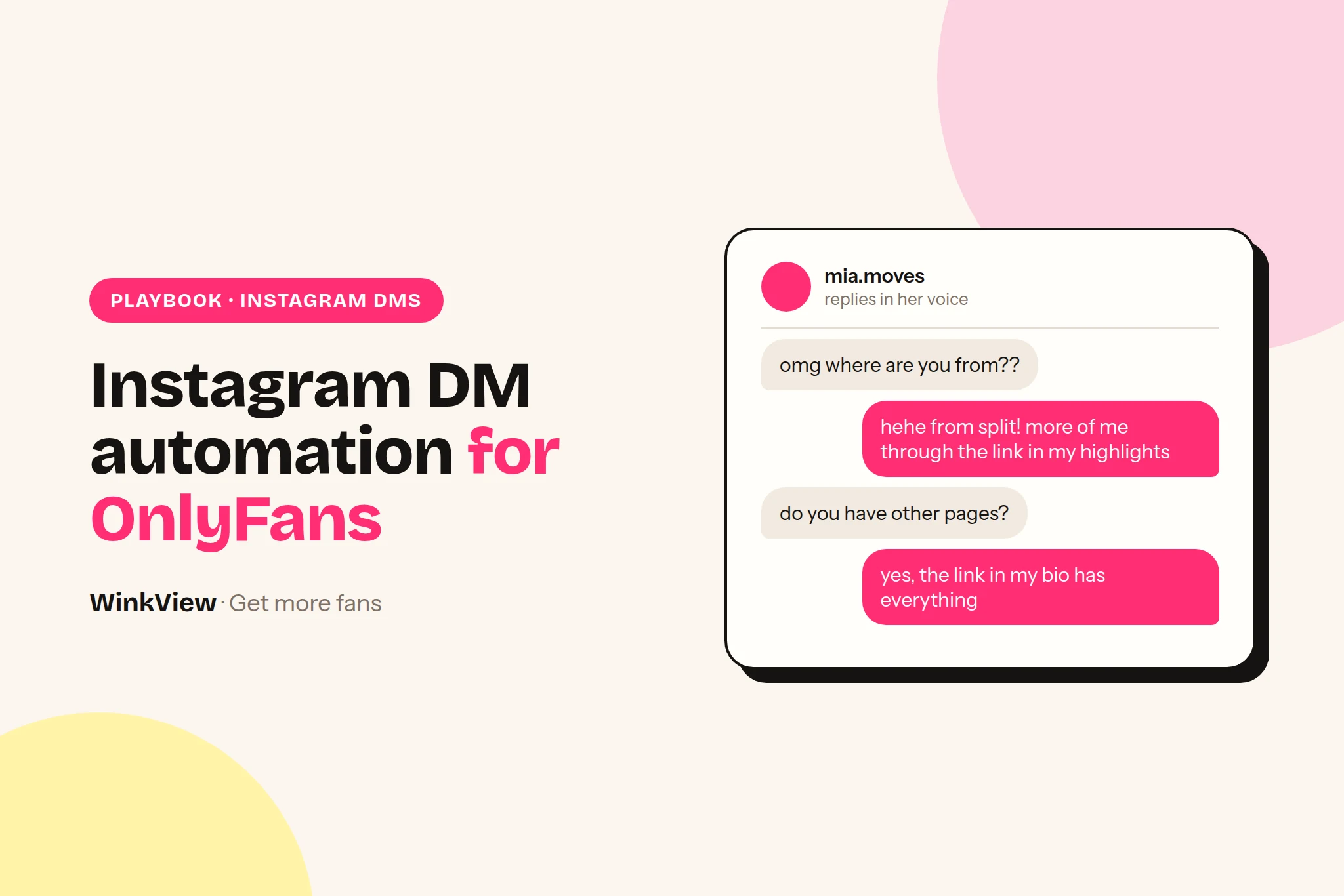
Instagram DM automation for OnlyFans creators means tools built on Meta’s official messaging API: ManyChat, Inro and InstantDM. They send scripted replies when someone comments a keyword or messages first. The other route is a person answering by hand, in her voice. Either way, a DM tool only answers people who are already interested. WinkView is what brings them: it turns her raw clips into finished edits and posts them everywhere, every day. Below: what each DM route can and cannot do, the cost for 1, 5 and 10 creators, a decision rule, the one rule for running both, and reply templates that stay inside Instagram’s rules.
The short answer
Use an API tool (ManyChat, Inro or InstantDM) for comment-to-DM funnels, keyword triggers and instant, scripted link delivery. They only answer people who messaged or commented first, inside Meta’s time windows.
Answer by hand when fans write ordinary words, not keywords: a person replying in her voice reads like her, but it costs staff time and is only as fast as that person. WinkView covers the start of the funnel: it edits her raw clips and posts them everywhere, every day, so there are DMs to answer, and its Automated DMs send her link to anyone who writes “link”.
A DM funnel needs traffic first. Count one week of comments and DMs per creator: dozens of people asking for her link means a reply problem, a handful means a reach problem.
You can run both across one roster, with one owner per inbox: never let two tools answer the same creator’s DMs.
No tool on this page chats with fans on OnlyFans, sends PPV or handles checkout. DMs should point to the link in her bio, never sell explicitly.
Disclosure
We make WinkView. ManyChat, Inro and InstantDM are described from their own pricing pages, help centres, terms and product pages, not from our own testing. Prices checked on 29 September 2026. Vendors change plans often, so confirm on their pages before you buy.
Two ways to answer Instagram DMs
The difference is technical, and it decides everything else: what can start a message, how fast the reply goes out, and what the tool is allowed to send.
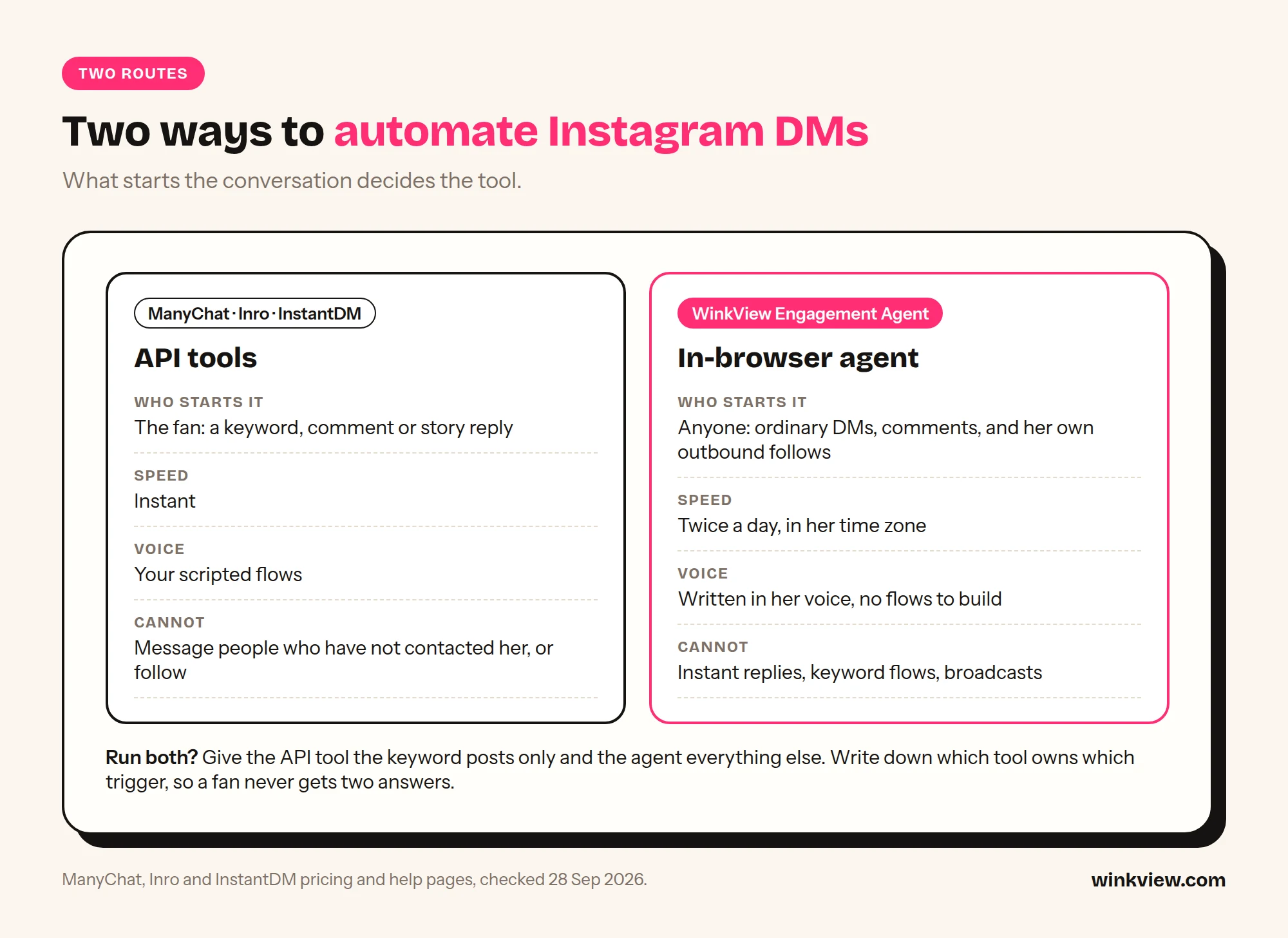
What starts the conversation decides which route fits.
Route 1: the official Instagram messaging API. ManyChat, Inro and InstantDM connect to her account through Meta’s developer platform. The account must be a professional account. Meta’s Instagram Platform overview says the APIs support “Instagram professional accounts including both businesses and creators”; personal accounts are not supported. The tool listens for events (a DM, a comment, a story reply) and answers with a flow you built in advance.
Route 2: a person in her inbox. Someone on your team, or the creator herself, reads the inbox and comments in the Instagram app and replies in her voice. Any message can get a natural answer and there are no flows to build, but it costs hours every day and replies are only as fast as the person.
This page is about choosing the DM tool. For how WinkView fills her inbox in the first place, with edited clips posted everywhere every day, read the Instagram automation guide. For what the DMs should actually say about her offer, read how to convert followers into subscribers. If you are specifically weighing Inrō against WinkView, the WinkView vs Inrō head-to-head goes through features, trials and a six-creator cost example.
Route 1: ManyChat, Inro and InstantDM on Meta’s API
All three sell the same core idea: someone comments a word under a Reel, or messages the account, and a DM with a link goes out within seconds. All three present themselves as official: ManyChat calls itself an Official Meta Business Partner, Inrō a Meta Tech Provider that runs on Instagram’s official API, InstantDM an official Meta Business Partner using the Instagram Graph API. The rules come from Meta, not from the vendor, so they apply to all three equally.
The 24-hour window. Meta’s messaging API documentation says: “Your app has 24 hours to respond to any message sent from an Instagram user to your app user.” Messages can only be sent after the person makes contact. Meta’s wider messaging policy allows promotional content inside that window; outside it, options are narrow. A separate human agent tag lets a real person answer later, not an automated flow.
Comment-to-DM is one message. Meta’s private replies documentation allows a DM to a commenter “within 7 days” of the comment, and “Only one message can be sent to the commenter.” Follow-ups are only allowed if the person replies, within 24 hours of that reply.
No cold outreach, no growth. The messaging API sends replies to people who contacted her first, so API tools do not DM strangers, and none of the three lists following or liking other accounts as a feature. That is why they are the lower-risk route for DMs, and also why they cannot fix a reach problem. (ManyChat’s pricing page does mention greeting new followers; check its docs for how that works on Instagram before you plan around it.)
Meta’s content rules still apply. An approved API connection does not make the message content approved. Meta’s Adult Sexual Solicitation policy covers offers and requests for sexual content, including indirect ones, in DMs as well as posts.
What each vendor says about adult content, quoted from its own pages:
ManyChat: its Terms of Service require that user content “will not be obscene or contain pornography (including but not limited to child pornography)”. Its Acceptable Use Policy prohibits “activities that are obscene, immoral, or that exploit or endanger minors” and says: “Using Manychat in any way that violates the policies of these or any other connected platform is also prohibited.” It does not single out adult creators.
Inro: its Terms of Service have no clause specific to adult content. They prohibit use that would violate “the policies of any platform the Service connects to (including Meta and Instagram)”. Inrō is also the only one of the three with a page aimed at OnlyFans creators, which says: “Trigger your link from comments and story replies,” and that it “does not use bots or unsolicited mass DMs”.
InstantDM: we found no content policy statement about adult content on its site.
In practice: a flow that sends a friendly message and points to her link page is ordinary use. A flow that promises explicit content in the DM puts the account and the tool subscription at risk.
Route 2: replies by hand, and where WinkView fits
Answering by hand is where most agencies start. A chatter or the creator reads the inbox in the Instagram app and replies in her voice. It handles ordinary messages better than any script, but it takes time every day and slows down when the inbox fills up. WinkView sits one step earlier: it is what fills her inbox with interested people, and it works alongside whichever DM route you pick.
WinkView does
Turns her raw phone clips into ready-to-post vertical videos: best moment first, dead air cut, hook text on screen, music
Posts every approved clip to Instagram Reels, Trial Reels and Stories, TikTok, YouTube Shorts, Facebook Reels, Threads and X
Spreads posts through the day in her time zone and posts her best clips again
Writes captions in her language for each platform
Posts nothing until a manager ticks it
Flags creators who run out of clips and accounts that need reconnecting
WinkView does not
Reply to DMs or comments, instantly or later
Run keyword or comment-to-DM flows
Send broadcasts to a contact list
Collect emails or phone numbers, or build a CRM
Chat with fans on OnlyFans, send PPV or handle checkout
Follow, like or comment on other accounts
The honest limit: more posts bring more DMs, and someone or something has to answer them. WinkView posts through each platform’s official connection. Its Automated DMs only answer the word “link”, so give her inbox one owner: WinkView for link replies, a DM tool for keyword funnels, or a chatter. If your team answers by hand, set a fixed time each day so replies do not pile up. API tools carry a different risk: the connection is sanctioned, the content you send through it is still judged.
Instagram DM automation tools compared
“Not stated” means the vendor’s page does not say, not that the feature is missing.
Tool and route
What it can reply to
Triggers
Voice
ManyChat (API)
DMs, comments, story interactions from people who contacted her first; also Messenger, TikTok and Telegram, with WhatsApp, SMS and email from Pro
Keywords, comments, new followers per its pricing page, instant
Your scripted flows; AI replies in DMs and comments on Pro and above
Inro (API)
DMs, comments, story mentions and replies, live comments, ads
Message people who have not contacted her; send more than one DM per comment unless they reply; follow accounts
Essential $14 a month on yearly billing (250 active contacts); Pro $29 on yearly billing, with AI (2,500 contacts). Monthly billing costs more. Priced per account
Free plan (25 contacts); 14 days on Essential and Pro
Inro
Same Meta limits; accounts per plan not stated
Pro from €12.99 a month (500 or more active contacts, rises with contacts); annual Pro €1,249 a year; managed plan from €299 a month
Free plan (100 contacts); 14 days on Pro
InstantDM
Same Meta limits; accounts per plan not stated
$9.99 a month (Legend Pro) or $24.99 (Trendsetter); 2 months free on yearly
7 days, no card required
WinkView
Reply to DMs or comments at all; keyword flows, broadcasts, email capture; OnlyFans messaging
€39 for 1 creator, down to €27.90 per creator on the 10-creator plan (excl. VAT), Video Editor and Reposting included
7 days, card required, nothing charged until day 8
API tools price by account and by active contacts: the people an automation touches in a month. ManyChat’s help centre is explicit: you can manage multiple accounts, “and each one is billed separately”, each with its own plan and contact limit. Inrō’s agency page says every client organisation bills to one invoice, but not whether several creators can share one Pro plan. InstantDM does not say. Each creator is a separate Instagram account with her own audience, so the model below assumes one plan per creator. Ask the vendor before you buy; if they allow several accounts on one plan, your cost drops.
Plan
1 creator
5 creators
10 creators
InstantDM Legend Pro ($9.99)
$9.99
5 x $9.99 = $49.95
10 x $9.99 = $99.90
Inro Pro, base tier (€12.99)
€12.99
5 x €12.99 = €64.95
10 x €12.99 = €129.90
ManyChat Pro, yearly billing ($29)
$29
5 x $29 = $145
10 x $29 = $290
WinkView (Video Editor and Reposting)
Solo €39
Growth €189 (6 places, €37.80 each for 5)
Pro €279 (€27.90 each)
Two things the table hides. First, API tools charge more as active contacts grow: a creator whose Reels pull big comment waves can outgrow the base tier in one month. On ManyChat Essential with yearly billing, extra contacts cost $0.082 each ($0.10 on monthly billing), so a creator with 1,000 active contacts in a month pays $14 + 750 x $0.082 = $75.50, while Pro covers her for $29. Check which plan is cheaper for each creator, not for the agency as a whole. Inrō’s Pro price also rises with its contact calculator, and the exact steps above 500 contacts are not on its pricing page. Second, WinkView’s price includes the Video Editor, which turns her raw clips into finished edits, and Reposting, which posts them daily to Instagram Reels, Trial Reels, Stories, TikTok, YouTube Shorts, Facebook Reels, Threads and X. The DM tools either do not post at all or, in Inrō’s case, publish to Instagram only.
Decision rule: which route for which job
Start with whether she has a reply problem or a reach problem. Count one normal week of comments, DMs and people asking where to find her. A creator with dozens of “link?” comments a week loses clicks every hour nobody answers, and a keyword funnel pays for itself. A creator who posts twice a week and gets a handful has nothing for a funnel to catch: the money is better spent on posting every day. Our guide to promoting OnlyFans on Instagram covers the reach side.
Then ask what starts each conversation and who needs to hear back when.
The fan starts it with a keyword, and needs the answer now: API tool. “Comment PLAN and I’ll send it” giveaways, story-reply funnels and scripted link delivery are exactly what Meta’s private replies were built for, and speed matters because the comment was made seconds ago.
The fan starts it with ordinary words, and a reply within hours is fine: a person, by hand. “You look great”, “where are you from”, “do you have other pages” do not fit keyword flows, and a reply in her voice later that day reads more like her than an instant script.
Nobody has started it yet: no DM tool fixes this. Reaching people who have never interacted with her is a reach job, and the messaging API is built for replies. That is the job WinkView does: her raw clips edited and posted everywhere, every day, so new people find her and message first.
Some creators have busy comments and some need reach: an API tool for the busy inboxes, WinkView posting for every creator. That is most agencies.
Where WinkView alone is not enough: a creator whose whole funnel is comment-to-DM giveaways on paid ads, an agency that needs email capture or a contact CRM, or anyone who needs replies in under a minute. WinkView’s Automated DMs only answer “link”, so pick an API tool for those and let WinkView keep her posting.
The one rule for running both: one owner per inbox
Do not let two senders reply to the same creator’s DMs or comments. Fans get two answers, one of them out of context, and two tools on one inbox is exactly the pattern that draws attention. An API tool answering a keyword and a person answering the same comment later is enough to cause it.
For each creator, decide who owns DM and comment replies: the API tool or a person on your team.
If an API tool owns her inbox, your team only steps in on conversations the flow hands over. WinkView’s posting is unaffected either way; if an API tool owns her inbox, do not also run WinkView’s Automated DMs for that creator.
If a person owns her inbox, do not connect a DM tool to her account.
Write the owner on the creator’s onboarding sheet, so a new team member does not “helpfully” add a second tool.
Review one week of her DMs after any change. Look for double replies.
DM scripts that stay inside Instagram’s rules
Whichever tool sends the message, the words are yours. These principles keep scripts on the safe side:
Point, don’t pitch. The DM sends people to the link in her bio or a highlight. The price and what is included live on that page, not in the chat.
No explicit words, no innuendo paired with a link. A suggestive line plus “link in bio” is still an offer. Keep the tone friendly and ordinary.
Don’t name the paid platform in automated DMs. Let the link page do that. It keeps the message readable by anyone.
Answer the question that was asked. A compliment gets a thank-you, not a sales link. Only send the link when someone asks where to see more.
One link per conversation. Repeating the link in every message reads as spam to fans and to Instagram.
Never script a claim you cannot stand behind, such as prices that have changed or promises about personal replies.
Only answer people who contacted her. No tool on this page should message strangers, and none needs to.
Platform rules
Meta’s Community Standards on sexual solicitation apply to DMs and comments, whichever tool sends them, and indirect offers count. Instagram’s Terms of Use also cover automated activity; read that section before you automate anything. Keep every automated message safe for work and send people to a link page, never to explicit content.
Copy these reply templates
SAFE INSTAGRAM DM TEMPLATES
Replace [brackets]. Keep her usual spelling and emoji habits.

1. WELCOME (new follower)
Hey, thanks for the follow! I post here most days, so there's plenty coming.

2. "WHERE CAN I SEE MORE?"
Everything is linked in my bio. The top link is where I post the most.

3. PRICE OR "WHAT DO I GET?"
It's all on the page in my bio: price and what's included are right at the top, so you know before you click.

4. COMPLIMENT
That's really kind, thank you. Made my day.

5. PUSHY OR EXPLICIT REQUEST
I keep my DMs friendly here. If you want more of my content, it's linked in my bio.

6. "DO YOU HAVE OTHER PAGES?"
I made a highlight called [Links] with all of them. Have a look there.

7. COMMENT ON A POST
Glad you liked this one! [Part two / the next one] goes up [this week].

8. LATE REPLY
Sorry for the slow reply, busy day. Did you find the link in my bio?

9. KEYWORD GIVEAWAY (API tool, one message per comment)
Here's the [plan] you asked for: [link to the free item]. The rest of what I post is linked in my bio.

KEEP OUT OF EVERY SCRIPT
Explicit words · innuendo next to a link · prices in the DM
the paid platform's name · "DM me for..." offers · the same link twice
In an API tool these become flow messages. A person answering by hand should adapt each one to her voice rather than paste fixed text, so use the templates as the standard to check replies against in the first week.
Worked example: a five-creator roster, split by inbox
Worked example
Fictional agency, illustrative numbers. The agency runs five creators. Tessa, a fitness and lifestyle creator, posts a Reel every Monday that says “Comment PLAN for this week’s workout plan”, and about 1,000 people a month comment or reply to her Stories. Lena, Ana, Kira and Nora get a few dozen DMs a week each and post only a few times a week.
Step 1, the count: Tessa has a reply problem. The other four have a reach problem.
Tessa’s inbox, API route: an API tool owns her DMs and comments. It sends one DM to each PLAN commenter with the plan and a line pointing to her link page; if the commenter replies, a follow-up goes out within Meta’s 24 hours. On ManyChat, Pro at $29 a month on yearly billing covers her 1,000 contacts, where Essential would cost $75.50. InstantDM Legend Pro would be $9.99 if the agency does not need AI replies inside the flows.
The other four, reach first: a chatter answers their DMs and comments by hand once or twice a day, in each creator’s voice. A few dozen DMs a week does not need a funnel tool. What these four need is more people seeing them.
Editing and posting, all five: WinkView Growth (6 places) turns every creator’s raw clips into finished edits and posts them daily on every platform, Tessa’s included, so her giveaway Reels reach more people too. Her replies stay with the API tool under the owner rule.
Cost: WinkView Growth €189 a month excl. VAT, plus ManyChat Pro $29 (about €25.50 at the ECB rate of 29 September 2026): about €215 a month for the roster. With InstantDM instead of ManyChat, about €198.
What the manager checks daily: any giveaway DMs that failed, edits waiting for approval, any creator who has run out of clips or account that needs reconnecting, replies that need a human, and any double reply on Tessa’s account.
No results are claimed here. Give each tool its own tracking link and count link clicks and new paying subscribers per week before and after, on the paid platform’s own stats. If clicks rise but subscribers do not, the problem is after the click.
If Lena posted rarely, no DM tool would matter much: fewer posts means fewer comments and fewer DMs to answer. That is the job WinkView does: the Video Editor turns her raw clips into finished edits and Reposting posts them everywhere, every day, alongside whichever DM tool you pick.
Who runs it
WinkView runs the social side for agencies such as Nyvia, at about €30,000 a month, and Estrella, at about €40,000 a month, as well as the agency behind our 440,000-view case study.
Frequently asked questions
Can I use ManyChat for an OnlyFans creator?
ManyChat works on any Instagram professional account, and its terms do not ban a creator’s industry by name. They do require that content is not obscene or pornographic and that you follow the connected platform’s policies, meaning Meta’s. Keep flows friendly, answer only people who contacted her, and point to her link page rather than describing paid content in the DM. Budget one ManyChat subscription per creator, because each account is billed separately.
Can an Instagram DM bot message people who have not messaged her?
Not as cold outreach. Meta’s messaging API lets tools answer someone who messaged, commented or replied to a story first, within 24 hours of a message or 7 days of a comment, and a comment gets one private reply unless the person answers. Reaching people beyond that is a reach job, not a DM job: more posts on more platforms. WinkView does that part by editing her raw clips and posting them everywhere, every day. Its Automated DMs only answer people who wrote “link” first.
Is ManyChat, Inro or InstantDM safe for an OnlyFans creator?
The connection is: API tools use Meta’s sanctioned route. But an approved connection does not approve the message, so explicit or solicitation-style scripts can still get the account restricted. Keep flows friendly, answer only people who contacted her and point to her link page. WinkView’s posting also runs through each platform’s official connection, and its Automated DMs only answer people who wrote “link” first.
Does WinkView reply to DMs?
Only to one word. WinkView’s Automated DMs send her link to anyone who writes “link” in a story reply, DM or comment; it does not hold conversations. It also turns her raw clips into ready-to-post videos and posts them to Instagram, TikTok, YouTube Shorts, Facebook, Threads and X every day, which is what brings new people to her DMs. Pair it with whichever route fits her inbox: an API tool for keyword funnels and instant replies, or a person for everyday messages such as compliments or “where are you from”.
Can I run an API tool and WinkView on the same account?
Yes. WinkView posts her clips while an API tool runs her keyword funnel, and the two never clash as long as only one of them answers her DMs: run WinkView’s Automated DMs or the API tool’s flows for that creator, not both. The rule that matters is for replies: never let two senders answer the same inbox, or fans get two answers and the account shows two automated senders. Write the inbox owner on her onboarding sheet and check a week of DMs after any change.
How much does Instagram DM automation cost for an agency?
Budget one plan per creator. InstantDM starts at $9.99 a month, Inrō Pro at €12.99 with 500 or more active contacts, and ManyChat at $14 on yearly billing for 250 contacts, with Pro at $29 for 2,500. Busy accounts cost more as contacts grow. WinkView is €39 for one creator down to €27.90 each on ten, excl. VAT, with editing, daily posting and Automated DMs for link replies included. None of them chats on OnlyFans or handles PPV. Checked on 29 September 2026.
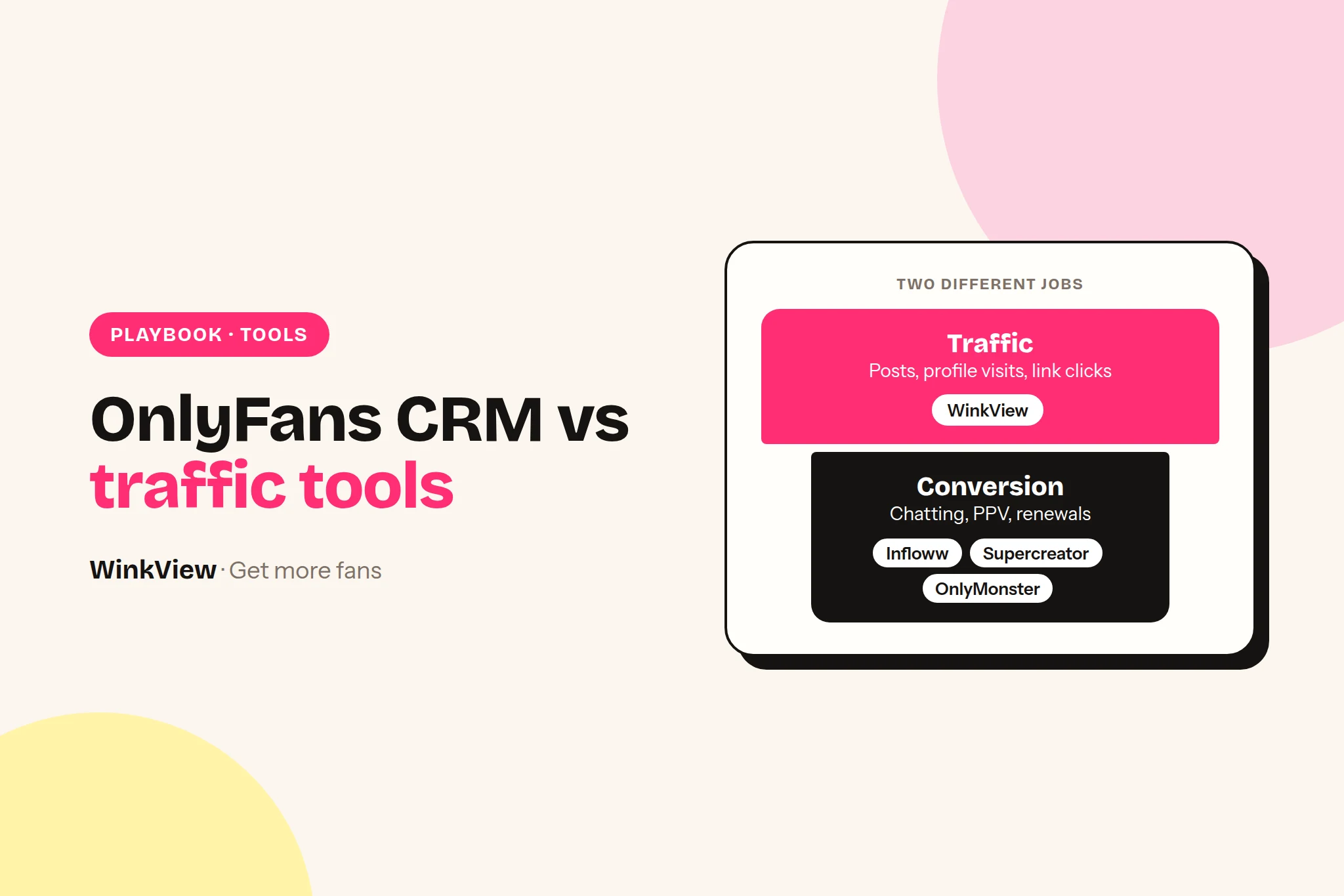
An OnlyFans CRM runs everything that happens inside the paid platform: the chat inbox, chatters, the vault, mass messages, fan data and revenue reports. Infloww, Supercreator, OnlyMonster and CreatorHero are the main options, and all four bill per creator account, mostly on a scale tied to what that creator earns. A traffic tool does a different job: it works on public social platforms before a fan exists. If you are searching for an Infloww alternative because revenue is flat, check first whether the problem is chat or traffic, because a second CRM cannot fix a traffic problem.
The short answer
Choose Infloww if you run creators on several paid platforms and want shift scheduling and employee reports in the same tool. From $40 per creator profile a month, rising with her earnings.
Choose Supercreator if you want AI to do more of the chatting. The CRM Lite plan is free for up to 10 accounts; the AI plan adds 5% of AI net sales on top of the monthly fee.
Choose OnlyMonster if you want the lowest published per-account price at most earnings levels, shift tools and an open API. From $30 per account a month, cheaper on 3 or 6-month terms.
Choose CreatorHero if you want one predictable base fee plus a success fee, with traffic-source analysis inside the CRM. $39.99 per creator plus a fee that rises with revenue.
None of them brings new people to the creator’s link. That is a traffic job, done on Instagram, TikTok, Reddit, X and the rest. You need one CRM and one traffic system, not two CRMs.
Disclosure
We make WinkView, a traffic tool for agencies. It is not a CRM and we do not rank it against the four CRMs below. We describe Infloww, Supercreator, OnlyMonster and CreatorHero from their own websites and documentation, not from our own testing. Prices checked 28 September 2026. All four change plans often, so confirm on their pages before you buy.
OnlyFans CRM vs traffic tool: two different jobs
Every paying fan passes through two zones. The first is public: someone sees a Reel or a Reddit post, visits the profile and taps the link. The second is private: she subscribes, gets a welcome message, opens chats and maybe buys PPV.
1Public post
2Profile visit
3Link click
4Subscribes
5Chats and buys
A traffic tool works on steps 1 to 3. A CRM works on steps 4 and 5. The CRM connects to the creator’s paid account and gives your team what the platform itself does not: one inbox across creators, chatter roles and permissions, a searchable vault, segmented mass messages, notes on each fan and revenue broken down by chatter, message and source.
Nothing in a CRM puts a post in front of a stranger on Instagram. Nothing in a traffic tool sends a PPV. So “Infloww vs Supercreator” is a real decision; “Infloww vs a traffic tool” is not.
One rule applies whichever CRM you pick. OnlyFans’ Terms of Service say that if someone else assists a creator with the operation of her account, “this does not affect your legal responsibility. Our relationship is with you, and not with any third-party.” In plain terms: the creator stays responsible for everything your team and your software do on her account, so put your CRM choice and your chat rules in writing with her.
Infloww vs Supercreator vs OnlyMonster vs CreatorHero: the facts
Every line below comes from the vendor’s own pricing page, homepage or help documentation. Where a site does not say something, the table says so rather than guessing. All prices are in US dollars per month.
$39.99 base plus $0 to $260 success fee: total $39.99 to $299.99
7 days
CRM
Platforms listed
AI chat features
Team and chatter tools
Infloww
OnlyFans, Fansly, MYM, Fanvue (Fansly, MYM and Fanvue plans list fewer features than OnlyFans)
AI Copilot on the OnlyFans plan, marked “in beta”, which learns the creator’s style
Roles and permissions, employee reports, shift scheduling, message dashboard
Supercreator
OnlyFans only, as far as its site states
Message, inbox and pricing copilots on Premium (capped at 500 AI messages a month). Super AI adds “Izzy”, an AI chatter, plus message flows and an auto follow-back for expired fans
Chatter analytics, payout calculation for chatters, password-less team access
OnlyMonster
OnlyFans (full features), Fansly (inbox, templates, fan notes), plus basic team access for Fanvue, LoyalFans, Telegram, Reddit, Snapchat and others, per its docs
AI smart replies, fan scoring, translator, AI credits included; you can connect your own AI model by API key
Shifts and shift-based access, over 20 permissions, open API, webhooks, CSV or JSON export
CreatorHero
OnlyFans; other platforms not stated on its homepage
AI chat-history summaries, AI translator, AI analysis of which traffic sources send paying fans
Chatter performance tracking, vault labels for used media, mass messages to online fans
Two things are worth reading closely. First, “per account” really means per account: Supercreator’s FAQ says a creator’s free and paid pages are billed separately. Second, the bands move as a creator’s earnings change; OnlyMonster lets you lock a rate for up to 6 months by prepaying. OnlyMonster’s platform list is from its supported platforms page.
What each CRM costs for 1, 5 and 10 creators
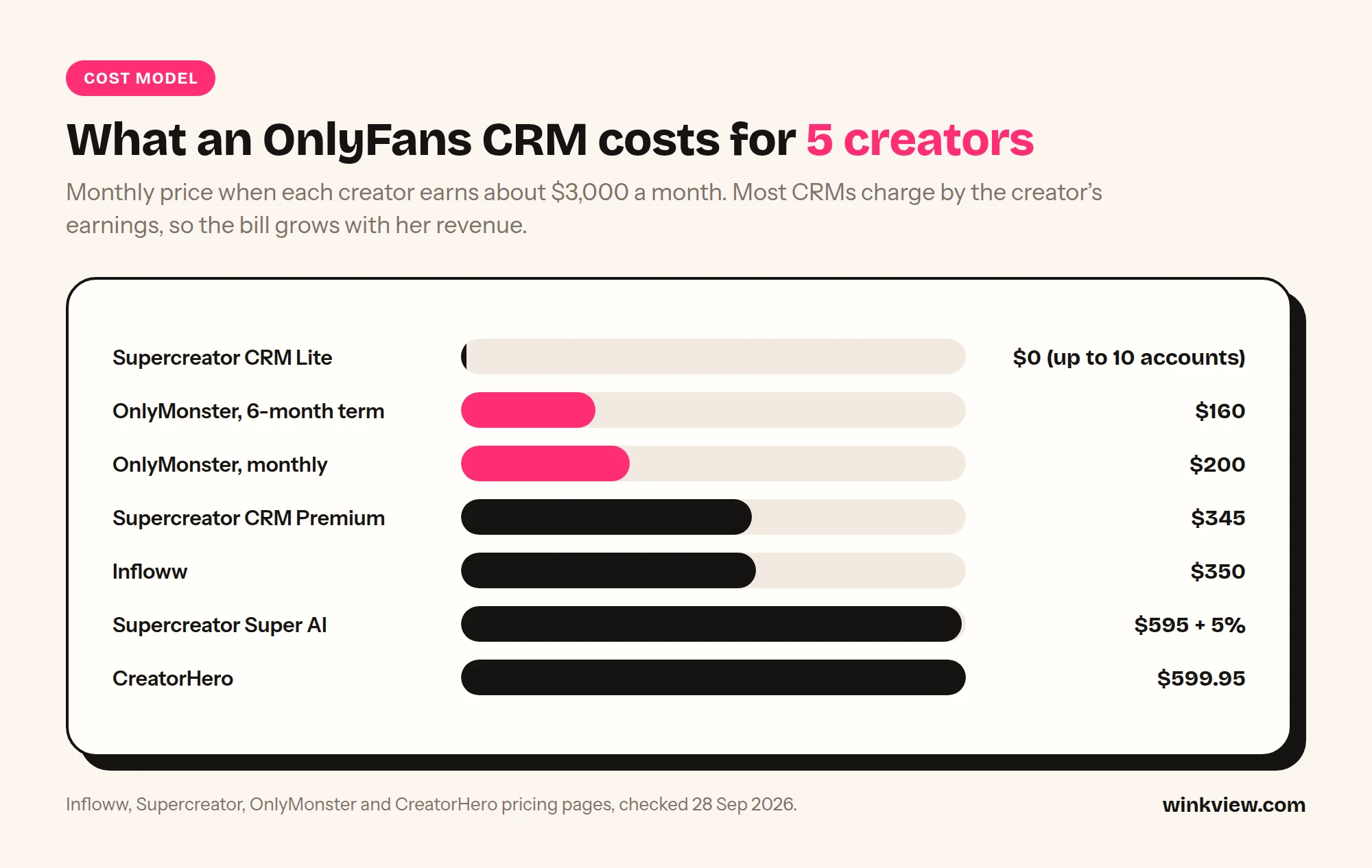
Because the bands depend on earnings, a fair comparison needs one assumption. Illustrative assumption: every creator earns $3,000 a month on OnlyFans. That puts her in these bands: Infloww $2,000.01 to $5,000 ($70), Supercreator $1,000 to $15,000 (Premium $69, Super AI $119), OnlyMonster $2,500 to $5,000 ($40 monthly, or $192 for 6 months, which is $32 a month), CreatorHero $2,500 to $5,000 ($39.99 base plus $80 success fee = $119.99).
Monthly CRM cost for five creators, each earning about $3,000 a month.
CRM plan (creator earning $3,000)
1 creator
5 creators
10 creators
OnlyMonster, 6-month term
$32
$160
$320
OnlyMonster, monthly
$40
$200
$400
Supercreator CRM Premium
$69
$345
$690
Infloww
$70
$350
$700
Supercreator Super AI
$119 + 5% of AI net sales
$595 + 5%
$1,190 + 5%
CreatorHero
$119.99
$599.95
$1,199.90
Supercreator CRM Lite
$0
$0
$0 (limit is 10 accounts)
The maths is band price times number of creators. Change the assumption and the order changes: at under $500 a month, Supercreator Premium is $15, OnlyMonster $30, Infloww $40 and CreatorHero $49.99. The cheapest line is also not the full picture. Super AI is built to take over part of the chatting itself, which none of the other rows are sold as, and its 5% only applies to sales its AI makes.
Best OnlyFans CRM for your agency
Infloww. Priced plans for four paid platforms (OnlyFans, Fansly, MYM, Fanvue), with shift scheduling and employee reports built in. Choose it if some creators sell on Fansly, MYM or Fanvue and you want one inbox. Skip it if every creator is OnlyFans-only and price per account is your main filter; OnlyMonster’s published bands are lower than Infloww’s at every earnings level.
Supercreator. A plan built around an AI chatter (Izzy), and the only permanent free plan on the four pricing pages. Choose it if hiring and training chatters is your bottleneck, or if you want to try a CRM on up to 10 accounts at no cost. Skip it if you need Fansly, or if you are not comfortable with a revenue share on AI sales.
OnlyMonster. Low published prices, prepay discounts, shifts, and an open API with data export. Choose it if you want to pull CRM data into your own dashboards or pay less per account. Skip it if your team needs deep Fansly or Fanvue features: its own docs show those platforms get fewer tools than OnlyFans.
CreatorHero. A fixed base fee with a success fee on top, and AI that looks at which traffic sources send paying fans. Choose it if attribution of traffic sources is the report you look at most. Skip it if you run many high earners: at $50,000 and above it is $299.99 per creator.
If you already use one of these and it does its job, switching means moving your team to a new inbox and retraining chatters, often for a price difference of tens of dollars per creator. Switch for a missing feature, not because revenue stalled. If revenue stalled, read the next section first.
Is your problem traffic or conversion?
Before you buy anything, split each creator’s month into three numbers you can pull from your CRM’s tracking-link and message reports:
Link clicks: clicks on her tracking links or bio link. This is traffic.
New subscribers per 1,000 link clicks: new subs divided by clicks, times 1,000. This is her page and offer.
First-purchase rate and mass message purchase rate: the share of new subscribers who buy anything within 30 days, and purchases divided by recipients for each mass message. This is chat and selling, the part a CRM and your chatters own.
Compare each creator against her own last month and against your other creators. We do not publish “good” benchmarks, because they depend on price, niche and free-trial use, and anyone quoting one universal figure is guessing.
Worked example (illustrative)
Example: Linden Management, a made-up agency with three creators, compares August with September.
Creator A: 4,000 clicks and 120 new subs (30 per 1,000), then 2,500 clicks and 76 new subs (30.4 per 1,000). Conversion held; clicks fell by more than a third. Traffic problem.
Creator B: 3,000 clicks and 90 new subs (30 per 1,000), then 3,200 clicks and 58 new subs (18.1 per 1,000). More people arrived and fewer subscribed. Page or offer problem: price, bio, pinned post, free trial.
Creator C: new subs flat at around 100, but first-purchase rate fell from 40 in 100 to 22 in 100 after a chatter change. Chat problem, and the only one of the three a CRM report points straight at.
Buying a second CRM helps Creator C at best. It does nothing for A or B.
TRAFFIC OR CONVERSION? (one sheet per creator, per month)
Creator: [name]      Month: [ ]      CRM: [name]

1. TRAFFIC
Link clicks this month:                [ ]
Link clicks last month:                [ ]
Change:                                [+ / - %]
Main click sources (tracking links):   [IG / TikTok / Reddit / X / other]

2. PAGE AND OFFER
New subscribers this month:            [ ]
Subs per 1,000 clicks = subs / clicks x 1,000:  [ ]
Last month:                            [ ]
Price or free-trial change this month? [yes / no, what]

3. CHAT AND SELLING (from CRM reports)
New subs who bought within 30 days:    [ ] of [ ]  = [ %]
Mass messages sent:                    [ ]
Purchases / recipients (average):      [ %]
Revenue per new subscriber:            [ ]
Chatter or script change this month?   [yes / no, what]

VERDICT (tick one)
[ ] Clicks down, subs per 1,000 steady   -> TRAFFIC. Fix posting and outreach.
[ ] Clicks steady or up, subs per 1,000 down -> PAGE/OFFER. Fix price, bio, trial.
[ ] Subs steady, purchase rates down     -> CHAT. Fix chatters, scripts, CRM use.
[ ] Cannot fill section 3                -> You need CRM reporting first.

Action this month: [one line]    Owner: [name]    Check date: [ ]
What fills the top of the funnel: WinkView
If the sheet says traffic, the fix is more of the right people seeing the creator on public platforms, every day, for every creator. That is the job WinkView does, and it works alongside whichever CRM you use. The two do not need to talk to each other: WinkView sends people to the link in her bio, and your CRM measures what happens after they click. Put a tracking link in her bio so the CRM can show you which platform the new subscribers came from.
WinkView has two parts, priced per creator, and every plan includes both. The Video Editor takes the raw phone clips your team drops in and turns each one into a ready-to-post vertical video: best moment first, dead air cut, hook text on screen, music. Nothing posts until a manager ticks it. Posting uses each platform’s official posting API, accounts connect through the official connect screens, and WinkView never sees or stores passwords.
Reposting then writes a fresh caption per platform in her language and posts every approved clip to Instagram Reels, Trial Reels, a daily Story, TikTok, YouTube Shorts, Facebook Reels, Threads and X, spread through the day in her time zone, and posts her best clips again. Unlimited posts, no per-post fees.
WinkView does (steps 1 to 3)
Posts her clips daily to Reels, Trial Reels, a Story, TikTok, Shorts, Facebook Reels, Threads and X
Writes captions per platform in her language and voice
Edits her raw clips: best moment first, dead air cut, hook text, music
Posts her best clips again and flags accounts that need reconnecting
Your CRM does (steps 4 and 5)
Chat inbox and chatters on the paid platform
Vault, mass messages and PPV
Fan notes and spending data
Revenue, tracking-link and chatter reports
Shifts and payouts, where the CRM offers them
Honest limits. WinkView does not post to or message on OnlyFans, Fansly or Fanvue, send PPV, handle checkout, post to Reddit, or follow and like on any platform; on Instagram its only automated replies are link DMs to people who write “link”. If a creator’s traffic comes mainly from Reddit, WinkView will not do that work, and real comment and DM conversations stay with your team. Posting through official APIs keeps the risk low; a creator’s own content still has to follow each platform’s rules.
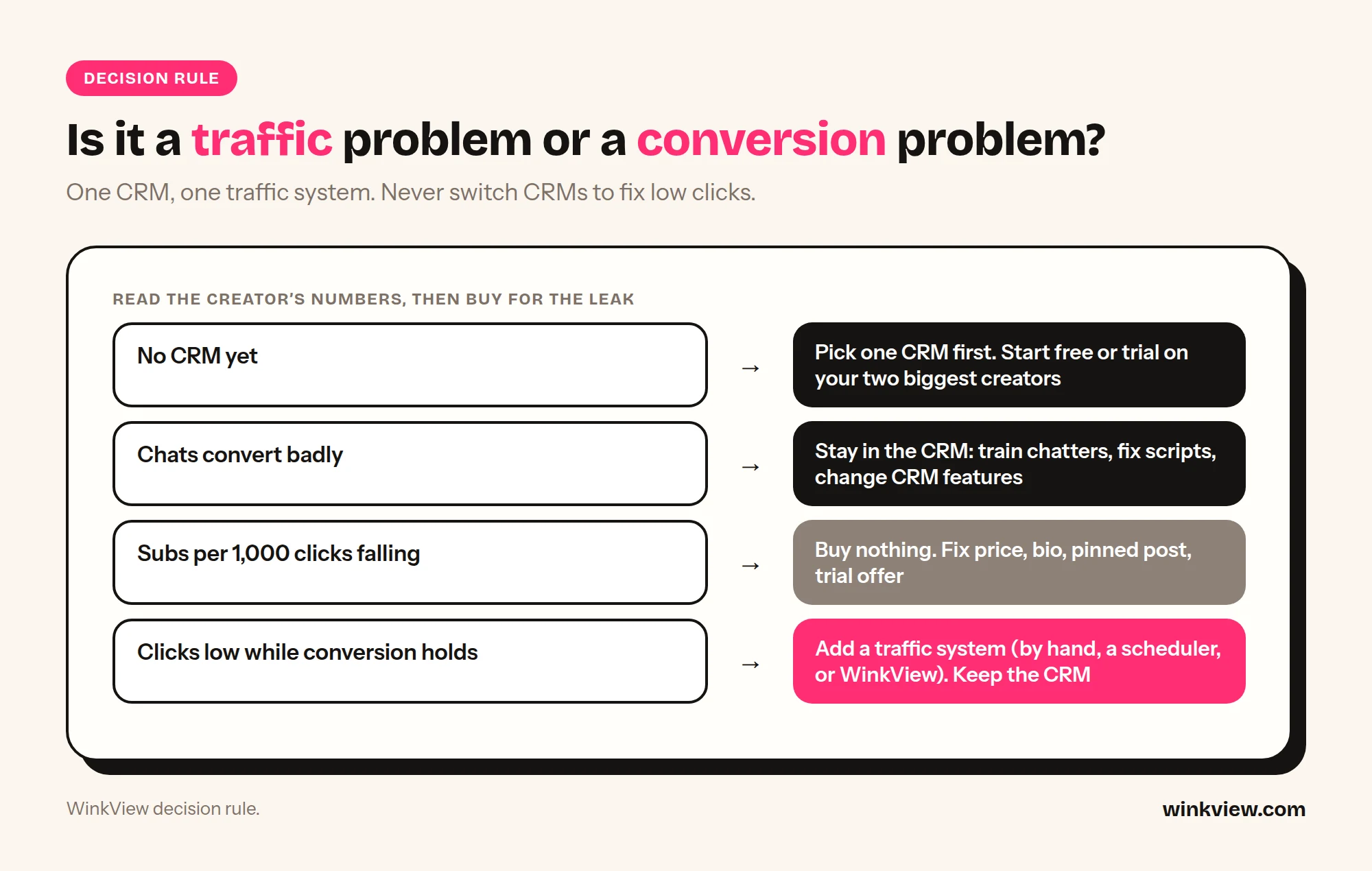
Use the diagnostic sheet for every creator, then apply this in order:
Buy for the leak you can see in the numbers.
No CRM yet, or you cannot fill section 3 of the sheet: pick one CRM first. Start with Supercreator CRM Lite (free) or a trial of OnlyMonster, Infloww or CreatorHero on your two biggest creators.
Section 3 is weak (chat problem): stay in the CRM world. Train chatters, fix scripts, or move to a CRM with the missing feature, such as AI chatting or shift tracking.
Subs per 1,000 clicks is falling (page problem): buy nothing. Fix price, bio, pinned post and free-trial offer, then measure again for a month.
Clicks are low or falling while conversion holds (traffic problem): add a traffic system. That can be your own team posting by hand, a scheduler, or a tool like WinkView. Do not switch CRMs. The by-hand option is costed in what an OnlyFans social media manager costs per creator.
Worked example: full stack for 5 creators (illustrative)
Example: Linden Management grows to five creators, each earning about $3,000 a month, and the sheet shows a traffic problem on three of them.
CRM: OnlyMonster on monthly billing, 5 x $40 = $200 a month (or $160 a month on the 6-month term).
Traffic: WinkView Growth at €189 a month excluding VAT, which covers up to 6 creators, so all five get their raw clips edited and posted daily everywhere, with one place free.
Not bought: a second CRM. Moving from OnlyMonster to Infloww would cost 5 x $70 = $350 a month and leave clicks where they were.
The bills are in different currencies, so add them at your own exchange rate. One tool per zone, each judged by its own line on the sheet.
It depends on your bottleneck. Infloww has priced plans for OnlyFans, Fansly, MYM and Fanvue plus shift scheduling, Supercreator sells an AI chatter plan and has a free tier, OnlyMonster has the lowest published per-account prices and an open API, and CreatorHero pairs a flat base fee with traffic-source analysis. Trial your top two on the same two creators for a week and compare the chat numbers on the diagnostic sheet.
Is WinkView an Infloww alternative?
No. WinkView does not connect to OnlyFans, Fansly or Fanvue, has no chat inbox and does not send PPV or mass messages. It edits her raw clips and posts them on public social platforms to bring people to the creator’s link. If you are replacing Infloww, look at Supercreator, OnlyMonster or CreatorHero; if you want more fans arriving, WinkView sits next to whichever CRM you keep.
Do WinkView and my CRM need to be connected?
No. WinkView works only on public social platforms and never logs in to the paid platform. It sends people to the link in the creator’s bio. Put a CRM tracking link there and your CRM will show how many of those clicks became subscribers and buyers.
Do these CRMs charge extra for chatters?
All four bill per creator account, not per chatter seat. Supercreator states it outright: the licence is tied to each OnlyFans account, with unlimited devices and team members. The others price per creator profile or account on their pricing pages and do not list per-seat fees; confirm team limits with them before a large rollout.
Does OnlyFans allow agencies to use a CRM?
OnlyFans’ Terms of Service accept that someone else may assist a creator with her account, but they make the creator legally responsible for all use of it, whoever operates it. We could not find a clause in the Terms that names or approves specific third-party CRMs, so treat any “officially approved” claim with care and agree the rules for your team with each creator in writing.
Should I switch CRMs if revenue has stalled?
Only if the diagnostic sheet shows a chat problem and your current CRM lacks the feature that would fix it. If clicks are falling while subscribers per 1,000 clicks hold steady, the problem is traffic, and a new CRM will not change it. Fix the traffic first and measure again after a month.
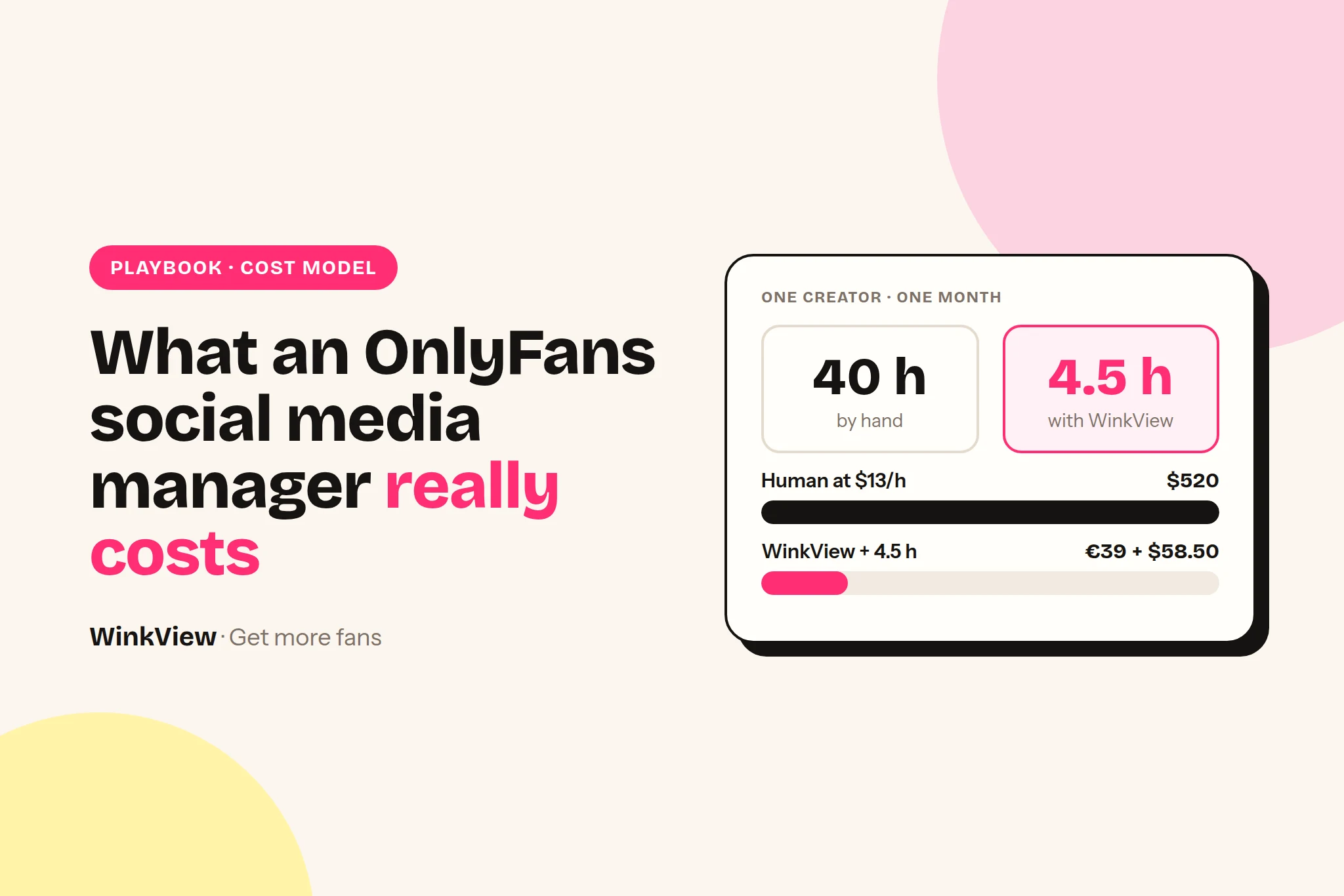
An OnlyFans social media manager or VA costs an agency roughly €140 to €1,600 per creator per month for the social side alone. The range is wide because the cost is pay divided by how many creators one person can carry, and by hand that is only 2 to 4. Software that edits and posts the clips costs €27.90 to €39 per creator, but a person still has to spend some time on it. Below are the pay data, a timed task list, the maths, a calculator and the cases where a human is still the better buy.
The short answer
Published rates: Filipino social media VAs from about $3 to $10 an hour, Upwork social media managers $14 to $35 an hour (median $20), a US in-house social media manager about $65,000 a year. OFM job boards show $300 part-time to $2,000 a month.
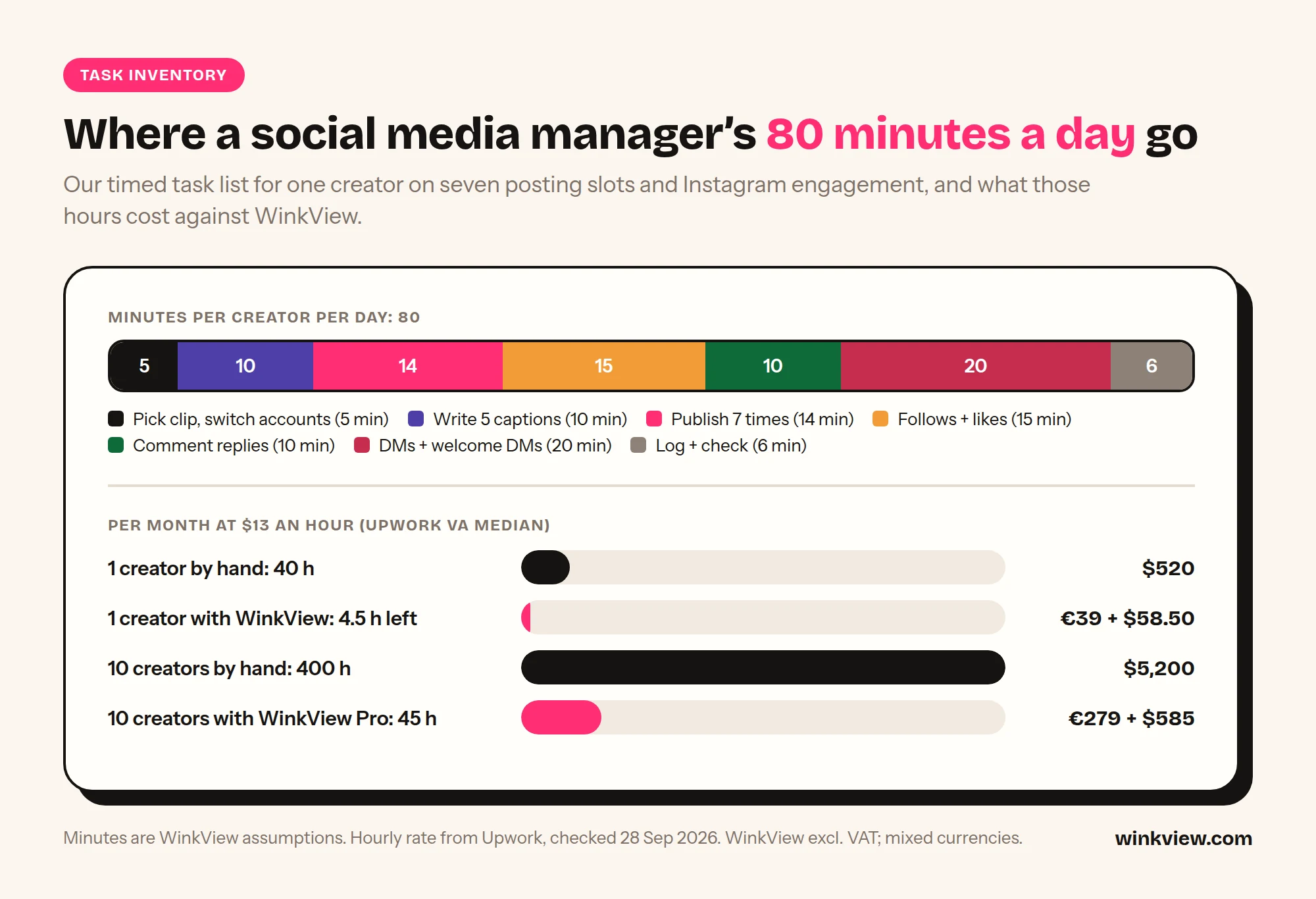
Our timed task list puts the social side at 80 minutes per creator per day for one clip a day, and about 185 minutes at a full 3-clip routine. That is 40 to 90 hours a month per creator. These are our assumptions: time your own team with the template below.
Cost per creator is pay divided by roster. By hand, one person carries 2 to 3 creators at a full routine, so even a €1,200 manager costs €400 or more per creator.
WinkView is €39 for 1 creator, €99 for 3, €189 for 6 and €279 for 10, excl. VAT. It posts, engages and, with the Video Editor, edits raw clips; it does not film or make judgement calls. With it, we estimate one person can run 6 to 8 creators.
At 3 creators the hybrid saves no money, it buys time. From about 6 creators it usually saves a salary. A person alone is still better for one creator with a cheap, fast assistant, for Reddit-led traffic and for creators who run their own accounts.
Disclosure
We make WinkView, the software compared in this article. We have tried to be fair to the human option, because in several areas it is simply better. Labour rates come from the published pages of Upwork, OnlineJobs.ph, Indeed, Glassdoor and ofmjob.com, linked where they are used. Prices, rates and listings checked on 28 and 29 September 2026. Minutes per task and creators per person are our estimates, labelled as such, so replace them with your own.
What an OnlyFans social media manager costs per creator
“What does a VA cost?” gives you a salary. The number an OFM agency needs is what the social work costs per creator per month, because that is how you price your service and how software is priced.
There are two ways to get there, and they give the same answer if your inputs are honest:
Hourly: hours of social work per creator per month, times what you pay per hour. Best if you pay freelancers or VAs by the hour.
Roster: what one person costs per month, divided by how many creators they run well. Best if you employ people on a salary.
Then do the same sum with software: the hours or people that remain, plus the tool’s price.
Chatters are a separate budget
This covers the social side only: posting clips to public platforms and working the creator’s Instagram. Chatting with fans on OnlyFans, Fansly or Fanvue is a different job with a different pay structure, and it is where the paid-platform revenue is made. Neither the maths here nor WinkView covers it: WinkView does not message fans on the paid platforms, does not send PPV and is not a CRM. Keep chatter pay out of these sums, or a cheap social tool looks like it saves more than it does. The two roles are compared in OnlyFans chatter vs social media manager.
What people charge: published pay data
Rates vary more by where you hire than by job title. These are the published figures we used, each from the source’s own page.
Hourly and freelance rates
Philippines, via OnlineJobs.ph. Its virtual assistant salary guide (updated April 2026) lists social media marketing at $3 to $6 an hour for beginners, $5 to $8 intermediate and $7 to $10 expert. Full-time monthly: $500 to $650 beginner, $640 to $750 intermediate, $700 to $1,200 expert.
Freelance VAs on Upwork. Upwork’s virtual assistant cost page gives a median of $13 an hour and a typical range of $10 to $20.
Freelance social media managers on Upwork. Upwork’s social media manager cost page gives a median of $20 an hour and a typical range of $14 to $35.
In-house, US.Indeed’s salary page shows an average of $64,959 a year for a social media manager (updated 2 August 2026). Over 2,080 working hours that is about $31 an hour, before employer taxes and benefits.
Social Media Growth Manager (a freelancer advertising their services)
$800 to $2,000 a month (about €705 to €1,760)
Freelance
Social media manager, posting and outreach
$300 to $400 a month
Part-time
Experienced SMM for an OnlyFans model
Paid per subscriber
Performance
Instagram posting and Reddit roles
From $5 a day, per 1,000 views, or commission
Various
Euro figures in this article use the ECB reference rate of 29 September 2026 ($1.1355 to €1). Two things stand out. The bottom of this market pays for posting, not management. And performance-only deals are common, which tells you the traffic side is judged on tracked subscribers. Higher figures you may see, such as SirenCY’s $35,000 to $150,000 a year for OnlyFans managers, cover account managers who own the whole creator relationship, not the social media role.
What the wider market pays
If you hire outside the OFM job boards, you compete with general social media pay. We use the same regional data as our guide to the OnlyFans social media manager role, converted to euros a month:
Typical social media manager payEuros per month, all industries: medians for the Philippines and Poland, averages for Germany and the US, converted 29 September 2026
Philippines€410
OFM listing ($800)€705
Poland€1,375
Germany€3,350
US€4,765
Source: Glassdoor (Philippines, Poland: medians), Indeed (Germany, US: averages), ofmjob.com listing, ECB rate. Checked 29 September 2026. Employer costs such as social contributions are extra where they apply.
Two things no rate page includes: the hours you spend recruiting and training, and cover when someone is ill or quits. If a VA leaves, your creators’ posting stops until you replace them. Budget for that yourself.
The daily task list, timed
Here is the social work for one creator on one day, if a person does it by hand. This is the light version: one raw clip is edited and goes out to every destination, and one of her best older clips is posted again. The minutes are our assumptions for a competent assistant who already has the raw clips ready. They are not measured data.
Where the 80 minutes go, and what they cost per month.
Task (one creator, one day, one clip)
Minutes (assumption)
Pick the day’s clip, move it to the posting device, switch into her accounts
Edit the raw clip: find the best moment, put it first, cut dead air
15
Add hook text on screen and music, export the vertical file
10
Post one of her best older clips again, with fresh captions, to every destination
20
Log what was posted, check nothing failed
6
Total per creator per day
80
Posting every day of the month, that is 80 x 30 = 2,400 minutes, or 40 hours per creator per month. A full-time person has about 160 hours, so at this light routine one person covers about 4 creators.
Most agencies do more than one clip a day. At a routine of about 3 clips a day to Instagram, TikTok, YouTube Shorts and Facebook, plus a Story and Threads posts, a careful manager spends about 185 minutes per creator per day: health checks, clip selection and editing, around 16 uploads with a caption each, and reposts of her best clips. With about 390 productive minutes in a working day, that is 2 creators, at a stretch 3. Your number could be lower or higher. The template below finds out.
Copy this template: 5-day time audit
SOCIAL TIME AUDIT (one creator, 5 normal days)
Creator: [name]      Person doing the work: [name]      Hourly cost: [ ]
Clips posted per day: [ ]

Log minutes per day:          Mon  Tue  Wed  Thu  Fri
Prep clip + switch accounts   [ ]  [ ]  [ ]  [ ]  [ ]
Write captions (all platforms)[ ]  [ ]  [ ]  [ ]  [ ]
Upload + publish (all dests.) [ ]  [ ]  [ ]  [ ]  [ ]
Edit raw clip (cut + order)   [ ]  [ ]  [ ]  [ ]  [ ]
Hook text + music + export    [ ]  [ ]  [ ]  [ ]  [ ]
Repost best older clips       [ ]  [ ]  [ ]  [ ]  [ ]
Logging + checking            [ ]  [ ]  [ ]  [ ]  [ ]
Filming direction             [ ]  [ ]  [ ]  [ ]  [ ]
Other (Reddit, X, TikTok replies) [ ] [ ] [ ] [ ] [ ]
Day total                     [ ]  [ ]  [ ]  [ ]  [ ]

Average minutes per day (5-day total / 5):        [ ]
Days worked per month (30 if daily posting):      [ ]
Hours per month = avg minutes x days / 60:        [ ]
Human cost per month = hours x hourly cost:       [ ]
Creators one full-time person can carry
  = 390 / average minutes per day:                [ ]
Keep "Filming" and "Other" separate: software does not cover them.
Time it with a stopwatch, not from memory: people underestimate account switching and login codes.
What WinkView costs per creator, and what you get
Plan (excl. VAT)
Creators
Per month
Per creator
Solo
1
€39
€39
Starter
3
€99
€33
Growth (team access, priority support)
6
€189
€31.50
Pro (onboarding call, direct line)
10
€279
€27.90
More than 10
Contact us
Every plan has a 7-day free trial (card required, nothing charged until day 8). Posts are unlimited. Full details are on the pricing page. Everything below is on every plan, including weekly filming briefs:
Reposting Agent. Your team uploads her finished clips once. It posts every day to Instagram Reels, Instagram Trial Reels, one Instagram Story, TikTok, YouTube Shorts, Facebook Reels, Threads and X, through each platform’s official connection, with AI-written captions for each platform, in her language and voice (EN, DE, SL, HR, SR, NO). A typical day is about 3 videos, 1 or 2 of them as Trial Reels. Optional approvals and a dashboard of views, posts published or failed and accounts needing reconnection.
Threads writer. Up to 10 text posts a day from her “About her” profile text.
Video Editor. Your team drops in her raw phone clips. AI edits each one into a ready-to-post vertical video: best moment first, dead air cut, hook text on screen, music. Clips where she talks and clips where she does not are handled automatically. Nothing posts until a manager ticks it.
What it does not do: film the clips; post to Reddit or Telegram; follow, like or comment; hold DM conversations beyond sending her link to people who write “link”; or touch OnlyFans, Fansly or Fanvue in any way.
Posting limits are not the bottleneck. Meta’s Instagram content publishing documentation caps API publishing at 100 posts per account in a rolling 24 hours, far above a daily posting routine. TikTok’s Content Posting API is the official route for posting to a creator’s TikTok from a third-party app.
The human work that remains
Software does not remove all human work. Someone on your team still does this for each creator, and this is the part you would charge to any automated tool:
Tool oversight (assumption)
Upload a weekly batch of raw clips and tick the edits: 20 min a week, so 80 min a month
Check what went out and any failed posts: 5 min a day, so 150 min a month
Handle exceptions, such as an account that needs reconnecting or a creator who ran out of clips: 10 min a week, so 40 min a month
Total: 270 minutes, or 4.5 hours per creator per month
Judgement work, in both columns
Filming direction and keeping creators shooting
Checking edited clips before they post
DM and comment replies, escalations, notes for the chat team
Reddit, Telegram and X posting
The paid page: pricing, posts, PPV, messages
With a person doing the judgement work properly as well, their day per creator drops from about 185 minutes to about 50 to 60, of which about 10 minutes is the pure oversight above. That is where our estimate of 6 to 8 creators per person comes from. It is an estimate: time your own team for two weeks before you change a roster. Watch quality, not just hours. When captions or edits start looking the same across creators, the roster is too big.
What a human does better, and what automation does better
Weekly filming briefs help; a person still coaches her.
Editing, cropping, text on clips
Yes
Yes, with the Video Editor
Trend judgement: which sound, which format, today
Better. Reacts the same day.
No. The dashboard shows which clips worked.
Reddit and Telegram
Yes
Never touches them
Relationship with the creator
Better. Creators stay where someone knows them.
No
Crisis handling: impersonators, a strike, a leak, an under-18 contact
Better. Needs judgement and escalation.
Flags accounts that need reconnecting; a person handles the rest
Posting on 7 surfaces every day
Possible, about 16 uploads per creator per day
Better. Unlimited posts, daily
Consistency on weekends, holidays, sick days
Needs cover
Better. Runs every day
Creators in several time zones
Hard: one person, one working day
Better. Runs in each creator’s own time zone
Posting her best clips again
Rarely done by hand
Better. Her best clips go out again automatically
Comment and DM replies, long personal conversations
Better.
No. A person or a DM tool does this
Captions in six languages
Only the languages they write
EN, DE, SL, HR, SR, NO
Account separation per creator
Depends on discipline
Each creator’s accounts connected separately, through official platform connections
Read the table as a split of one job, not a contest. The top half is judgement. The bottom half is the same action repeated hundreds of times a week. Paying €1,375 or €3,350 a month for the bottom half is the expensive mistake.
The maths: calculate your own numbers
The calculator uses the roster method, because most agencies employ people on a monthly cost. Enter what one SMM costs you, how many creators they carry by hand and how many you think they could carry with WinkView.
Calculator: SMM by hand vs SMM with WinkView
Enter your numbers to see the result. If scripts are off, use the tables below.
The same maths as fixed tables
With one SMM costing €1,200 a month, 3 creators per SMM by hand and 7 with WinkView (whole people only, no part-timers):
Creators
By hand
With WinkView
Difference per month
3
1 SMM = €1,200 (€400 each)
1 SMM + Starter €99 = €1,299 (€433 each)
€99 more
6
2 SMMs = €2,400 (€400 each)
1 SMM + Growth €189 = €1,389 (€232 each)
€1,011 saved
10
4 SMMs = €4,800 (€480 each)
2 SMMs + Pro €279 = €2,679 (€268 each)
€2,121 saved
Per creator at a full roster, by region. Seven creators need the Pro plan (Growth covers 6), so the hybrid column adds €279 ÷ 7 = €39.86 per creator:
SMM hired in
SMM cost per month
Per creator by hand (÷3)
Per creator hybrid (÷7 + €39.86)
Philippines (median)
€410
€137
€98
OFM listing, $800
€705
€235
€141
Poland (median)
€1,375
€458
€236
Germany (average)
€3,350
€1,117
€518
US (average)
€4,765
€1,588
€721
The cheaper the labour, the smaller the gap. With a €410 manager, the hybrid saves about €38 per creator a month; with a German salary, about €598. If your people only manage 2 creators each by hand, every gap gets wider.
If you pay by the hour
Using the light routine from the task list (40 hours per creator by hand, 4.5 hours of oversight with WinkView), per creator per month, converted at $1.1355 to €1:
Hourly rate (source)
Human only: 40 h
With WinkView: 4.5 h + plan
Hours freed
$5 (OnlineJobs.ph range)
$200 (€176)
€20 + plan = €48 to €59
35.5
$13 (Upwork VA median)
$520 (€458)
€52 + plan = €79 to €91
35.5
$20 (Upwork SMM median)
$800 (€705)
€79 + plan = €107 to €118
35.5
$31 (Indeed US average)
$1,240 (€1,092)
€123 + plan = €151 to €162
35.5
The range in the WinkView column runs from Pro (€27.90 per creator) to Solo (€39). Note the plan maths for odd rosters: with five creators you pay for six places on Growth, so your real cost is €189 ÷ 5 = €37.80 per creator until you sign the sixth. On Starter, five creators would need two plans. Check which combination is cheaper for your exact count before you buy.
Worked example
Fictional agency, illustrative numbers. Lena runs 6 creators: Mia, Nora, Ana, Kira, Ella and Zoe. She employs two SMMs in Poland at €1,375 a month each, 3 creators per person. Monthly cost: 2 × €1,375 = €2,750, or €458 per creator.
She moves all six to WinkView Growth at €189. One SMM, Petra, now approves captions, handles sensitive DMs and directs filming for all six. New cost: €1,375 + €189 = €1,564, or €261 per creator. Difference: €2,750 minus €1,564 = €1,186 a month, €14,232 a year.
Lena does not let the second SMM go. She moves him to Reddit for the three creators who want it, which WinkView does not do, and to editing, which was the team’s bottleneck. Same payroll, more traffic sources. Either choice is valid; the point is that the posting no longer needs a second person.
The part of this example that matters most is the last paragraph. Freed hours only save money if you either cut them or move them to work that earns. Decide which before the trial starts, or the saving disappears into slack. For running the rest of the week across several creators, the guide to managing multiple models’ social media has a tracker.
When a human is still the better buy
Use this rule. Keep a person doing all of the social side if any one of these is true. Otherwise, software plus a person doing the judgement work is cheaper.
The creator runs her own socials and wants to. Her time costs you nothing in cash, and her own replies are the most personal there is. Do not replace that.
You have one creator and a very cheap assistant who is fast. At $5 an hour, the break-even is about 13 hours of human work a month: 4.5 hours of oversight ($22.50) plus Solo at €39 (about $44) is about $67, or 13.4 hours. If your audit shows less than about 27 minutes a day, a person is cheaper in cash.
The brand is built on personal conversation. If most of her income comes from long, specific DM exchanges rather than from posted clips, the person is the product. WinkView’s Automated DMs only send her link, so the saving on posting matters less.
Most of the work is on channels WinkView does not cover. WinkView does not post to Reddit or Telegram, does not hold conversations in comments or DMs and does not touch OnlyFans, Fansly or Fanvue. If your traffic comes mainly from Reddit, you still need a person there.
Your creators have no backlog of finished clips. Software posts what is in the library. If the bottleneck is filming, a person who directs shoots is worth more than faster posting.
Her growth depends on hands-on comment and DM work. WinkView edits and posts. It does not follow, like or comment, and its Automated DMs only send her link. If her Instagram grows mainly through personal conversation in comments and DMs, keep a person on that.
Choose WinkView if your people spend most of the day uploading and captioning, your creators sit in different time zones or languages, or you are about to hire another SMM just to keep up with posting. Without any hire, it suits small agencies where the owner reviews the dashboard and directs filming.
Use both if you have 4 or more creators. The person keeps the judgement work and the relationship; the software does the repeat work. Roll it out like this:
Ask each SMM to log minutes per creator per task for one week, using the audit template above.
Mark each task “judgement” or “repeat”.
Move one creator’s repeat tasks to WinkView for two weeks, with approvals on.
Give the freed hours to filming direction for that creator.
Compare her posts published, views and link clicks with a creator still done by hand.
Roll out creator by creator, and only then change rosters.
Platform rules
Whether a person or software posts, the account owner is responsible for what goes out. Keep every public post and DM safe for work: Meta’s policy on adult sexual solicitation covers messages as well as posts, and TikTok’s Community Guidelines apply to every clip and caption posted there. WinkView’s posting uses each platform’s official connection. It does not automate follows, likes or comments, and its Automated DMs only answer people who wrote “link” first. Instagram’s Terms of Use cover automated activity and are worth reading before you add any other tool. A person logging in to many creators from one phone carries its own risk too.
Test it yourself before you decide
Run one creator on WinkView and one comparable creator by hand for 14 days. Fill this in honestly, including the hours.
Copy this template
TEST SHEET: SMM by hand vs SMM + WinkView (14 days)

Creator A (by hand): ________   Creator B (WinkView): ________
Dates: ____ to ____   Similar follower counts? (y/n) ____

                                   By hand      WinkView
Posts planned                      ____         ____
Posts published                    ____         ____
Days with zero posts               ____         ____
Surfaces posted to (of 7)          ____         ____
SMM minutes per day (logged)       ____         ____
  of which uploading/captioning    ____         ____
  of which filming direction       ____         ____
Views (total)                      ____         ____
Profile visits                     ____         ____
Link clicks (own tracking link)    ____         ____
Tracked subscribers                ____         ____
Instagram checks or warnings       ____         ____
Captions that needed fixing        ____         ____

Monthly cost at my full roster
  SMM cost x SMMs needed           ____         ____
  + software                       ____         ____
  = total                          ____         ____

Hours freed per month:             ____
What those hours will do instead:  [cut / Reddit / editing / new creator]

Decision: _______________________________________
If the WinkView creator’s numbers hold up and the SMM gained an hour or more a day, you have your answer. If you are pricing your agency’s service, the by-hand cost per creator is roughly what your social management costs you before margin. Proof from one agency is in our case study: 440,000 views in 12 days, from 15 accounts and 238 published posts.
Who runs it
WinkView runs the social side for agencies such as Nyvia, at about €30,000 a month, and Estrella, at about €40,000 a month, as well as the agency behind our 440,000-view case study.
Frequently asked questions
How much does an OnlyFans social media manager cost?
Published freelance rates run from about $3 to $10 an hour for Filipino social media VAs to $14 to $35 an hour on Upwork. OFM job listings on ofmjob.com, checked on 29 September 2026, showed $800 a month for a fixed remote manager and part-time posting roles from $300. Divide by roster size: by hand one person runs 2 to 3 creators at a full routine, so per creator the cost is usually €140 to several hundred euros a month.
Is it cheaper to pay a VA per hour or a monthly salary?
For a full-time role, OnlineJobs.ph lists social media marketing salaries of $500 to $1,200 a month depending on experience. A full-time person covers roughly 2 to 4 creators by hand, depending on how many clips each posts a day, so a monthly salary is usually cheaper once you have three or more creators. Hourly suits one or two creators, cover for a gap, or a trial period while you time the work.
Can WinkView replace a social media manager?
For the repetitive part, yes: daily posting to seven surfaces, AI-written captions per platform in her language, Threads posts, reposts of her best clips and, with the Video Editor, editing raw clips into ready-to-post videos. Not for the rest. WinkView does not film, judge trends, handle crises, post to Reddit or manage the creator relationship, and someone still spends about 4.5 hours per creator a month on uploads, approvals and checks. Most agencies keep one person and give them more creators, which is where the saving comes from.
How many creators can one SMM handle with WinkView?
Our estimate is 6 to 8, against 2 to 3 by hand. It comes from timing the daily routine: about 185 minutes per creator by hand at about 3 clips a day, falling to about 50 to 60 when posting, captions and routine replies are automated and the SMM reviews, directs filming and handles exceptions. It is an estimate, not survey data. Log your own team’s minutes for two weeks and watch quality before you change rosters.
Is it cheaper to hire a VA in the Philippines than to use software?
A Philippine social media manager at the €410 median, running 3 creators, costs about €137 per creator. The hybrid with the same person running 7 creators plus WinkView Pro, the smallest plan that covers 7, costs about €98 per creator. The gap is smaller than with European salaries, but it is still there, and the software keeps posting through holidays and sick days. Many agencies use both: a lower-cost SMM plus WinkView.
Does the hybrid model save money with only 3 creators?
Usually not. With 3 creators you still need one person, so software is an added cost: €99 a month on Starter. What you buy is time. The SMM stops spending hours uploading and captioning and spends them on filming direction, Reddit or editing. From about 6 creators the maths changes, because the hybrid avoids hiring a second person. Use the calculator on this page with your real salary and roster.
For OnlyFans creators’ Instagram accounts, buy one dedicated static residential or ISP proxy per creator, located in her country and ideally her region, and log in through it every single day from the same browser profile. At four big providers that costs $2.70 to $35 for a single creator, falling to about $3 each once you run 10. Rotating residential pools and cheap datacenter IPs are the wrong tools here, and mobile proxies work but cost about $130 a month per creator for a dedicated one. Below: the four proxy types in plain words, a decision rule, prices checked today with the maths for 1, 5 and 10 creators, and a setup checklist you can copy.
The short answer
Best proxy for an Instagram OnlyFans agency: a dedicated static residential / ISP IP, one per creator, never shared.
Match the country of the creator, and the city or region where her own phone uses Instagram when the provider offers it.
Rotating residential proxies change IP between sessions. For a logged-in creator account that looks like account sharing.
Mobile (4G/5G) proxies are the fallback when no ISP IP exists in her country. Dedicated mobile costs far more.
A proxy only fixes the IP. Browser fingerprint, cookies and behaviour still need their own setup.
Disclosure
We make WinkView, AI video editing and reposting software for agencies. WinkView does not sell proxies, IPs or browsers. The proxy providers below are described from their own pricing pages, not from our testing. Prices checked 28 September 2026, in US dollars as the providers show them, excluding VAT. Vendors change plans often, so confirm before you buy.
The four proxy types in plain words
A proxy is a middle computer. Your team’s browser connects to it, and Instagram sees the proxy’s IP address instead of your office wifi. What matters is what kind of IP Instagram sees, and whether it is the same one tomorrow.
Type
What Instagram sees
Same location every day?
Usually billed per
Datacenter
An IP owned by a hosting company, not a home internet provider
Yes, but it is obviously a server
IP per month
Rotating residential
A home connection, but a different one every session or every few minutes
No. The IP changes, often the city too
GB of traffic
Static residential / ISP
A home-style connection from a real internet provider, hosted on stable servers
Yes, the same IP for as long as you pay
IP per month
Mobile (4G/5G)
A phone on a mobile network, where many real users share IPs
Dedicated: same device and carrier. Rotating: changes
GB, or per port/device per month
Datacenter. Cheapest and fast, but the IP range belongs to a hosting company. A real creator does not scroll Instagram from a server farm. Fine for scraping public pages, poor for a logged-in creator account.
Rotating residential. You buy traffic from a huge pool of home connections. Great for checking how a page looks in ten countries, bad for a login: Monday the creator is in Leeds, Tuesday in Bristol, Wednesday in Glasgow. Bright Data, for example, lists pay-as-you-go residential traffic at $8 per GB, and you pay for every video frame the browser loads. Most providers offer “sticky” sessions that hold an IP for a while, but the IP still comes from a pool and you do not own it.
Static residential / ISP. The two names mean the same product at most providers: an IP registered to a normal internet provider that stays yours. This is the fit for creator accounts. You pay a flat price per IP, usually with generous or unlimited bandwidth.
Mobile. Instagram is a phone app, and mobile networks put many real people behind shared IPs, so mobile IPs look natural. The catch: rotating mobile is billed per GB and changes IP, and a dedicated mobile proxy (one real modem or phone for you) costs many times more than an ISP IP.
The rule: one creator, one place, every day
Instagram keeps a list of where each account logs in from. The creator can see it herself in Instagram’s login activity screen, which lists the devices that recently logged in. Your agency’s sessions show up on that list next to her own phone.
So think about what the list looks like from Instagram’s side. A real person has one or two places: her phone at home, maybe a laptop. An account that appears from a new city every day, or from three countries in one week, looks like it has been sold, shared or taken over. That is exactly the pattern that triggers checks, and it is the pattern rotating pools and country hopping create.
Our decision rule
If a dedicated ISP IP exists in her country: buy it, one per creator. Pick her city or region if the provider offers city targeting.
If no provider has ISP IPs in her country: use a dedicated mobile proxy in her country, and budget for it.
If the only cheap option is in a neighbouring country: do not use it. A consistent wrong country is still a wrong country next to her own phone.
Never use rotating pools, shared IPs or one IP for several creators on logged-in Instagram sessions.
The location you match is her real one, not the audience you want. If she lives in Manchester but you want American fans, the account still logs in from England. You reach Americans with content, captions and posting times, not with a US IP.
Which proxy to buy for each creator, in order.
Static residential vs ISP vs mobile proxy for Instagram: which to buy
For most agencies the choice comes down to two products and one question: is there a dedicated ISP IP in her country?
Question
Static residential / ISP
Dedicated mobile
Monthly cost for one creator
$2.70 to $35 at the providers below, depending on the minimum plan
IPRoyal: from $130 for 30 days
Country coverage
Limited. Oxylabs lists 25 locations for dedicated ISP, IPRoyal over 31 countries
Wider in principle, varies by provider and carrier
Stability
Same IP all month, every month
Same device and carrier; the IP can change within the carrier
Best for
The default for creators in the US, UK and large EU markets
Creators in countries with no ISP stock
Two words on the product pages matter more than the price: dedicated and shared. Oxylabs’ standard ISP proxies allow up to 3 users per IP, and Bright Data sells cheaper shared ISP plans next to dedicated ones. A shared IP means strangers’ activity sits on the same address as your creator. For creator accounts, buy dedicated.
What proxies cost per creator per month
These are the dedicated static / ISP options from four well-known providers, taken from their own pricing pages today. All prices are USD per month, excluding VAT.
Minimum plans make some providers expensive for small agencies and cheap at 10 creators.
Now the maths per creator. One IP per creator, smallest plan that covers the headcount, divided by the number of creators.
Provider
1 creator
5 creators
10 creators
IPRoyal ISP
1 x $2.70 = $2.70
5 x $2.70 = $13.50, so $2.70 each
10 x $2.70 = $27.00, so $2.70 each
Oxylabs Dedicated ISP
5-IP minimum $16 / 1 = $16.00
$16 / 5 = $3.20
10 x $3.20 = $32, so $3.20 each
Decodo Dedicated ISP
3-IP plan $9.99 / 1 = $9.99
10-IP plan $29 / 5 = $5.80
$29 / 10 = $2.90
Bright Data Dedicated ISP
10-IP plan $35 / 1 = $35.00
$35 / 5 = $7.00
$35 / 10 = $3.50
Two caveats. IPRoyal’s figure is a “starting from” price and may be higher for some countries. The Oxylabs 10-IP line assumes the Starter per-IP rate applies between its listed 5-IP and 100-IP plans; check in their dashboard.
Compare that with the mobile route. IPRoyal lists dedicated mobile proxies from $130 for 30 days: $130 for 1 creator, 5 x $130 = $650 for 5, and 10 x $130 = $1,300 for 10. Rotating mobile is cheaper to start (Decodo lists mobile traffic at $4 per GB pay as you go), but it rotates, and it is billed on data that a video-heavy app burns quickly. SOAX prices residential and mobile at one per-GB rate with a credit system, which suits scraping volume more than one steady login per creator.
Worked example (illustrative)
Example: “Alder Creative”, an illustrative agency with 5 creators: two in London, one in Berlin, one in Madrid, one in Ljubljana.
London, Berlin and Madrid: the owner confirms each country is on the provider’s ISP location list before buying. On Decodo’s 10-IP plan that is $29 a month, with spare IPs for new signings.
Ljubljana: the owner checks each provider’s location list. If Slovenia is not offered as ISP, she buys one dedicated mobile proxy in Slovenia (IPRoyal from $130) instead of a cheap Austrian ISP IP.
Monthly proxy bill: $29 + $130 = $159, or $31.80 per creator on average, with one creator carrying most of the cost.
The lesson: country coverage, not headline price, decides the bill.
Proxy setup checklist
Use this once per creator when you set her up, and keep the filled sheet in her file.
Copy this checklist
PROXY SETUP CHECKLIST: one sheet per creator
Creator: [name]      Instagram: [@handle]
Where her own phone uses Instagram: [country, city/region]

BUY
[ ] Proxy type: dedicated static residential / ISP (mobile only if no ISP in her country)
[ ] Country matches hers: [country]
[ ] City or region matches hers, if offered: [city]
[ ] Marked "dedicated", not "shared": [yes]
[ ] Assigned to this creator only. Never reused for another account: [yes]

CHECK THE IP BEFORE FIRST LOGIN
[ ] Look up the IP in two IP lookup tools: country, city, provider name
[ ] Provider shows as an internet provider, not a hosting company
[ ] IP not listed on public spam or abuse blacklists
[ ] Browser time zone and language set to her country

LOG IN
[ ] One browser profile for this creator only (own cookies, own storage)
[ ] Same profile + same proxy every session, from day one
[ ] Creator available by phone for the first login to approve any check
[ ] Two-factor authentication stays on, codes go to the creator

IF THE IP CHANGES (provider replaced it, or proxy went down)
[ ] Stop all activity on the account the same day
[ ] Get a replacement in the same country and city
[ ] Log in once, calmly, from the same browser profile; pass any check
[ ] No engagement for the first days on the new IP
[ ] Never switch back and forth between old and new IP
[ ] Note the date and new IP here: [date] [IP]
On two-factor: keep it on. Instagram’s own account security guidance recommends it, and a creator account without it is a bigger risk than any proxy choice.
Common mistakes agencies make with proxies
One proxy for the whole roster. Five creators on one IP tells Instagram the accounts are linked. If one gets flagged, the others sit on the same address.
Buying “residential” and getting rotating. The cheapest per-GB residential plans rotate by default. Read the product name: you want static, ISP or dedicated.
Matching the audience, not the creator. A US IP for a UK creator whose phone logs in from Leeds every night puts two countries on her login list.
Chatters on their own wifi. The proxy is useless if one team member logs into the creator’s Instagram from their phone in another country. Every session goes through her proxy and profile, or not at all. If your team would rather work from real phones, compare the cost in phone farm vs cloud browser.
Switching providers mid-month to save $1. Every new IP is a new location on her list. Stability is the product you are paying for.
Assuming shared is “good enough”. Shared ISP plans are cheaper for a reason: other customers use the same address.
Treating the proxy as a shield. A clean IP does not make aggressive follow and DM volumes safe.
Where a proxy alone is not enough
An IP is one signal out of several. Instagram also sees the browser or device itself, and how the account behaves.
Fingerprint. Screen size, fonts, graphics card, time zone, language. If five creators log in from the same laptop through five proxies, the browser still looks like one machine. Each creator needs her own browser profile; GoLogin, Multilogin and AdsPower are compared, with proxy and staff costs, in antidetect browsers for OnlyFans agencies.
Cookies. Logging out and in again on the same browser leaves traces from the last account. Separate profiles keep cookies and storage apart.
Behaviour. Two hundred follows in ten minutes at 4am in her time zone looks automated from any IP. Pace, pauses and daily limits that start low on new accounts matter as much as the address.
One thing a proxy does not affect much: posting through a platform’s official API connection is not a browser login, so the IP question is mainly about sessions where someone, or some tool, is logged in and clicking.
Where WinkView fits next to your proxies
WinkView does not sell or include proxies. It cuts how often anyone needs to log in through one. The AI Video Editor turns her raw phone clips into ready-to-post vertical videos, and nothing posts until the manager ticks it. Reposting then posts every approved clip to Instagram Reels, Trial Reels and Stories, TikTok, YouTube Shorts, Facebook Reels, Threads and X through official platform connections, spread through the day in her time zone.
Because posting runs through official connections, it is not a browser login and does not need her proxy. Plans start at €39 per creator a month, with a 7-day free trial.
WinkView covers
Editing her raw clips into ready-to-post videos
Daily posting through official connections, no proxy needed
Captions written in her language
Unlimited posts, no per-post fees
You still need proxies for
Every manual login to her Instagram: DMs, comments, checks
Reddit, where WinkView does not post
Logins to OnlyFans, Fansly or Fanvue
Any other tool that logs into her accounts
Be honest with yourself about the maths too. A $3 ISP proxy is the right buy for every account your team logs into by hand. WinkView makes sense when the video work is what eats your team’s hours: it takes editing and posting off the list, so fewer people need to log in at all.
Frequently asked questions
Residential vs mobile proxy for Instagram: which is better?
A dedicated static residential (ISP) proxy in the creator’s country is the better default: stable, cheap per IP and usually unlimited bandwidth. A mobile proxy looks natural too, but a dedicated one costs far more (IPRoyal lists from $130 for 30 days), and rotating mobile changes IP. Use mobile when no ISP IP is available in her country.
Is a static residential proxy the same as an ISP proxy?
At most providers, yes: both mean an IP registered to a normal internet provider that stays assigned to you. Decodo, for example, sells them on one page as ISP / static residential. What matters more is whether the plan is dedicated or shared.
How many proxies does an OnlyFans agency need?
One per creator account you log into, plus a spare or two for new signings. Never put two creators on one IP. If a creator has a backup Instagram account, give it its own IP too.
Should the proxy match the creator’s city or just her country?
Country is the minimum. City or region is better when the provider offers it, because her own phone logs in from there and your sessions appear on the same login list. If you have to choose between her country with no city targeting and a neighbouring country with exact city targeting, take her country.
What happens if the proxy IP changes?
Instagram sees a new location and may ask for a check. Pause activity, get a replacement in the same country and city, log in once from the same browser profile with the creator on hand to approve, and keep the account quiet for a few days. Then stay on the new IP.
Do I still need proxies if I use WinkView?
Yes, for every account your team logs into by hand. WinkView does not include proxies or browsers. It edits her clips and posts them through official platform connections, which are not browser logins, so posting itself does not need a proxy. DMs, comments, security checks and platforms such as Reddit still go through her proxy and browser profile.