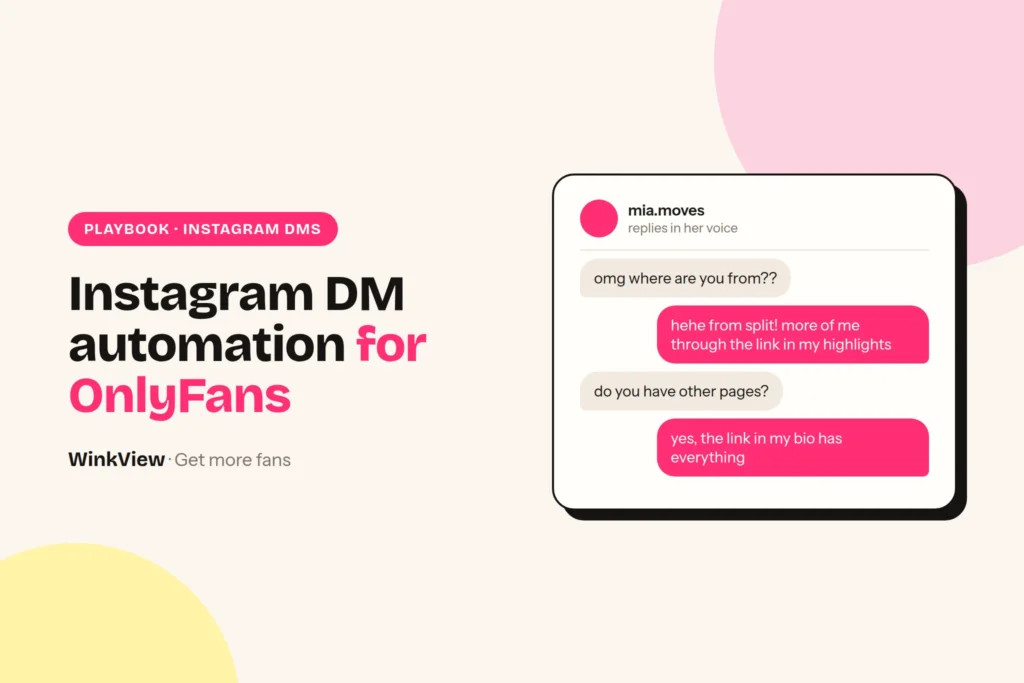
Instagram DM automation for OnlyFans creators means tools built on Meta’s official messaging API: ManyChat, Inro and InstantDM. They send scripted replies when someone comments a keyword or messages first. The other route is a person answering by hand, in her voice. Either way, a DM tool only answers people who are already interested. WinkView is what brings them: it turns her raw clips into finished edits and posts them everywhere, every day. Below: what each DM route can and cannot do, the cost for 1, 5 and 10 creators, a decision rule, the one rule for running both, and reply templates that stay inside Instagram’s rules.
The short answer
- Use an API tool (ManyChat, Inro or InstantDM) for comment-to-DM funnels, keyword triggers and instant, scripted link delivery. They only answer people who messaged or commented first, inside Meta’s time windows.
- Answer by hand when fans write ordinary words, not keywords: a person replying in her voice reads like her, but it costs staff time and is only as fast as that person. WinkView covers the start of the funnel: it edits her raw clips and posts them everywhere, every day, so there are DMs to answer, and its Automated DMs send her link to anyone who writes “link”.
- A DM funnel needs traffic first. Count one week of comments and DMs per creator: dozens of people asking for her link means a reply problem, a handful means a reach problem.
- You can run both across one roster, with one owner per inbox: never let two tools answer the same creator’s DMs.
- No tool on this page chats with fans on OnlyFans, sends PPV or handles checkout. DMs should point to the link in her bio, never sell explicitly.
Disclosure
We make WinkView. ManyChat, Inro and InstantDM are described from their own pricing pages, help centres, terms and product pages, not from our own testing. Prices checked on 29 September 2026. Vendors change plans often, so confirm on their pages before you buy.
Two ways to answer Instagram DMs
The difference is technical, and it decides everything else: what can start a message, how fast the reply goes out, and what the tool is allowed to send.
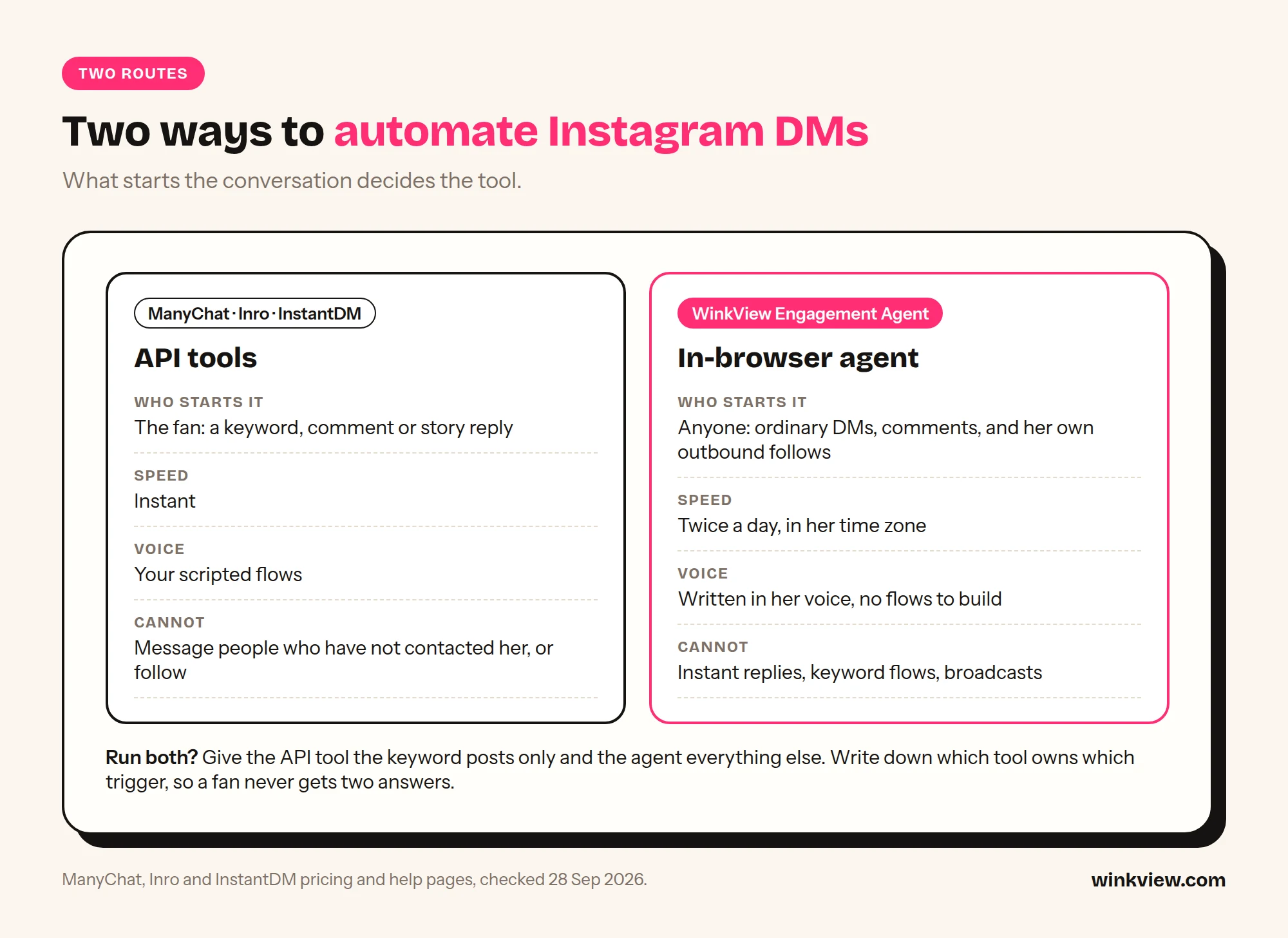
Route 1: the official Instagram messaging API. ManyChat, Inro and InstantDM connect to her account through Meta’s developer platform. The account must be a professional account. Meta’s Instagram Platform overview says the APIs support “Instagram professional accounts including both businesses and creators”; personal accounts are not supported. The tool listens for events (a DM, a comment, a story reply) and answers with a flow you built in advance.
Route 2: a person in her inbox. Someone on your team, or the creator herself, reads the inbox and comments in the Instagram app and replies in her voice. Any message can get a natural answer and there are no flows to build, but it costs hours every day and replies are only as fast as the person.
This page is about choosing the DM tool. For how WinkView fills her inbox in the first place, with edited clips posted everywhere every day, read the Instagram automation guide. For what the DMs should actually say about her offer, read how to convert followers into subscribers. If you are specifically weighing Inrō against WinkView, the WinkView vs Inrō head-to-head goes through features, trials and a six-creator cost example.
Route 1: ManyChat, Inro and InstantDM on Meta’s API
All three sell the same core idea: someone comments a word under a Reel, or messages the account, and a DM with a link goes out within seconds. All three present themselves as official: ManyChat calls itself an Official Meta Business Partner, Inrō a Meta Tech Provider that runs on Instagram’s official API, InstantDM an official Meta Business Partner using the Instagram Graph API. The rules come from Meta, not from the vendor, so they apply to all three equally.
- The 24-hour window. Meta’s messaging API documentation says: “Your app has 24 hours to respond to any message sent from an Instagram user to your app user.” Messages can only be sent after the person makes contact. Meta’s wider messaging policy allows promotional content inside that window; outside it, options are narrow. A separate human agent tag lets a real person answer later, not an automated flow.
- Comment-to-DM is one message. Meta’s private replies documentation allows a DM to a commenter “within 7 days” of the comment, and “Only one message can be sent to the commenter.” Follow-ups are only allowed if the person replies, within 24 hours of that reply.
- No cold outreach, no growth. The messaging API sends replies to people who contacted her first, so API tools do not DM strangers, and none of the three lists following or liking other accounts as a feature. That is why they are the lower-risk route for DMs, and also why they cannot fix a reach problem. (ManyChat’s pricing page does mention greeting new followers; check its docs for how that works on Instagram before you plan around it.)
- Meta’s content rules still apply. An approved API connection does not make the message content approved. Meta’s Adult Sexual Solicitation policy covers offers and requests for sexual content, including indirect ones, in DMs as well as posts.
What each vendor says about adult content, quoted from its own pages:
- ManyChat: its Terms of Service require that user content “will not be obscene or contain pornography (including but not limited to child pornography)”. Its Acceptable Use Policy prohibits “activities that are obscene, immoral, or that exploit or endanger minors” and says: “Using Manychat in any way that violates the policies of these or any other connected platform is also prohibited.” It does not single out adult creators.
- Inro: its Terms of Service have no clause specific to adult content. They prohibit use that would violate “the policies of any platform the Service connects to (including Meta and Instagram)”. Inrō is also the only one of the three with a page aimed at OnlyFans creators, which says: “Trigger your link from comments and story replies,” and that it “does not use bots or unsolicited mass DMs”.
- InstantDM: we found no content policy statement about adult content on its site.
In practice: a flow that sends a friendly message and points to her link page is ordinary use. A flow that promises explicit content in the DM puts the account and the tool subscription at risk.
Route 2: replies by hand, and where WinkView fits
Answering by hand is where most agencies start. A chatter or the creator reads the inbox in the Instagram app and replies in her voice. It handles ordinary messages better than any script, but it takes time every day and slows down when the inbox fills up. WinkView sits one step earlier: it is what fills her inbox with interested people, and it works alongside whichever DM route you pick.
WinkView does
- Turns her raw phone clips into ready-to-post vertical videos: best moment first, dead air cut, hook text on screen, music
- Posts every approved clip to Instagram Reels, Trial Reels and Stories, TikTok, YouTube Shorts, Facebook Reels, Threads and X
- Spreads posts through the day in her time zone and posts her best clips again
- Writes captions in her language for each platform
- Posts nothing until a manager ticks it
- Flags creators who run out of clips and accounts that need reconnecting
WinkView does not
- Reply to DMs or comments, instantly or later
- Run keyword or comment-to-DM flows
- Send broadcasts to a contact list
- Collect emails or phone numbers, or build a CRM
- Chat with fans on OnlyFans, send PPV or handle checkout
- Follow, like or comment on other accounts
The honest limit: more posts bring more DMs, and someone or something has to answer them. WinkView posts through each platform’s official connection. Its Automated DMs only answer the word “link”, so give her inbox one owner: WinkView for link replies, a DM tool for keyword funnels, or a chatter. If your team answers by hand, set a fixed time each day so replies do not pile up. API tools carry a different risk: the connection is sanctioned, the content you send through it is still judged.
Instagram DM automation tools compared
“Not stated” means the vendor’s page does not say, not that the feature is missing.
| Tool and route | What it can reply to | Triggers | Voice |
|---|---|---|---|
| ManyChat (API) | DMs, comments, story interactions from people who contacted her first; also Messenger, TikTok and Telegram, with WhatsApp, SMS and email from Pro | Keywords, comments, new followers per its pricing page, instant | Your scripted flows; AI replies in DMs and comments on Pro and above |
| Inro (API) | DMs, comments, story mentions and replies, live comments, ads | Icebreakers, DMs, comments, stories, live, ads; instant | Scripted flows; AI agent included on Pro, 50 AI credits on the free plan |
| InstantDM (API) | Comments, DMs, story replies | Custom trigger words, comment-to-DM, follow-for-link; instant | Scripted flows; AI voice not stated |
| A person, by hand | Anything in her inbox and comments | None: someone reads and answers when they can | Her own voice, no scripts to build |
| Tool | What it cannot do | Price | Trial |
|---|---|---|---|
| ManyChat | Message people who have not contacted her; send more than one DM per comment unless they reply; follow accounts | Essential $14 a month on yearly billing (250 active contacts); Pro $29 on yearly billing, with AI (2,500 contacts). Monthly billing costs more. Priced per account | Free plan (25 contacts); 14 days on Essential and Pro |
| Inro | Same Meta limits; accounts per plan not stated | Pro from €12.99 a month (500 or more active contacts, rises with contacts); annual Pro €1,249 a year; managed plan from €299 a month | Free plan (100 contacts); 14 days on Pro |
| InstantDM | Same Meta limits; accounts per plan not stated | $9.99 a month (Legend Pro) or $24.99 (Trendsetter); 2 months free on yearly | 7 days, no card required |
| WinkView | Reply to DMs or comments at all; keyword flows, broadcasts, email capture; OnlyFans messaging | €39 for 1 creator, down to €27.90 per creator on the 10-creator plan (excl. VAT), Video Editor and Reposting included | 7 days, card required, nothing charged until day 8 |
Sources: ManyChat pricing (prices “vary by billing country”), Inro pricing, InstantDM pricing, WinkView pricing, all checked on 29 September 2026.
What it costs for 1, 5 and 10 creators
API tools price by account and by active contacts: the people an automation touches in a month. ManyChat’s help centre is explicit: you can manage multiple accounts, “and each one is billed separately”, each with its own plan and contact limit. Inrō’s agency page says every client organisation bills to one invoice, but not whether several creators can share one Pro plan. InstantDM does not say. Each creator is a separate Instagram account with her own audience, so the model below assumes one plan per creator. Ask the vendor before you buy; if they allow several accounts on one plan, your cost drops.
| Plan | 1 creator | 5 creators | 10 creators |
|---|---|---|---|
| InstantDM Legend Pro ($9.99) | $9.99 | 5 x $9.99 = $49.95 | 10 x $9.99 = $99.90 |
| Inro Pro, base tier (€12.99) | €12.99 | 5 x €12.99 = €64.95 | 10 x €12.99 = €129.90 |
| ManyChat Pro, yearly billing ($29) | $29 | 5 x $29 = $145 | 10 x $29 = $290 |
| WinkView (Video Editor and Reposting) | Solo €39 | Growth €189 (6 places, €37.80 each for 5) | Pro €279 (€27.90 each) |
Two things the table hides. First, API tools charge more as active contacts grow: a creator whose Reels pull big comment waves can outgrow the base tier in one month. On ManyChat Essential with yearly billing, extra contacts cost $0.082 each ($0.10 on monthly billing), so a creator with 1,000 active contacts in a month pays $14 + 750 x $0.082 = $75.50, while Pro covers her for $29. Check which plan is cheaper for each creator, not for the agency as a whole. Inrō’s Pro price also rises with its contact calculator, and the exact steps above 500 contacts are not on its pricing page. Second, WinkView’s price includes the Video Editor, which turns her raw clips into finished edits, and Reposting, which posts them daily to Instagram Reels, Trial Reels, Stories, TikTok, YouTube Shorts, Facebook Reels, Threads and X. The DM tools either do not post at all or, in Inrō’s case, publish to Instagram only.
Decision rule: which route for which job
Start with whether she has a reply problem or a reach problem. Count one normal week of comments, DMs and people asking where to find her. A creator with dozens of “link?” comments a week loses clicks every hour nobody answers, and a keyword funnel pays for itself. A creator who posts twice a week and gets a handful has nothing for a funnel to catch: the money is better spent on posting every day. Our guide to promoting OnlyFans on Instagram covers the reach side.
Then ask what starts each conversation and who needs to hear back when.
- The fan starts it with a keyword, and needs the answer now: API tool. “Comment PLAN and I’ll send it” giveaways, story-reply funnels and scripted link delivery are exactly what Meta’s private replies were built for, and speed matters because the comment was made seconds ago.
- The fan starts it with ordinary words, and a reply within hours is fine: a person, by hand. “You look great”, “where are you from”, “do you have other pages” do not fit keyword flows, and a reply in her voice later that day reads more like her than an instant script.
- Nobody has started it yet: no DM tool fixes this. Reaching people who have never interacted with her is a reach job, and the messaging API is built for replies. That is the job WinkView does: her raw clips edited and posted everywhere, every day, so new people find her and message first.
- Some creators have busy comments and some need reach: an API tool for the busy inboxes, WinkView posting for every creator. That is most agencies.
Where WinkView alone is not enough: a creator whose whole funnel is comment-to-DM giveaways on paid ads, an agency that needs email capture or a contact CRM, or anyone who needs replies in under a minute. WinkView’s Automated DMs only answer “link”, so pick an API tool for those and let WinkView keep her posting.
The one rule for running both: one owner per inbox
Do not let two senders reply to the same creator’s DMs or comments. Fans get two answers, one of them out of context, and two tools on one inbox is exactly the pattern that draws attention. An API tool answering a keyword and a person answering the same comment later is enough to cause it.
- For each creator, decide who owns DM and comment replies: the API tool or a person on your team.
- If an API tool owns her inbox, your team only steps in on conversations the flow hands over. WinkView’s posting is unaffected either way; if an API tool owns her inbox, do not also run WinkView’s Automated DMs for that creator.
- If a person owns her inbox, do not connect a DM tool to her account.
- Write the owner on the creator’s onboarding sheet, so a new team member does not “helpfully” add a second tool.
- Review one week of her DMs after any change. Look for double replies.
DM scripts that stay inside Instagram’s rules
Whichever tool sends the message, the words are yours. These principles keep scripts on the safe side:
- Point, don’t pitch. The DM sends people to the link in her bio or a highlight. The price and what is included live on that page, not in the chat.
- No explicit words, no innuendo paired with a link. A suggestive line plus “link in bio” is still an offer. Keep the tone friendly and ordinary.
- Don’t name the paid platform in automated DMs. Let the link page do that. It keeps the message readable by anyone.
- Answer the question that was asked. A compliment gets a thank-you, not a sales link. Only send the link when someone asks where to see more.
- One link per conversation. Repeating the link in every message reads as spam to fans and to Instagram.
- Never script a claim you cannot stand behind, such as prices that have changed or promises about personal replies.
- Only answer people who contacted her. No tool on this page should message strangers, and none needs to.
Platform rules
Meta’s Community Standards on sexual solicitation apply to DMs and comments, whichever tool sends them, and indirect offers count. Instagram’s Terms of Use also cover automated activity; read that section before you automate anything. Keep every automated message safe for work and send people to a link page, never to explicit content.
Copy these reply templates
SAFE INSTAGRAM DM TEMPLATES
Replace [brackets]. Keep her usual spelling and emoji habits.

1. WELCOME (new follower)
Hey, thanks for the follow! I post here most days, so there's plenty coming.

2. "WHERE CAN I SEE MORE?"
Everything is linked in my bio. The top link is where I post the most.

3. PRICE OR "WHAT DO I GET?"
It's all on the page in my bio: price and what's included are right at the top, so you know before you click.

4. COMPLIMENT
That's really kind, thank you. Made my day.

5. PUSHY OR EXPLICIT REQUEST
I keep my DMs friendly here. If you want more of my content, it's linked in my bio.

6. "DO YOU HAVE OTHER PAGES?"
I made a highlight called [Links] with all of them. Have a look there.

7. COMMENT ON A POST
Glad you liked this one! [Part two / the next one] goes up [this week].

8. LATE REPLY
Sorry for the slow reply, busy day. Did you find the link in my bio?

9. KEYWORD GIVEAWAY (API tool, one message per comment)
Here's the [plan] you asked for: [link to the free item]. The rest of what I post is linked in my bio.

KEEP OUT OF EVERY SCRIPT
Explicit words · innuendo next to a link · prices in the DM
the paid platform's name · "DM me for..." offers · the same link twice
In an API tool these become flow messages. A person answering by hand should adapt each one to her voice rather than paste fixed text, so use the templates as the standard to check replies against in the first week.
Worked example: a five-creator roster, split by inbox
Worked example
Fictional agency, illustrative numbers. The agency runs five creators. Tessa, a fitness and lifestyle creator, posts a Reel every Monday that says “Comment PLAN for this week’s workout plan”, and about 1,000 people a month comment or reply to her Stories. Lena, Ana, Kira and Nora get a few dozen DMs a week each and post only a few times a week.
- Step 1, the count: Tessa has a reply problem. The other four have a reach problem.
- Tessa’s inbox, API route: an API tool owns her DMs and comments. It sends one DM to each PLAN commenter with the plan and a line pointing to her link page; if the commenter replies, a follow-up goes out within Meta’s 24 hours. On ManyChat, Pro at $29 a month on yearly billing covers her 1,000 contacts, where Essential would cost $75.50. InstantDM Legend Pro would be $9.99 if the agency does not need AI replies inside the flows.
- The other four, reach first: a chatter answers their DMs and comments by hand once or twice a day, in each creator’s voice. A few dozen DMs a week does not need a funnel tool. What these four need is more people seeing them.
- Editing and posting, all five: WinkView Growth (6 places) turns every creator’s raw clips into finished edits and posts them daily on every platform, Tessa’s included, so her giveaway Reels reach more people too. Her replies stay with the API tool under the owner rule.
- Cost: WinkView Growth €189 a month excl. VAT, plus ManyChat Pro $29 (about €25.50 at the ECB rate of 29 September 2026): about €215 a month for the roster. With InstantDM instead of ManyChat, about €198.
- What the manager checks daily: any giveaway DMs that failed, edits waiting for approval, any creator who has run out of clips or account that needs reconnecting, replies that need a human, and any double reply on Tessa’s account.
No results are claimed here. Give each tool its own tracking link and count link clicks and new paying subscribers per week before and after, on the paid platform’s own stats. If clicks rise but subscribers do not, the problem is after the click.
If Lena posted rarely, no DM tool would matter much: fewer posts means fewer comments and fewer DMs to answer. That is the job WinkView does: the Video Editor turns her raw clips into finished edits and Reposting posts them everywhere, every day, alongside whichever DM tool you pick.
Who runs it
WinkView runs the social side for agencies such as Nyvia, at about €30,000 a month, and Estrella, at about €40,000 a month, as well as the agency behind our 440,000-view case study.
Frequently asked questions
Can I use ManyChat for an OnlyFans creator?
ManyChat works on any Instagram professional account, and its terms do not ban a creator’s industry by name. They do require that content is not obscene or pornographic and that you follow the connected platform’s policies, meaning Meta’s. Keep flows friendly, answer only people who contacted her, and point to her link page rather than describing paid content in the DM. Budget one ManyChat subscription per creator, because each account is billed separately.
Can an Instagram DM bot message people who have not messaged her?
Not as cold outreach. Meta’s messaging API lets tools answer someone who messaged, commented or replied to a story first, within 24 hours of a message or 7 days of a comment, and a comment gets one private reply unless the person answers. Reaching people beyond that is a reach job, not a DM job: more posts on more platforms. WinkView does that part by editing her raw clips and posting them everywhere, every day. Its Automated DMs only answer people who wrote “link” first.
Is ManyChat, Inro or InstantDM safe for an OnlyFans creator?
The connection is: API tools use Meta’s sanctioned route. But an approved connection does not approve the message, so explicit or solicitation-style scripts can still get the account restricted. Keep flows friendly, answer only people who contacted her and point to her link page. WinkView’s posting also runs through each platform’s official connection, and its Automated DMs only answer people who wrote “link” first.
Does WinkView reply to DMs?
Only to one word. WinkView’s Automated DMs send her link to anyone who writes “link” in a story reply, DM or comment; it does not hold conversations. It also turns her raw clips into ready-to-post videos and posts them to Instagram, TikTok, YouTube Shorts, Facebook, Threads and X every day, which is what brings new people to her DMs. Pair it with whichever route fits her inbox: an API tool for keyword funnels and instant replies, or a person for everyday messages such as compliments or “where are you from”.
Can I run an API tool and WinkView on the same account?
Yes. WinkView posts her clips while an API tool runs her keyword funnel, and the two never clash as long as only one of them answers her DMs: run WinkView’s Automated DMs or the API tool’s flows for that creator, not both. The rule that matters is for replies: never let two senders answer the same inbox, or fans get two answers and the account shows two automated senders. Write the inbox owner on her onboarding sheet and check a week of DMs after any change.
How much does Instagram DM automation cost for an agency?
Budget one plan per creator. InstantDM starts at $9.99 a month, Inrō Pro at €12.99 with 500 or more active contacts, and ManyChat at $14 on yearly billing for 250 contacts, with Pro at $29 for 2,500. Busy accounts cost more as contacts grow. WinkView is €39 for one creator down to €27.90 each on ten, excl. VAT, with editing, daily posting and Automated DMs for link replies included. None of them chats on OnlyFans or handles PPV. Checked on 29 September 2026.