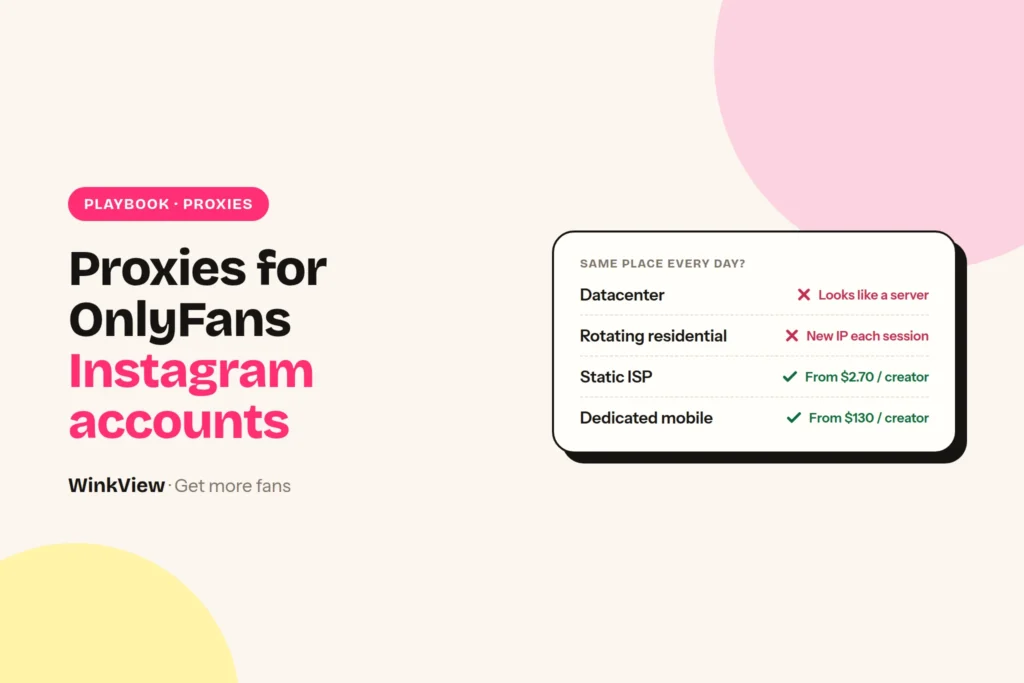
For OnlyFans creators’ Instagram accounts, buy one dedicated static residential or ISP proxy per creator, located in her country and ideally her region, and log in through it every single day from the same browser profile. At four big providers that costs $2.70 to $35 for a single creator, falling to about $3 each once you run 10. Rotating residential pools and cheap datacenter IPs are the wrong tools here, and mobile proxies work but cost about $130 a month per creator for a dedicated one. Below: the four proxy types in plain words, a decision rule, prices checked today with the maths for 1, 5 and 10 creators, and a setup checklist you can copy.
The short answer
- Best proxy for an Instagram OnlyFans agency: a dedicated static residential / ISP IP, one per creator, never shared.
- Match the country of the creator, and the city or region where her own phone uses Instagram when the provider offers it.
- Rotating residential proxies change IP between sessions. For a logged-in creator account that looks like account sharing.
- Mobile (4G/5G) proxies are the fallback when no ISP IP exists in her country. Dedicated mobile costs far more.
- A proxy only fixes the IP. Browser fingerprint, cookies and behaviour still need their own setup.
Disclosure
We make WinkView, AI video editing and reposting software for agencies. WinkView does not sell proxies, IPs or browsers. The proxy providers below are described from their own pricing pages, not from our testing. Prices checked 28 September 2026, in US dollars as the providers show them, excluding VAT. Vendors change plans often, so confirm before you buy.
The four proxy types in plain words
A proxy is a middle computer. Your team’s browser connects to it, and Instagram sees the proxy’s IP address instead of your office wifi. What matters is what kind of IP Instagram sees, and whether it is the same one tomorrow.
| Type | What Instagram sees | Same location every day? | Usually billed per |
|---|---|---|---|
| Datacenter | An IP owned by a hosting company, not a home internet provider | Yes, but it is obviously a server | IP per month |
| Rotating residential | A home connection, but a different one every session or every few minutes | No. The IP changes, often the city too | GB of traffic |
| Static residential / ISP | A home-style connection from a real internet provider, hosted on stable servers | Yes, the same IP for as long as you pay | IP per month |
| Mobile (4G/5G) | A phone on a mobile network, where many real users share IPs | Dedicated: same device and carrier. Rotating: changes | GB, or per port/device per month |
Datacenter. Cheapest and fast, but the IP range belongs to a hosting company. A real creator does not scroll Instagram from a server farm. Fine for scraping public pages, poor for a logged-in creator account.
Rotating residential. You buy traffic from a huge pool of home connections. Great for checking how a page looks in ten countries, bad for a login: Monday the creator is in Leeds, Tuesday in Bristol, Wednesday in Glasgow. Bright Data, for example, lists pay-as-you-go residential traffic at $8 per GB, and you pay for every video frame the browser loads. Most providers offer “sticky” sessions that hold an IP for a while, but the IP still comes from a pool and you do not own it.
Static residential / ISP. The two names mean the same product at most providers: an IP registered to a normal internet provider that stays yours. This is the fit for creator accounts. You pay a flat price per IP, usually with generous or unlimited bandwidth.
Mobile. Instagram is a phone app, and mobile networks put many real people behind shared IPs, so mobile IPs look natural. The catch: rotating mobile is billed per GB and changes IP, and a dedicated mobile proxy (one real modem or phone for you) costs many times more than an ISP IP.
The rule: one creator, one place, every day
Instagram keeps a list of where each account logs in from. The creator can see it herself in Instagram’s login activity screen, which lists the devices that recently logged in. Your agency’s sessions show up on that list next to her own phone.
So think about what the list looks like from Instagram’s side. A real person has one or two places: her phone at home, maybe a laptop. An account that appears from a new city every day, or from three countries in one week, looks like it has been sold, shared or taken over. That is exactly the pattern that triggers checks, and it is the pattern rotating pools and country hopping create.
Our decision rule
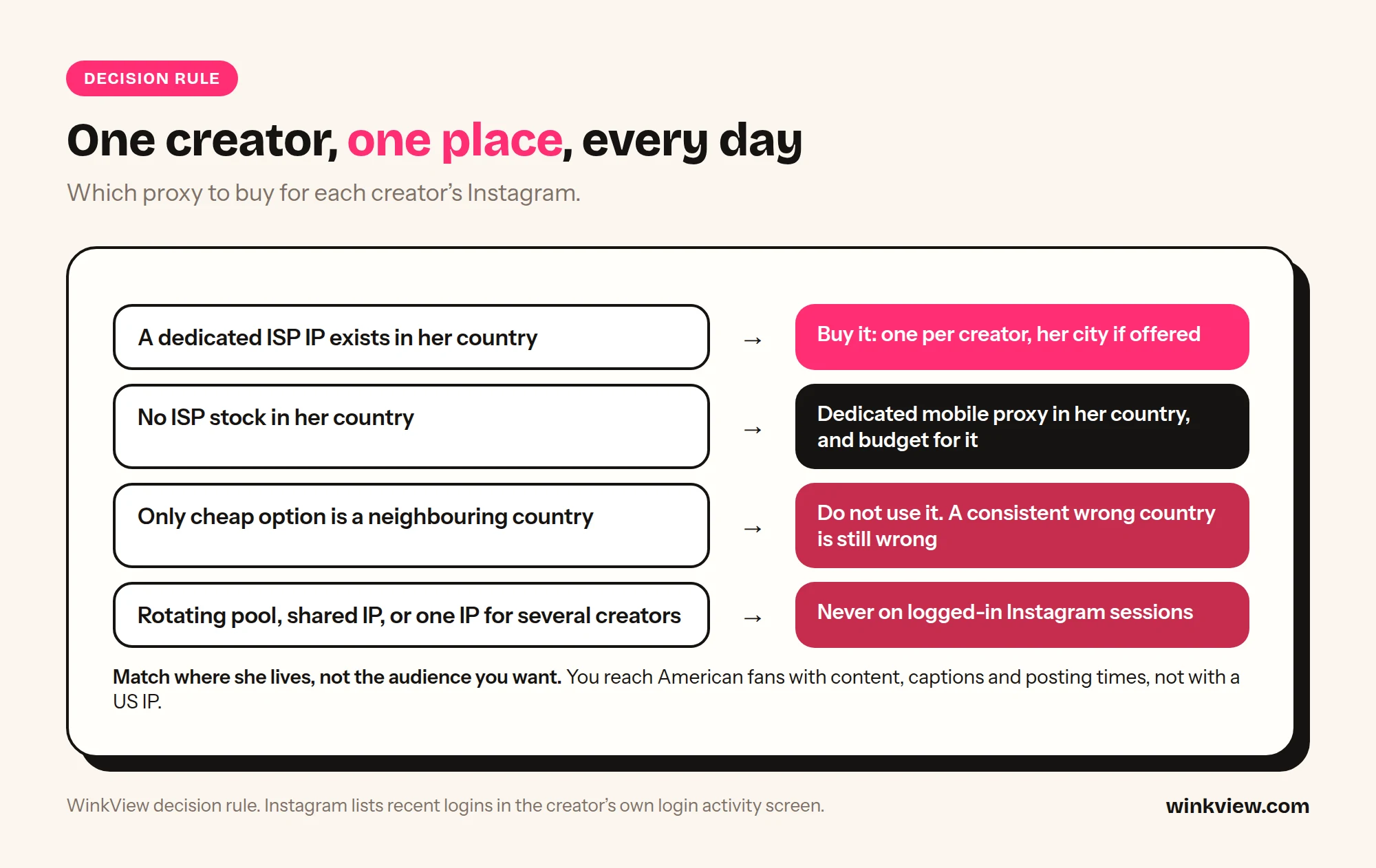
- If a dedicated ISP IP exists in her country: buy it, one per creator. Pick her city or region if the provider offers city targeting.
- If no provider has ISP IPs in her country: use a dedicated mobile proxy in her country, and budget for it.
- If the only cheap option is in a neighbouring country: do not use it. A consistent wrong country is still a wrong country next to her own phone.
- Never use rotating pools, shared IPs or one IP for several creators on logged-in Instagram sessions.
The location you match is her real one, not the audience you want. If she lives in Manchester but you want American fans, the account still logs in from England. You reach Americans with content, captions and posting times, not with a US IP.
Static residential vs ISP vs mobile proxy for Instagram: which to buy
For most agencies the choice comes down to two products and one question: is there a dedicated ISP IP in her country?
| Question | Static residential / ISP | Dedicated mobile |
|---|---|---|
| Monthly cost for one creator | $2.70 to $35 at the providers below, depending on the minimum plan | IPRoyal: from $130 for 30 days |
| Country coverage | Limited. Oxylabs lists 25 locations for dedicated ISP, IPRoyal over 31 countries | Wider in principle, varies by provider and carrier |
| Stability | Same IP all month, every month | Same device and carrier; the IP can change within the carrier |
| Best for | The default for creators in the US, UK and large EU markets | Creators in countries with no ISP stock |
Two words on the product pages matter more than the price: dedicated and shared. Oxylabs’ standard ISP proxies allow up to 3 users per IP, and Bright Data sells cheaper shared ISP plans next to dedicated ones. A shared IP means strangers’ activity sits on the same address as your creator. For creator accounts, buy dedicated.
What proxies cost per creator per month
These are the dedicated static / ISP options from four well-known providers, taken from their own pricing pages today. All prices are USD per month, excluding VAT.
| Provider and product | Smallest plan | Per IP | Notes from the page |
|---|---|---|---|
| IPRoyal ISP | Per proxy, 30 days | From $2.70 | “Starting from” price; over 31 countries; unlimited bandwidth |
| Oxylabs Dedicated ISP | 5 IPs, $16 | $3.20 | Minimum 5 IPs; 25 locations |
| Decodo Dedicated ISP | 3 IPs, $9.99 | $3.33 (falls to $2.90 at 10 IPs) | Unlimited bandwidth; 14-day money-back |
| Bright Data Dedicated ISP | 10 IPs, $35 | $3.50 | 100 GB fair usage per IP per month |
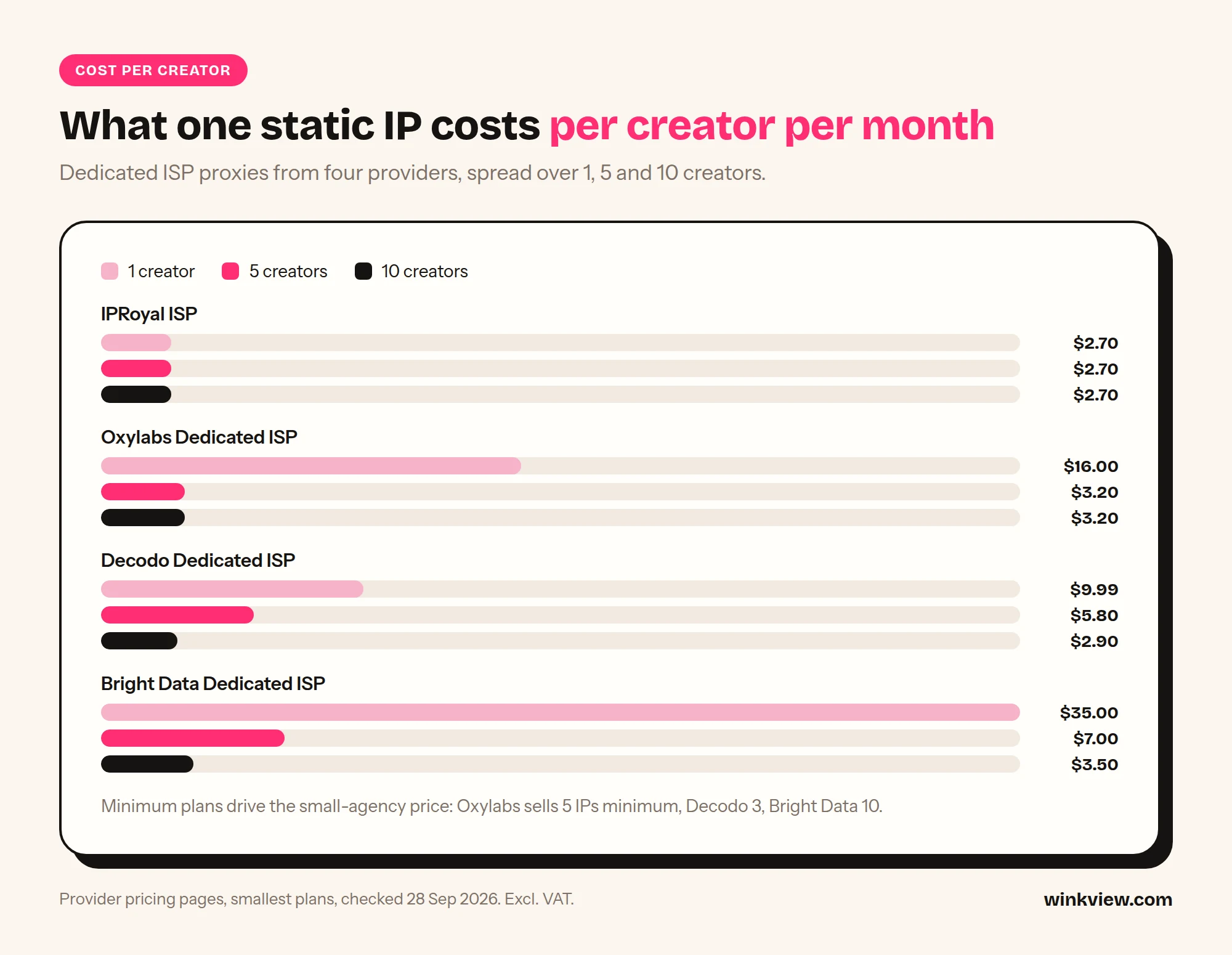
Now the maths per creator. One IP per creator, smallest plan that covers the headcount, divided by the number of creators.
| Provider | 1 creator | 5 creators | 10 creators |
|---|---|---|---|
| IPRoyal ISP | 1 x $2.70 = $2.70 | 5 x $2.70 = $13.50, so $2.70 each | 10 x $2.70 = $27.00, so $2.70 each |
| Oxylabs Dedicated ISP | 5-IP minimum $16 / 1 = $16.00 | $16 / 5 = $3.20 | 10 x $3.20 = $32, so $3.20 each |
| Decodo Dedicated ISP | 3-IP plan $9.99 / 1 = $9.99 | 10-IP plan $29 / 5 = $5.80 | $29 / 10 = $2.90 |
| Bright Data Dedicated ISP | 10-IP plan $35 / 1 = $35.00 | $35 / 5 = $7.00 | $35 / 10 = $3.50 |
Two caveats. IPRoyal’s figure is a “starting from” price and may be higher for some countries. The Oxylabs 10-IP line assumes the Starter per-IP rate applies between its listed 5-IP and 100-IP plans; check in their dashboard.
Compare that with the mobile route. IPRoyal lists dedicated mobile proxies from $130 for 30 days: $130 for 1 creator, 5 x $130 = $650 for 5, and 10 x $130 = $1,300 for 10. Rotating mobile is cheaper to start (Decodo lists mobile traffic at $4 per GB pay as you go), but it rotates, and it is billed on data that a video-heavy app burns quickly. SOAX prices residential and mobile at one per-GB rate with a credit system, which suits scraping volume more than one steady login per creator.
Worked example (illustrative)
Example: “Alder Creative”, an illustrative agency with 5 creators: two in London, one in Berlin, one in Madrid, one in Ljubljana.
- London, Berlin and Madrid: the owner confirms each country is on the provider’s ISP location list before buying. On Decodo’s 10-IP plan that is $29 a month, with spare IPs for new signings.
- Ljubljana: the owner checks each provider’s location list. If Slovenia is not offered as ISP, she buys one dedicated mobile proxy in Slovenia (IPRoyal from $130) instead of a cheap Austrian ISP IP.
- Monthly proxy bill: $29 + $130 = $159, or $31.80 per creator on average, with one creator carrying most of the cost.
The lesson: country coverage, not headline price, decides the bill.
Proxy setup checklist
Use this once per creator when you set her up, and keep the filled sheet in her file.
Copy this checklist
PROXY SETUP CHECKLIST: one sheet per creator
Creator: [name]      Instagram: [@handle]
Where her own phone uses Instagram: [country, city/region]

BUY
[ ] Proxy type: dedicated static residential / ISP (mobile only if no ISP in her country)
[ ] Country matches hers: [country]
[ ] City or region matches hers, if offered: [city]
[ ] Marked "dedicated", not "shared": [yes]
[ ] Assigned to this creator only. Never reused for another account: [yes]

CHECK THE IP BEFORE FIRST LOGIN
[ ] Look up the IP in two IP lookup tools: country, city, provider name
[ ] Provider shows as an internet provider, not a hosting company
[ ] IP not listed on public spam or abuse blacklists
[ ] Browser time zone and language set to her country

LOG IN
[ ] One browser profile for this creator only (own cookies, own storage)
[ ] Same profile + same proxy every session, from day one
[ ] Creator available by phone for the first login to approve any check
[ ] Two-factor authentication stays on, codes go to the creator

IF THE IP CHANGES (provider replaced it, or proxy went down)
[ ] Stop all activity on the account the same day
[ ] Get a replacement in the same country and city
[ ] Log in once, calmly, from the same browser profile; pass any check
[ ] No engagement for the first days on the new IP
[ ] Never switch back and forth between old and new IP
[ ] Note the date and new IP here: [date] [IP]
After an IP change or a check, restart engagement slowly; the 4-week Instagram warm-up schedule gives week-by-week limits.
On two-factor: keep it on. Instagram’s own account security guidance recommends it, and a creator account without it is a bigger risk than any proxy choice.
Common mistakes agencies make with proxies
- One proxy for the whole roster. Five creators on one IP tells Instagram the accounts are linked. If one gets flagged, the others sit on the same address.
- Buying “residential” and getting rotating. The cheapest per-GB residential plans rotate by default. Read the product name: you want static, ISP or dedicated.
- Matching the audience, not the creator. A US IP for a UK creator whose phone logs in from Leeds every night puts two countries on her login list.
- Chatters on their own wifi. The proxy is useless if one team member logs into the creator’s Instagram from their phone in another country. Every session goes through her proxy and profile, or not at all. If your team would rather work from real phones, compare the cost in phone farm vs cloud browser.
- Switching providers mid-month to save $1. Every new IP is a new location on her list. Stability is the product you are paying for.
- Assuming shared is “good enough”. Shared ISP plans are cheaper for a reason: other customers use the same address.
- Treating the proxy as a shield. A clean IP does not make aggressive follow and DM volumes safe.
Where a proxy alone is not enough
An IP is one signal out of several. Instagram also sees the browser or device itself, and how the account behaves.
- Fingerprint. Screen size, fonts, graphics card, time zone, language. If five creators log in from the same laptop through five proxies, the browser still looks like one machine. Each creator needs her own browser profile; GoLogin, Multilogin and AdsPower are compared, with proxy and staff costs, in antidetect browsers for OnlyFans agencies.
- Cookies. Logging out and in again on the same browser leaves traces from the last account. Separate profiles keep cookies and storage apart.
- Behaviour. Two hundred follows in ten minutes at 4am in her time zone looks automated from any IP. Pace, pauses and daily limits that start low on new accounts matter as much as the address.
The full picture of what runs on a creator’s Instagram, and where the risks sit, is in our guide to Instagram automation for OnlyFans creators. If you are organising a whole roster, the guide to managing multiple creators’ social media covers logins, roles and trackers.
One thing a proxy does not affect much: posting through a platform’s official API connection is not a browser login, so the IP question is mainly about sessions where someone, or some tool, is logged in and clicking.
Where WinkView fits next to your proxies
WinkView does not sell or include proxies. It cuts how often anyone needs to log in through one. The AI Video Editor turns her raw phone clips into ready-to-post vertical videos, and nothing posts until the manager ticks it. Reposting then posts every approved clip to Instagram Reels, Trial Reels and Stories, TikTok, YouTube Shorts, Facebook Reels, Threads and X through official platform connections, spread through the day in her time zone.
Because posting runs through official connections, it is not a browser login and does not need her proxy. Plans start at €39 per creator a month, with a 7-day free trial.
WinkView covers
- Editing her raw clips into ready-to-post videos
- Daily posting through official connections, no proxy needed
- Captions written in her language
- Unlimited posts, no per-post fees
You still need proxies for
- Every manual login to her Instagram: DMs, comments, checks
- Reddit, where WinkView does not post
- Logins to OnlyFans, Fansly or Fanvue
- Any other tool that logs into her accounts
Be honest with yourself about the maths too. A $3 ISP proxy is the right buy for every account your team logs into by hand. WinkView makes sense when the video work is what eats your team’s hours: it takes editing and posting off the list, so fewer people need to log in at all.
Frequently asked questions
Residential vs mobile proxy for Instagram: which is better?
A dedicated static residential (ISP) proxy in the creator’s country is the better default: stable, cheap per IP and usually unlimited bandwidth. A mobile proxy looks natural too, but a dedicated one costs far more (IPRoyal lists from $130 for 30 days), and rotating mobile changes IP. Use mobile when no ISP IP is available in her country.
Is a static residential proxy the same as an ISP proxy?
At most providers, yes: both mean an IP registered to a normal internet provider that stays assigned to you. Decodo, for example, sells them on one page as ISP / static residential. What matters more is whether the plan is dedicated or shared.
How many proxies does an OnlyFans agency need?
One per creator account you log into, plus a spare or two for new signings. Never put two creators on one IP. If a creator has a backup Instagram account, give it its own IP too.
Should the proxy match the creator’s city or just her country?
Country is the minimum. City or region is better when the provider offers it, because her own phone logs in from there and your sessions appear on the same login list. If you have to choose between her country with no city targeting and a neighbouring country with exact city targeting, take her country.
What happens if the proxy IP changes?
Instagram sees a new location and may ask for a check. Pause activity, get a replacement in the same country and city, log in once from the same browser profile with the creator on hand to approve, and keep the account quiet for a few days. Then stay on the new IP.
Do I still need proxies if I use WinkView?
Yes, for every account your team logs into by hand. WinkView does not include proxies or browsers. It edits her clips and posts them through official platform connections, which are not browser logins, so posting itself does not need a proxy. DMs, comments, security checks and platforms such as Reddit still go through her proxy and browser profile.