To run multiple Instagram accounts as an OnlyFans agency without getting models banned, do three things: keep every public post and bio inside Instagram’s written rules, give each creator her own IP, browser profile and phone number, and warm new accounts up slowly instead of switching everything on at once. This page covers the rules, the risk factors, a 4-week warm-up schedule and what to do in the first hour after a restriction.
The short answer
- A “shadowban” is usually Instagram’s Recommendation Guidelines at work: her content still reaches followers but is not shown to non-followers. Check it in Account Status.
- Disabled accounts mostly come from content (nudity, sexual solicitation, links in the bio) or from spam signals: very high action frequency, repetitive posts, automation.
- Isolate every creator: one creator, one IP, one browser profile, one phone number. Never let one phone or one VA laptop log into several creators.
- Warm up new or recovered accounts over 4 weeks with low daily action counts. Instagram publishes no official limits, so treat any number as a cautious guess.
- No tool, including ours, can guarantee an account will not be restricted.
Disclosure
We make WinkView, AI video editing and reposting software for creator agencies. Everything about Instagram’s rules on this page is taken from Instagram’s and Meta’s own published pages, linked where they are quoted. Tool prices checked 28 September 2026.
What actually gets OnlyFans creator accounts restricted on Instagram
Instagram does not publish a list of “things that get OnlyFans models banned”. It publishes four documents that, together, explain almost every case agencies describe.
1. The Community Standards (content that gets removed). Instagram’s Community Guidelines now point to Meta’s Community Standards, which cover Facebook, Instagram, Messenger and Threads. Two policies matter most for creators:
- Adult nudity and sexual activity: removes imagery with visible genitalia, visible female nipples (with narrow exceptions) and close-ups of buttocks, among others.
- Adult sexual solicitation: removes content that offers sex chats or nude imagery, and content that “asks for, offers or provides methods of contact to acquire pornographic material, or contains usernames or links to pornographic websites”. Mentioning availability, a price or “any signal of a transaction” alongside suggestive content also counts.
That second policy is why the bio, the captions and the link matter as much as the photos. A safe photo with a caption that names a price or a paid-platform username can break it.
2. The Spam policy (behaviour that gets restricted). Meta’s Spam policy does not allow “posting, sharing, engaging with content or creating accounts … either manually or automatically, at very high frequencies”. It adds that Meta “may place restrictions on accounts that are acting at lower frequencies when other indicators of spam (e.g. posting repetitive content) or signals of inauthenticity are present”. It also bans buying, selling or exchanging accounts and buying engagement such as likes, follows or views.
3. The Terms of Use (automation and accounts). Instagram’s Terms of Use say you can’t create accounts or access or collect information “in an automated way without our express permission”. The same Terms say you can’t use Instagram if Instagram previously disabled your account for breaking the law or its policies. So opening a replacement account for a disabled creator is itself against the Terms.
4. The Recommendation Guidelines (the real “shadowban”). Instagram’s Recommendations on Instagram page explains that it holds content shown to non-followers to a higher standard than the Community Standards. Content can stay up and still not be recommended in Explore, Reels or Feed suggestions. For creators, the lines that bite are:
- “Content that may be sexually explicit or suggestive, such as pictures of people in see-through clothing.”
- “Unoriginal content that is largely repurposed from another source with only minor, immaterial edits”.
- “Long captions unrelated to the underlying content and coordinated comment networks intended to artificially drive engagement and distribution.”
- At account level, Instagram tries not to recommend accounts that recently broke the Community Guidelines, that repeatedly or recently put non-recommendable content in the username, profile photo or bio, or that “repeatedly engaged in misleading practices to build followings, such as purchasing ‘likes’”.
Read that list as an agency. Posting the same clip with the same caption on five creators’ accounts looks like unoriginal, repetitive content. Having your creators comment on each other’s Reels on a schedule looks like a coordinated comment network. A suggestive profile photo can make the whole account non-recommendable, not just one post.
How to check if an Instagram account is shadowbanned: Account Status
You do not need a third-party “shadowban checker”. Instagram shows it directly. According to Instagram’s Account Status announcement, you reach it through Settings, then Account, then Account Status. The menu has moved over the years, so if you cannot find it, type “Account Status” into the settings search.
Account Status shows:
- Whether the account is at risk of being disabled.
- Whether her content may be recommended to non-followers in Explore, Reels, Feed recommendations, Search and Suggested Accounts.
- Examples of posts or profile elements that break the Recommendation Guidelines.
- Content removed under the Community Guidelines.
If you think Instagram got it wrong, you can tap “Request a Review” from the same screen. Instagram’s creator guidance on reach says you can then fix the problem “by editing or deleting content”.
Make checking Account Status part of your weekly routine for every creator, not something you open after reach drops. A single flagged profile photo or bio line can hold back every Reel she posts.
Operational risk factors when you run multiple Instagram accounts
Content rules explain removals. Operations explain why accounts get checkpoints, action blocks and disables even when the content is clean. Instagram does not publish how it detects spam or inauthentic behaviour, so the list below is a set of risk factors that match its published rules, not proven triggers or measured rates.
| Risk factor | Why it looks wrong | Do this instead |
|---|---|---|
| Shared or jumping IPs (VA on a VPN, office Wi-Fi for every creator, rotating proxies) | One network used by many unrelated accounts, or one account appearing from new countries daily, looks like an account farm or a takeover | One fixed IP per creator, in her own country, used every day |
| Many devices per login (creator, manager and two VAs all logged in) | A private person rarely logs in from four devices in a week | One device or browser profile works her account; others use it, not their own |
| One phone logged into several creators | Links unrelated accounts to one device; if one is disabled, the others sit next to it | No shared phones. One creator per phone or per browser profile |
| Action bursts on new accounts | Meta’s Spam policy names “very high frequencies” of posting and engaging | Warm up over 4 weeks; spread actions across the day |
| Identical captions and clips across accounts | “Repetitive content” and “unoriginal content” are both named in Meta’s rules | A fresh caption per creator and platform; no reused watermarked clips |
| Paid-platform link, username or prices in the bio | The solicitation policy names usernames and links to pornographic websites and “any signal of a transaction” | A safe-for-work link page; no prices or explicit words on Instagram |
On links: we cannot tell you how Meta classifies any particular paid platform or link page, and it does not say. What you control is the profile itself. Keep the bio, captions, highlights and pinned comments free of the patterns the solicitation policy lists, and send people to a neutral link page. The guide to promoting OnlyFans on Instagram covers profile set-up, the link page and Reels strategy in detail; this page stays on account safety.
The per-creator isolation rule set
If you remember one rule: one creator, one IP, one browser profile, one phone number. The goal is that nothing ties creator A to creator B except that both follow ordinary accounts in the same niche. If one account gets disabled, the others should have nothing in common with it that Instagram can see.
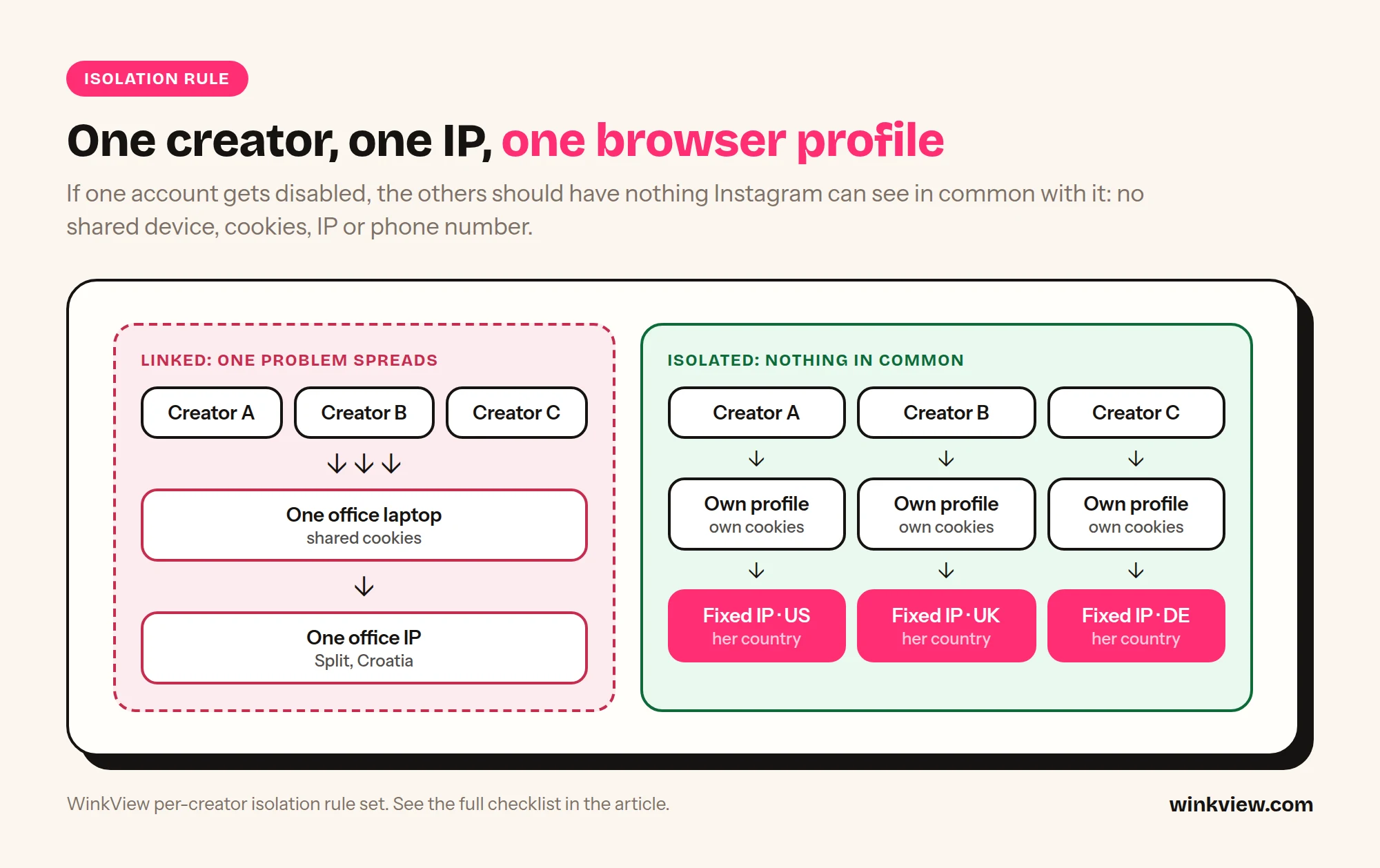
Copy this rule set
PER-CREATOR ISOLATION RULES
Creator: [name]   Instagram: [@handle]   Country: [country]

1. ONE IP
   - A fixed residential or mobile IP in her country.
   - Same IP every session. No VPN hopping, no rotating proxies.
   - Never shared with another creator.

2. ONE BROWSER PROFILE (or one phone)
   - Her own browser profile with its own cookies and logins.
   - Nobody logs into her Instagram from their personal phone.
   - No other creator is ever logged in on this profile or phone.

3. ONE PHONE NUMBER AND ONE EMAIL
   - A number and email used only for her account.
   - Two-factor on. Codes go to one place the agency controls.

4. ONE WORKING LOCATION FOR THE LOGIN
   - Team members work her account through that profile only.
   - If she also uses the app herself, agree who does what.

5. NOTHING SHARED IN PUBLIC
   - No identical captions across creators.
   - Creators do not comment on each other on a schedule.
   - Each creator has her own link page, never a shared one.

6. LOG IT
   - IP: [ ]  Profile ID: [ ]  Phone: [ ]  Email: [ ]
   - Who has access: [ ]  Last password change: [ ]
Rule 5 matters more than most owners expect. Recommendation Guidelines name “coordinated comment networks”, and an agency engagement pod is exactly that. If you manage many creators, the guide to managing multiple creators’ social media has an access tracker you can combine with this sheet.
A 4-week warm-up schedule for a new or recovered account
Use this for a brand-new account, an account that has been dormant for months, or one that just came back from a restriction. The idea is simple: behave like a new real person for a month, then speed up slowly. Keep the isolation rules from day one; changing IPs mid-warm-up undoes the point.
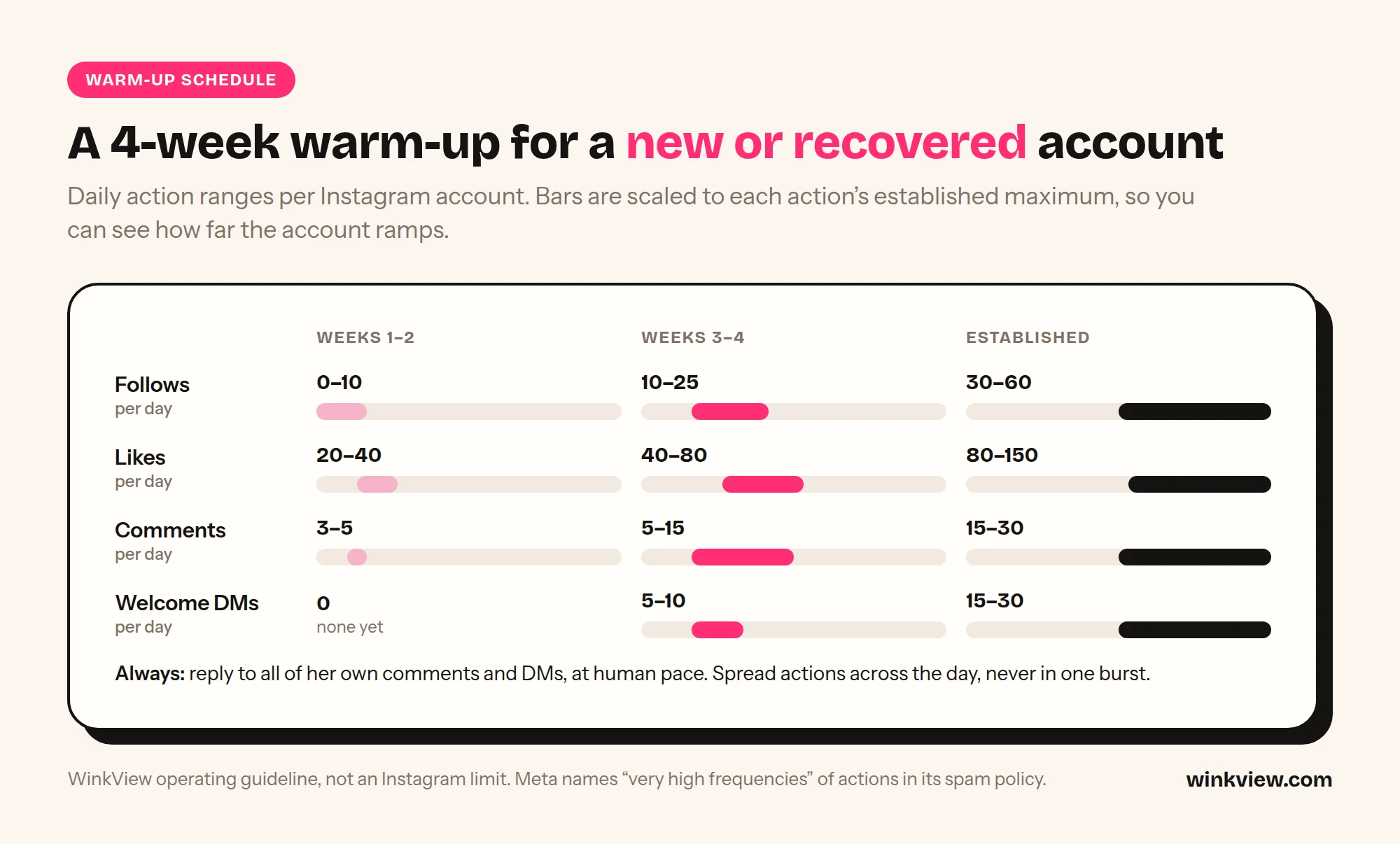
Copy this 4-week schedule
4-WEEK INSTAGRAM WARM-UP
Creator: [ ]   Start date: [ ]   IP / profile set: [yes / no]

WEEK 1: look like a person
Post:     Profile photo, safe bio, no link yet. 3 feed posts or Reels
          across the week. 1 to 2 Stories a day from day 3.
Engage:   By hand only. Scroll the feed and Reels 10 to 15 minutes
          twice a day. Like what she would actually like. Follow a
          handful of large niche and lifestyle accounts.
Avoid:    Link in bio, DMs to strangers, any tool, following
          fans of other creators, login from a second device.

WEEK 2: start a normal rhythm
Post:     1 Reel a day or every other day. Daily Stories.
          Add the safe-for-work link page to the bio at the end
          of the week.
Engage:   By hand or at the lowest tool setting. Reply to every
          comment and DM she receives. A few genuine comments
          on accounts in her niche.
Avoid:    Mass follows, copy-paste comments, reused captions.

WEEK 3: add outbound engagement
Post:     1 Reel a day. Daily Stories. Trial Reels if available.
Engage:   Tool can start following fans of similar creators at
          the low end of the ceiling table. Short welcome DMs
          to people who followed her, not cold DMs.
Avoid:    Raising all limits at once. Change one thing per week.

WEEK 4: settle
Post:     Normal schedule.
Engage:   Raise follows and likes towards the middle of the
          ceiling table if Account Status is clean.
Check:    Account Status every 2 to 3 days. Any "try again
          later", code request or warning: drop back to week 2
          levels for 7 days.

AFTER WEEK 4
Raise limits by small steps no more than once a week.
Review Account Status weekly, forever.
Daily action ceilings
Instagram publishes no official daily limits for follows, likes, comments or DMs. The numbers below are cautious operating ranges we suggest for staying well below “very high frequencies”. They are not Instagram’s numbers, not thresholds that are known to be safe, and not a guarantee. Older accounts with steady, real activity usually tolerate more than new ones; recovered accounts should be treated as new.
| Action per day | Weeks 1 to 2 | Weeks 3 to 4 | Established account |
|---|---|---|---|
| Follows | 0 to 10 | 10 to 25 | 30 to 60 |
| Likes | 20 to 40 | 40 to 80 | 80 to 150 |
| Comments on others’ posts | 3 to 5 | 5 to 15 | 15 to 30 |
| Welcome DMs to new followers | 0 | 5 to 10 | 15 to 30 |
| Replies to her own comments and DMs | All, at human pace | All, at human pace | All, at human pace |
Spread each day’s actions over at least two sessions with pauses in between. 40 follows in five minutes is a different signal from 40 follows across a day, even though the total is the same.
What to do in the first hour after a checkpoint, restriction or disabled account
The first hour is where agencies turn a warning into a lost account: three people log in from three phones to “check”, a VA retries the blocked action, someone opens a replacement account. Do this instead.
- Stop everything on that account. Pause any engagement tool and scheduled activity for her. Tell the team nobody touches the login until you say so.
- Name what happened. A code or “confirm it’s you” screen is a checkpoint. “Try again later” is an action block. A reach drop with a note in Account Status is a recommendation restriction. A login screen that says the account is disabled is a disable. They need different responses.
- Clear checkpoints from her usual set-up. Complete the code or identity check from the same IP and browser profile or phone she normally uses, not from a VA’s phone in another country.
- Write down the last 24 hours. Screenshot the message. Note the time, the device and IP, and every action taken on the account the day before: posts, follows, DMs, logins, tools. You will need this to find the cause.
- Open Account Status. See what was removed or flagged. If Instagram got it wrong, tap “Request a Review” (how Account Status works). If it was right, edit or delete the item.
- If the account is disabled, follow Instagram’s disabled accounts page: log in and follow the on-screen instructions to ask for a review. If you see no disabled message and cannot log in, it may be a login issue or a takeover; use instagram.com/hacked.
- Do not open a replacement account. Instagram’s Terms of Use say you cannot use Instagram if it previously disabled your account for breaking its policies. A new account for the same creator on the same set-up is the fastest way to lose that one too.
- Check her neighbours. Did any other creator share a phone, IP, VA laptop or link page with her? Isolate them now, before anything else happens.
- Restart at week 2 levels. Once the account works again, run the warm-up from week 2 for at least 7 days before raising anything.
Worked example (illustrative)
Example, not a real customer: “Ferngate Talent” runs 8 creators with 2 VAs. Both VAs keep all 8 Instagram logins on their own phones, work from the same office Wi-Fi, and paste the same caption on every creator’s Reel. One creator gets a disable after a caption mentioned her paid page.
What changes after the first hour: the disabled creator goes to review through the in-app flow; nobody opens a new account. The other 7 creators each get a fixed IP in their own country and one browser profile; the VAs log out of every creator on their phones. Captions are rewritten per creator. The 7 restart at week 2 of the warm-up, and Account Status is checked on Mondays for all of them.
The point of the example is not the outcome, which nobody can promise, but that one shared set-up had put 8 accounts at risk for one caption.
What isolation costs per creator
You can build isolation yourself, and for accounts your team logs into by hand you should. The tools are cheap; the cost is the hours your team spends inside each profile. Here is the tooling floor using two published prices.
- GoLogin (anti-detect browser profiles): Professional is $9 a month for 10 profiles on monthly billing, or $4.50 a month on annual billing (50% off); larger tiers cover 25 to 100 profiles. A free plan has 3 profiles.
- IPRoyal static residential proxies: from $2.70 per IP for 30 days. “From” means some countries may cost more.
| Creators | DIY tooling floor (monthly) |
|---|---|
| 1 | $9 + 1 x $2.70 = $11.70 |
| 5 | $9 + 5 x $2.70 = $22.50 ($4.50 per creator) |
| 10 | $9 + 10 x $2.70 = $36.00 ($3.60 per creator) |
The table assumes the smallest GoLogin Professional tier covers your profile count; check the tier for your number on their page. It excludes phone numbers and SIMs, and it includes no work: someone still has to open each profile, post, reply and clear checks by hand. Multiply your own daily minutes per creator by 30 and by your VA’s hourly cost to get the real number. For AdsPower and Multilogin next to GoLogin, with staff hours costed, see antidetect browsers for OnlyFans agencies; for choosing the IP itself, see which proxy each creator’s Instagram needs.
Decision rule: if you have 1 or 2 creators and a VA with spare hours, DIY isolation plus manual work is fine. If you have 5 or more creators, or your VAs are the ones sharing phones today, cut the number of logins first: every task that can run through an official connection instead of a browser session is one less chance to break the rule set.
Fewer logins: take posting out of the browser
The safest login is the one nobody makes. Posting is the task that pulls most people into a creator’s account every day, and it does not need a browser session at all. WinkView takes it off your team’s plate.
- Raw clips in, ready-to-post videos out. The AI Video Editor edits each raw phone clip into a vertical video: best moment first, dead air cut, hook text on screen, music.
- Nothing posts until the manager ticks it, so every clip is checked against the content rules above before it goes out.
- Posted everywhere, every day. Reposting posts every approved clip to Instagram Reels, Trial Reels and Stories, TikTok, YouTube Shorts, Facebook Reels, Threads and X, spread through the day in her time zone.
- Official connections only. The creator approves access on each platform’s own connect screen, so no VA phone or laptop needs her login just to post.
- A caption per platform written in her language, which addresses the identical-captions risk factor on the posting side.
The honest limits. WinkView does not log in to her account, run engagement or manage IPs and browser profiles, so the isolation rules above still apply to every manual session: DMs, comments and checks. It cannot fix content problems: if her profile photo, bio or Reels break the Community Standards, no tool saves the account. It does not recover disabled accounts.
For what is and is not allowed when you automate anything on Instagram, read the Instagram automation guide for OnlyFans agencies. For turning followers into paying fans, see how to convert followers into subscribers.
Frequently asked questions
Can an OnlyFans model get banned from Instagram just for having OnlyFans?
Instagram’s rules target content and behaviour, not a creator’s job. What gets accounts removed is nudity, sexual solicitation (including usernames, links or prices that signal a paid transaction) and spam behaviour. Keep everything on Instagram safe-for-work, link to a neutral link page, and check Account Status weekly.
How do I know if a creator’s Instagram is shadowbanned?
Open Account Status in her settings. It shows whether her content can be recommended to non-followers in Explore, Reels, Search and Suggested Accounts, and gives examples of what is holding it back. If you think Instagram made a mistake, tap “Request a Review” from the same screen.
How many Instagram accounts can one phone run safely?
For agency work, treat the answer as one creator per phone or per browser profile. Instagram publishes no safe number for this. One phone logged into several unrelated creators ties them together, so a problem with one sits next to the others. If you are deciding between phones and browsers, see phone farm vs cloud browser.
Should we open a new account after a creator is disabled?
Not while the disable stands. Instagram’s Terms of Use say you cannot use Instagram if it previously disabled your account for breaking its policies. Ask for a review through the in-app flow first, fix the cause, and only then decide with the creator what to do next.
Does using an engagement tool get accounts banned?
It can. Instagram’s Terms prohibit automated access without its permission, and Meta’s Spam policy restricts very high frequencies of actions, manual or automated. Isolation, human pace and low starting limits reduce the risk; nothing removes it. Posting through official connections is the route Meta built for tools, so it is not the same risk as automated follows, likes or DMs.