Give every creator her own lane: her own content folder, caption voice and language, her own connected accounts and one named person on your team. Then run one shared 10-minute check each day for four problems: missing content, a failed post, an account issue and a conversation that needs a person. Below is a filled two-creator tracker to copy and the exact daily routine.
The short answer
One creator means one content folder, one caption voice, one set of connected accounts and one owner on your team.
Keep a shared tracker with the same rows for every creator, so anyone can cover for a colleague.
Check four problems every day: missing content, failed posts, account issues and conversations that need a person.
WinkView edits her raw clips and posts them everywhere, every day, by itself; your team supplies clips, ticks the edits, answers DMs and fixes problems.
WinkView plans are priced per creator, from €39 a month for one creator.
Give each creator her own lane
Most mix-ups in a group of creators come from shared shortcuts. One folder holds everyone’s clips, one caption style gets pasted everywhere, or two accounts are opened from the same laptop.
Separate four things for every creator and never share them:
Accounts: her Instagram, TikTok, YouTube, Facebook, Threads and X, connected to her profile only.
Content: one folder per creator, holding only clips she has approved for public posting.
Voice: her language, tone and three captions she likes, written down once.
Owner: one named person who answers for her accounts this week.
Share the process instead: the same tracker rows, the same daily check and the same weekly deadline. A manager covering on a Saturday should find everything in the same place for every creator.
A filled two-creator tracker
This is a shared sheet your team keeps next to WinkView, not a screen inside the product. Example creators: Mia, a gym and fitness creator, and Lena, who cooks at home.
Worked example
Row
Mia (fitness)
Lena (cooking)
Accounts
Instagram, TikTok, YouTube Shorts
Instagram, TikTok, Facebook, Threads
Content folder
Mia, week 39: 14 clips, 5 left
Lena, week 39: 6 clips, runs out Wednesday
Voice
Upbeat, short, gym jokes
Warm, chatty, one tip per caption
Language, time zone
English, London
German and English, Vienna
Approvals
Off since week 3
On (new this week)
Edits approved
Ticked daily by Sam
3 waiting for Ana
Status today
On track
Needs 8 clips
Next action
Upload week 40 by Friday
Ask Lena for clips by Tuesday 18:00
Owner
Sam
Ana
Last problem
TikTok reconnect, fixed Monday
None yet
Read it in ten seconds: Mia needs nothing today, while Lena will run out of clips midweek, and Ana owns that fix.
Copy this template
CREATOR TRACKER (one column per creator)
Name and niche:      [ ]
Accounts:            [platforms connected]
Content folder:      [folder name, clips uploaded, clips left]
Voice:               [3 words + link to 3 sample captions]
Language, time zone: [ ]
Approvals:           [on / off, since when]
Edits approved:      [ticked today / waiting, how many]
Raw clips left:      [ ]
Status today:        [on track / needs clips / needs fix]
Next action:         [what, by when]
Owner:               [one name]
Last problem:        [what, date, fixed?]
What WinkView keeps separate for you
WinkView gives you one login for every creator you manage, but each creator’s work runs on its own. You never edit a clip or press publish by hand.
1Raw clips in her folder
2AI edits, you tick
3AI captions, her voice
4Daily posts everywhere
The Video Editor turns each raw phone clip into a ready-to-post vertical video: best moment first, dead air cut, hook text on screen, music. Nothing posts until her owner ticks it.
The Reposting Agent posts her approved clips every day. Your team uploads a batch to her content library, WinkView writes captions with AI in her language and voice, and it posts to Instagram Reels, Trial Reels, a daily Story, TikTok, YouTube Shorts, Facebook Reels, Threads and X through each platform’s official connection.
Each creator’s accounts are connected to her profile only, and posts go out spread through the day in her time zone, so Mia’s clips never land on Lena’s accounts. The Reposting page shows how that works. Comments and DMs are not automated: her owner answers them by hand.
WinkView does
Keeps one content library per creator
Writes captions in each creator’s language and voice
Posts daily to every connected destination
Edits every raw clip into a ready-to-post video
Flags in the Today tab when a creator runs out of clips or an account needs reconnecting
Shows posting history per creator
You do
Upload raw clips and tick the edits to post
Keep the tracker current
Run the 10-minute daily check
Reply to comments and DMs, and pass on what needs the creator
Run the paid pages: pricing, messages, PPV
Posting goes through each platform’s official connection, which is the low-risk part. What the same work costs with a person doing it is in what an OnlyFans social media manager costs.
The daily 10-minute check
One person runs this each morning for the whole group of creators, then updates the tracker. Work creator by creator, not tab by tab.
Minutes 0 to 2: content left. Check each folder. Anyone under three days of clips gets a “needs clips” status and a message today.
Minutes 2 to 4: failed posts. Open posting history for each creator and look for anything that did not go out. Note the platform and reason.
Minutes 4 to 6: account issues. Check the Today tab for a creator out of clips, a platform check or an account that needs reconnecting. Assign it to the owner.
Minutes 6 to 9: conversations. Skim her comments and DMs for questions only the creator can answer, such as a custom request or a complaint. Pass them on in one message.
Minute 10: update the tracker. Set status, next action and owner for each creator. Anything still open gets a deadline.
Aim for about two minutes per creator, since nothing is rebuilt by hand. If the check keeps running long, one creator usually has a recurring problem to fix at the cause.
Fix the cause, not just the problem
A problem that shows up every week is part of your process. Use this table to pick the lasting fix.
Problem
Quick fix today
Lasting fix
Folder runs dry
Ask for clips, post from backlog
Earlier weekly deadline, bigger batches
Failed post
Reconnect the account, repost
Check connections in the weekly review
Platform asks for a check
Owner completes it with the creator
Keep logins on one known device per creator
Caption sounds wrong
Edit before approval
Add better sample captions
Fan needs the creator
Pass it on the same day
Agree a reply window with her
Review each creator on her own once a week. Strong numbers from Mia should never hide an empty folder for Lena. Ask each creator for new paying subscribers that week, because the money chain ends on her paid page: public post, profile visit, link click, paid subscriber, later PPV.
Add a creator when last week passed three tests: every folder was topped up before it ran dry, the daily check stayed near ten minutes, and someone else could cover for each owner. If any test failed, fix that first.
Cost grows in steps, not per post. WinkView plans are priced per creator, from €39 a month for one creator, with unlimited posts, the Video Editor and Reposting included, and larger plans cover 3, 6 or 10 creators. Pick the plan that fits your group of creators with a place to spare.
Does a creator count twice if I use editing and posting?
No. WinkView is priced per creator, and each plan includes the Video Editor, Reposting and Briefing for every creator on it, with unlimited posts. Plans start at €39 a month for one creator, and larger plans cover 3, 6 or 10 creators. For more than ten creators, book a demo on the WinkView site to talk about your setup.
Can every creator have a different voice and language?
Yes. WinkView writes captions in each creator’s own language and voice, whatever language she speaks (English, German, Spanish, Italian and more). Give it three captions she likes for each creator, keep approvals on for the first batch and edit anything that sounds off. Once her captions come out right week after week, you can switch approvals off for that creator.
Do managers need to edit or post anything each day?
No. The Video Editor edits every raw clip and the Reposting Agent posts the approved ones every day, spread through each creator’s time zone. Your team’s laptops can be off. Managers tick the edits, reply to comments and DMs, and step in when something needs a person: a platform check, an account to reconnect or a conversation the creator herself has to answer.
What if two creators share a niche?
Keep them fully separate anyway: separate folders, separate sample captions and never the same clip on both accounts. Give each a distinct angle, for example one posts gym routines while the other posts at-home workouts and meal prep. Fans who see near-identical captions on two accounts start to suspect fakes, and one official link-in-bio page per model helps them find the real links.
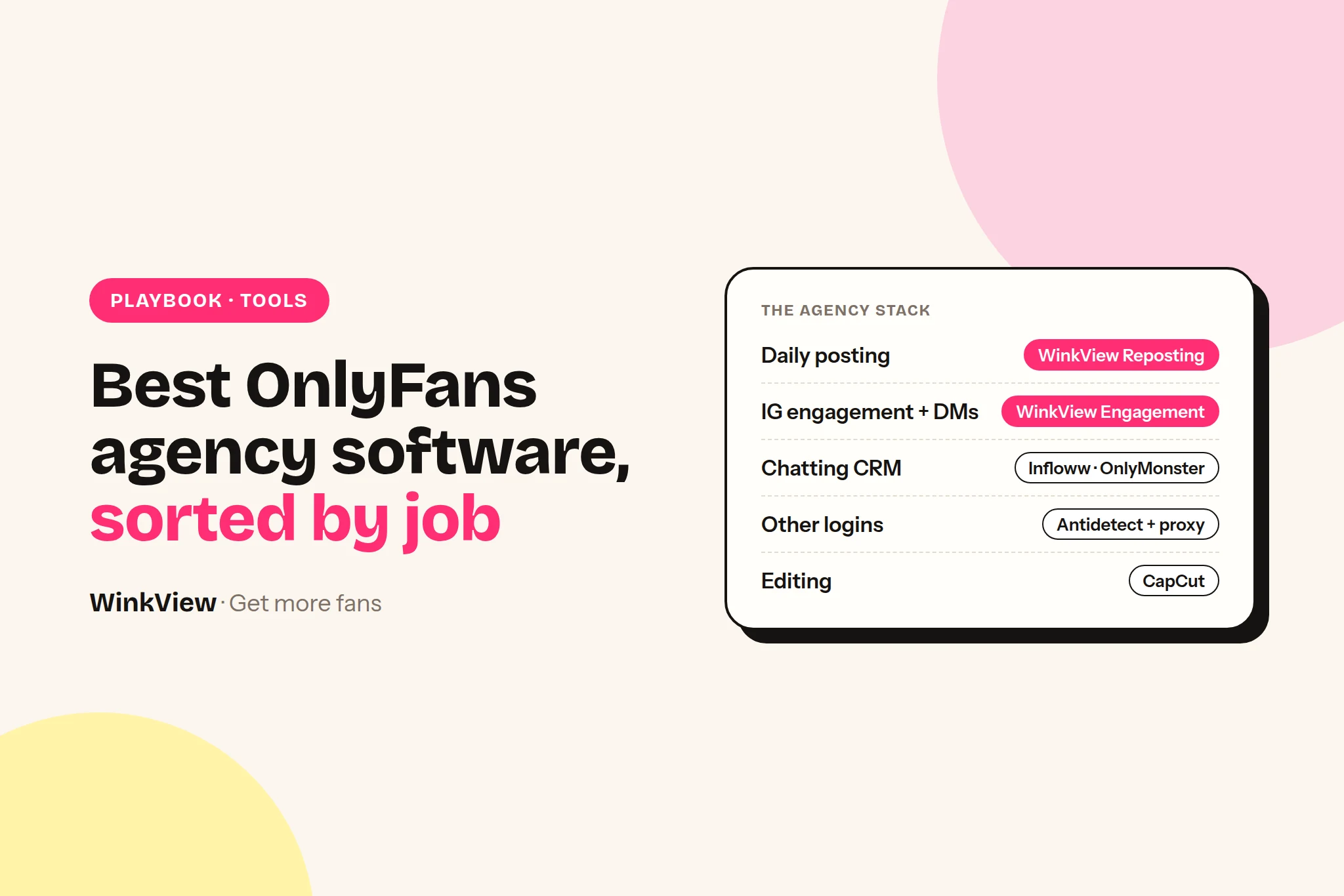
The best OnlyFans agency software is not one tool. It is four jobs, each with its own tool: a chatting CRM for the paid page, an editing and posting tool for public traffic, a DM tool or a person for Instagram comments and DMs, and account safety for every login your team touches. Below you get one pick and one alternative per job, with the price, what you pay per, and what each tool does not do, then three priced stacks for 1, 5 and 20 creators.
The short answer
Chatting and fan CRM: Infloww (from $40 per creator profile a month, rising with her earnings). Alternative: Supercreator (free Lite plan for up to 10 accounts; CRM Premium from $15 per account a month).
Traffic and daily posting: WinkView Reposting Agent (from €39 a month per creator). Alternative: Buffer ($5 per channel a month on yearly billing) if your team writes every caption itself.
Instagram comments and DMs: your own team for real conversations, in her voice. WinkView’s Automated DMs send her link to anyone who writes “link”; it does not follow or like. Alternative: Manychat (from $14 a month billed annually, priced by active contacts) for scripted DM flows. The WinkView plan adds a weekly filming brief per creator.
Account safety: WinkView posts through official connections and never logs in as her, so it needs no browser profile. For every login your team opens by hand (Instagram for DMs, Reddit, X, email), an antidetect browser such as Multilogin plus residential proxies.
WinkView is not a CRM. It never touches OnlyFans, Fansly or Fanvue. You still need a chatting tool for the paid page.
Disclosure
We make WinkView, one of the tools on this page. We describe Infloww, Supercreator, OnlyMonster, Buffer, Metricool, Manychat, GoLogin and Multilogin from their own pricing and product pages, not from our own testing. Prices checked 28 September 2026. Vendors change plans often, so confirm on their pages before you buy.
Where each piece of OnlyFans agency software sits in the money chain
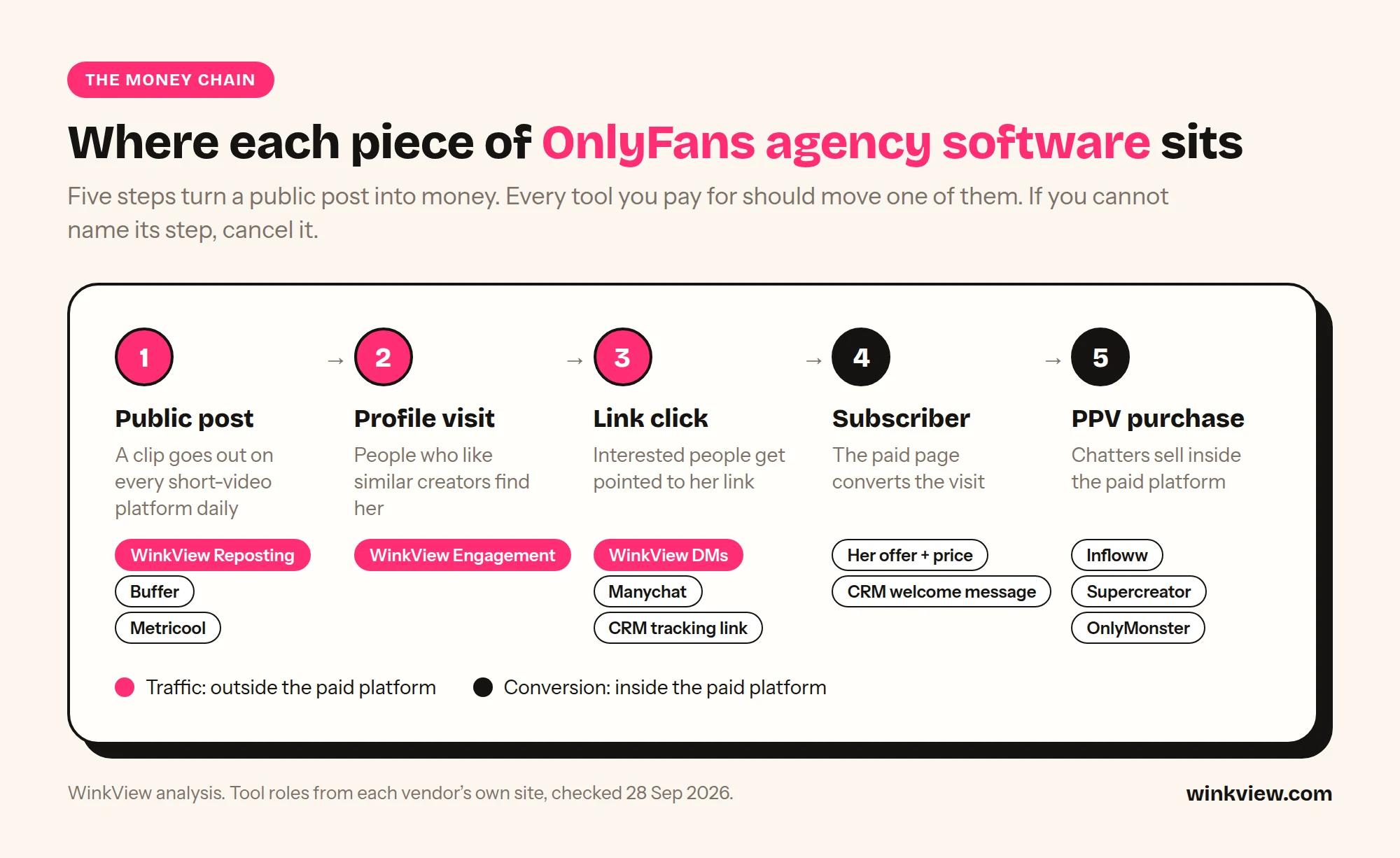
Most “best OnlyFans agency tools” lists put a CRM, a video editor and a notes app in one flat list of twenty. That hides the only question that matters: which step of the sale does this tool move? A new paying fan follows the same five steps every time.
The five steps from a public post to a PPV sale, and which tool moves each one.
1Public post
2Profile visit
3Link click
4Subscriber
5PPV purchase
Step
What has to happen
Tool that touches it
1. Public post
A clip goes out on Instagram, TikTok, Shorts, Threads every day
WinkView Video Editor and Reposting Agent, or Buffer / Metricool plus your team. CapCut to make the clip
2. Profile visit
People who like similar creators notice her account
Daily Reels and Trial Reels from WinkView reach non-followers; your team answers comments by hand
3. Link click
Interested people get pointed to the link in her bio
Your team’s DM replies, or Manychat flows. Tracking links in your CRM
4. Subscriber
The paid page converts the visit
The creator’s offer and price; CRM auto-messages for new fans
5. PPV purchase
Chatters sell inside the paid platform
Infloww, Supercreator or OnlyMonster
Read the table as a split. Steps 1 to 3 happen on public social platforms. Steps 4 and 5 happen inside OnlyFans, Fansly or Fanvue. No tool on this page does both halves well, which is why you need at least two. If you already get clicks but few subscribers, the problem is step 4, not software: start with why views are not turning into subscribers.
Chatting and fan CRM: Infloww, Supercreator, OnlyMonster
This is the tool your chatters live in all day: one inbox across creators, fan notes, scripts, mass messages and sales tracking per chatter. It is the software that earns the PPV money, so it comes first in the buying order below.
Account, tiered by the account’s last 30 days of earnings
$30 a month (under $2,500 earned) up to $250 (over $50,000); 3 and 6 month terms cheaper
No social posting listed
Pick: Infloww. It lists OnlyFans, Fansly, Fanvue and MYM in one place, plus shift scheduling, a message dashboard to review every chatter’s messages, and employee reports on sales, messages sent and PPV sales. Built-in proxies come on the OnlyFans plan. The catch is the billing unit: the price rises with each creator’s earnings, from $40 under $500 a month to $500 above $75,000, so a top earner costs many times what a new creator does.
Alternative: Supercreator, if you are OnlyFans-only and cost-sensitive. CRM Lite is free for up to 10 accounts. CRM Premium adds the AI copilots, chatter analytics and sales tracking, from $15 per account (under $1,000 earned a month) up to $249 (over $25,000). Super AI takes 5% of AI net sales on top of $99, so model it against your PPV revenue before you switch it on.
OnlyMonster sits in between: primary proxies included on every Pro plan and a price that follows each account’s earnings, from $30 to $250 a month. Of the three, only Infloww names Fansly and Fanvue on its pricing page; check the others if you run creators on several paid platforms. Every earnings band, CreatorHero and a CRM cost table for 1, 5 and 10 creators are in our OnlyFans CRM comparison: Infloww vs Supercreator vs OnlyMonster.
Traffic and daily posting: WinkView, Buffer, Metricool
Step 1 of the chain is volume: the same clips going out every day on every short-video platform, with a caption that fits the platform. The cost that matters here is not the licence, it is the hours your team spends uploading and writing captions for each creator.
Pick: WinkView Video Editor and Reposting
Pay per creator: Solo €39 for 1, Starter €99 for 3, Growth €189 for 6, Pro €279 for 10, custom above 10 (excl. VAT)
Drop in her raw clips; the Video Editor turns each into a ready-to-post video, and once you tick it, it writes a fresh caption per platform in her language and voice
Posts daily to Instagram Reels, Trial Reels, a daily Story, TikTok, YouTube Shorts, Facebook Reels, Threads and X, plus Threads text posts
Unlimited posts on every plan; official posting APIs, no passwords stored
Does not post to Reddit or the paid platform; editing is done by the WinkView Video Editor before posting
Alternative: Buffer
Pay per channel: Essentials $5 a month per channel on yearly billing ($60 a year); Team $10 per channel on yearly billing for approval workflows
Channels above 10 cost less (discount not stated on the page)
Free plan: 3 channels, 10 scheduled posts each
AI assistant helps, but your team writes and schedules every caption
Does not edit raw clips or post to the paid platform
The billing unit decides the maths. One creator on Instagram, TikTok and YouTube is 3 Buffer channels but 1 WinkView creator. At five creators that is 15 channels, so 15 x $5 = $75 a month on Essentials before the volume discount, or 15 x $10 = $150 on Team if you want approvals. Buffer is cheaper per month; WinkView is the one that also edits her raw clips and writes the captions in the same price.
Metricool is the choice if the job is reporting, not posting volume. Starter covers up to 5 brands for €20 a month on monthly billing (€16 on annual); approvals and team roles need Advanced, from €54 a month monthly for 15 brands. X is a $10 add-on per connected account. Use it for the monthly performance deck you send each creator.
All three post through official connections. Instagram’s own content publishing API caps an account at 100 API-published posts in 24 hours, far above what any creator needs, and TikTok’s Content Posting API keeps posts private until the posting app passes an audit. That is why official posting is the low-risk part of the stack.
Instagram comments and DMs: your team, Manychat
Step 2 and 3 are where most agencies burn chatter hours: following fans of similar creators, answering comments, replying to “hi” in the DMs and pointing people to the bio link. Two very different tools cover this.
Pick: your chatters or social manager, by hand. WinkView edits and posts, and its Automated DMs send her link to anyone who writes “link”. It does not follow, like or comment. Profile visits come from the daily Reels, Trial Reels and Stories it posts, and a person answers the comments and DMs those posts bring in, in her voice, pointing interested people to the link in her bio or highlights. That keeps the account inside Instagram’s rules, because Instagram does not approve third-party engagement automation. It also costs chatter hours, so put DMs on the shift plan like any other inbox.
Alternative: Manychat, if the creator already gets many DMs and you want scripted answers and link delivery. Essential is $14 a month billed annually ($168 a year) with 250 active contacts and up to 2 channels; Pro is $29 a month billed annually ($348 a year) with 2,500 contacts and up to 3 channels; contacts above the allowance are billed on top. It answers people who message first. It does not follow, like or bring new people to the profile, and it does not post.
A simple rule: if the account gets too few DMs, you need more daily posts reaching non-followers (WinkView). If it gets too many of the same DMs, you need flows (Manychat). Manychat, Inro and InstantDM are compared, with costs and reply templates, in our Instagram DM automation guide for OnlyFans.
Account safety for many logins
An agency with ten creators may hold forty logins: paid platform, Instagram, TikTok, Reddit, X, email. When several of those open from one laptop and one office IP, platforms can link them. There are three layers, and each covers different logins.
The paid platform: your CRM usually handles it. Infloww lists built-in proxies on its OnlyFans plan; OnlyMonster includes primary proxies on every Pro plan.
Instagram: WinkView posts through Instagram’s official connection, so the posting side needs no browser profile or proxy from you, and your laptop can be off. If your team logs into her Instagram by hand to answer DMs, treat that login like the ones below.
Everything else (Reddit, X, Telegram, email, backup accounts, and Instagram when your team logs in by hand): an antidetect browser with one profile per login, plus residential proxies. Multilogin Pro is $11 a month for 10 profiles on monthly billing ($85 a year on annual) with 1 GB proxy traffic a month; Business starts at $40 a month for 100 profiles with unlimited team seats. GoLogin has a free plan with 3 profiles; Professional is $9 a month for 10 profiles on monthly billing, or $4.50 a month on annual billing (50% off).
Antidetect browsers are the flexible option: any site, any account, your team drives. They also mean your team must keep a proxy per profile, keep each profile on the same IP, and do the work by hand. WinkView does not replace them and does not need one: it edits and posts through official connections. Use the antidetect browser for the logins your team opens by hand, and let WinkView take the editing and uploading off that list.
Content production and team ops
These matter, but they do not move a step of the money chain on their own, so they get one line each. For every category in one list, including content protection and link-in-bio tools, see the 20 best OFM tools.
Editing:CapCut is the default AI video editor for cutting and captioning clips, with a free online editor. Every posting tool above needs finished clips, and WinkView also has its own AI Video Editor that edits raw clips and sends them straight to posting.
Docs and SOPs: Notion (Plus is $10 per member a month) for chatter scripts, creator briefs and onboarding.
Email and files: Google Workspace for a shared Drive and one email per creator account.
Team chat: Slack or a Telegram group for shift handovers. Keep creator logins out of chat.
Three sample stacks: 1, 5 and 20 creators
Monthly list prices, excluding VAT. WinkView is priced in euros and the US vendors in dollars, so totals are shown per currency rather than converted. Where the vendor gives only a starting price or a quote, it says so.
Stack
Tools and plan
Arithmetic
Monthly total
1 creator
WinkView Solo; Supercreator CRM Premium
€39 + (1 x $15)
€39 + $15 (or €39 + $0 on CRM Lite)
5 creators
WinkView Growth (6 seats); Infloww for OnlyFans
€189 + (5 x from $40)
€189 + from $200. With Supercreator Premium instead: €189 + from $75
20 creators
WinkView Agency; Infloww for OnlyFans; Multilogin Business 100 profiles for Reddit, X and email
quote + (20 x from $40) + $40
From $840 + WinkView quote (excluded from the total)
Notes on the maths. Infloww’s $40 and Supercreator’s $15 are their lowest earnings bands; creators who earn more sit on higher bands, so treat the CRM line as a floor. WinkView above 10 creators is a custom Agency price; for reference only, the Pro rate of €27.90 per creator times 20 would be €558, but that is arithmetic, not a quote. Supercreator lists custom pricing for 20+ accounts. Multilogin’s $40 is monthly billing; proxies beyond the included traffic are extra and not in the total.
Example (illustrative)
Northfield Talent is a made-up agency with five creators, two chatters per shift and one social manager (what a social media manager costs per creator is worked out separately). Before, the social manager uploaded each clip to four apps per creator and answered Instagram DMs by hand. The owner sorts the stack by job:
Steps 1 and 2: WinkView Growth, €189 a month for up to 6 creators, so €189 / 5 = €37.80 per creator today, with a free seat for the next signing.
Steps 4 and 5: Infloww at from $40 x 5 = $200 a month, because the owner wants shift scheduling and per-chatter sales reports.
Reddit and X: the social manager keeps doing these by hand in Multilogin Pro 10 ($11 a month monthly), 10 profiles for 5 creators x 2 platforms.
Total: €189 + from $211 a month. What changed is not the price, it is who does what: the social manager now spends the day on Reddit, clip approvals and Instagram DMs instead of uploads.
Buy for the step that is leaking money right now, and in this order:
A chatting CRM first, once a creator has any paying fans. PPV and renewals are where the money is, and a shared inbox is what lets you add a second chatter. With one OnlyFans creator and one chatter, the free Supercreator Lite plan may be enough to start.
Daily posting second, when the creator posts fewer than once a day on each short-video platform. If her subscribers are flat, more posts beat a better inbox.
A DM tool third, once posting is steady and the inbox fills with the same questions every day. A DM flow without daily posts has nobody to answer.
Antidetect and proxies the day your team logs into more than one creator’s Reddit, X or backup accounts from the same machine. Before that, it is overhead.
Reporting and ops tools last. Metricool, Notion and Slack make a working system tidier; they do not make it work.
Two rules keep the stack clean. One tool owns each job for each account, so nothing gets posted twice. And every tool must name the step it moves; if you cannot point to its row in the money chain table, cancel it. Just starting? The guide to starting an OnlyFans agency covers the first creator.
Copy this stack audit
OFM STACK AUDIT                 Date: [ ]   Creators: [ ]

JOB                 TOOL        PAY PER        MONTHLY COST   OWNER
Chatting / CRM      [ ]         [creator/acct] [ ]            [ ]
Daily posting       [ ]         [creator/chan] [ ]            [ ]
IG DMs              [ ]         [creator/cont] [ ]            [ ]
Account safety      [ ]         [profile/IP]   [ ]            [ ]
Editing             [ ]         [seat]         [ ]            [ ]
Ops (docs/chat)     [ ]         [seat]         [ ]            [ ]
TOTAL                                          [ ]
Cost per creator (total / creators):           [ ]

MONEY CHAIN CHECK (name the tool, or write GAP)
1 Public post:     [ ]     2 Profile visit:  [ ]
3 Link click:      [ ]     4 Subscriber:     [ ]
5 PPV:             [ ]

OVERLAP CHECK
Two tools posting to the same account?        [yes / no]
Two tools replying to the same DMs?           [yes / no]
Logins shared on one machine and one IP?      [yes / no]

PRICE CHECK
Any tool priced on creator earnings?          [which, next tier at $ ]
Any seats or channels paid but unused?        [count]

DECISION
Cancel: [ ]   Add: [ ]   Review again on: [date]
What is the best OnlyFans agency software if I can only buy one tool?
A chatting CRM, because that is where PPV and renewal money is made. Supercreator’s CRM Lite is free for up to 10 accounts, so a one-creator agency can start at zero, and Infloww starts at $40 per creator profile a month (rising with earnings) if you run chatters on shifts or several paid platforms. Add a traffic tool once the paid page converts the visitors it already gets.
Is WinkView a CRM? Can it replace Infloww or Supercreator?
No. WinkView works only on public social platforms: it edits her clips and posts them every day. It does not log into OnlyFans, Fansly or Fanvue, does not chat with fans on the paid platform, send PPV or handle checkout. You run it next to your CRM, not instead of it.
Do I need an antidetect browser if I use WinkView?
Not for WinkView: it posts through official connections and never logs in as her. For the logins your team opens by hand, such as Instagram for DMs, Reddit, X, Telegram and email, yes: one antidetect profile per login with its own proxy is still the standard setup. Your CRM usually covers the paid-platform login with its own proxies.
Why are CRM prices tied to creator earnings?
Infloww, Supercreator and OnlyMonster all price per creator account by that account’s monthly earnings, so the bill grows as the creator grows: Infloww $40 to $500, Supercreator Premium $15 to $249, OnlyMonster $30 to $250 a month. Put the next band into your cost model before you sign a creator whose earnings are about to jump.
Is automated Instagram engagement allowed?
Instagram does not approve third-party engagement automation, so no tool can promise it is allowed or risk-free. WinkView does not like, follow or comment: it edits clips and posts them through official APIs, which WinkView, Buffer and Metricool all use, and that is the low-risk part. Its Automated DMs only answer people who wrote “link” first; every other conversation stays with a person.
Start with one creator and one small service you can deliver every single day: her raw clips edited and posted everywhere every day, so new visitors find their way to her paid page. Sell it with a one-page offer, a short personal message and a 20-minute discovery call, then run a tight first week. All four templates are below, ready to copy.
The short answer
Sell one defined service to one creator before you build a team or a larger group of creators.
A deliverable first offer: her raw clips edited into ready-to-post videos, posted daily on every platform, and a weekly report.
Approach creators personally with one specific observation about their public accounts, never a mass message.
Your fee or revenue share is a business choice you set and write down; there is no industry standard rate.
Judge the first week on what actually went out and on new paying subscribers she can see.
Decide what you sell first
“We do everything” falls apart the first time a creator asks who films, who edits and who answers messages at 2am. A small, clear offer is easier to sell and much easier to deliver well.
For a new agency, the most deliverable service sits at the top of the money chain. A public post brings a profile visit, the visit brings a link click, the click becomes a paid subscriber, and that subscriber may buy PPV later. You own the first three steps; she owns the paid page.
1Public post
2Profile visit
3Link click
4Paid subscriber
5PPV purchase
Leave filming, paid-page messaging and PPV out of your first offer unless you already have people who do that well. You can add them once the core service runs without drama.
Your one-page starter offer
Send this as a single page or PDF after a first reply, and walk through it on the call. It answers the questions every creator asks: what you do, what she does, what it costs and how you both judge it.
Copy this template
[AGENCY NAME]: SOCIAL GROWTH STARTER FOR [CREATOR NAME]

WHAT THIS IS
A 30-day service that puts your public content in front of
more of the right people every day and points them to your link.

WHAT WE DO
- Edit your raw clips into ready-to-post vertical videos:
  best moment first, hook text, music
- Post them daily to [Instagram Reels, Trial Reels, a daily
  Story, TikTok, YouTube Shorts, Facebook Reels, Threads]
- Write captions in your language and voice; you approve them
  for the first [2] weeks
- Repost your best clips so they keep working
- Set up her link-in-bio page
- Send a short report every [Monday]: what went out, what
  changed, what we do next

WHAT YOU DO
- Send [10] raw public clips by [Friday] each week
- Reply to caption approvals within [24] hours
- Run your paid page: pricing, messages, PPV

NOT INCLUDED
- Posting or messaging on your OnlyFans, Fansly or Fanvue
- Filming new content [unless agreed]

PRICE
[Monthly fee] or [% share of clearly defined revenue]
Billed [when]. Minimum term [30 days]. [Notice] to stop.

HOW WE JUDGE IT
- Posts that went out vs planned
- New paying subscribers, week on week
- Link clicks, if your link page shows them

Start date: [date]   Contact: [name, handle, email]
The price line is deliberately blank. Flat fees, revenue shares and mixes of both are all business choices, and none of them is an industry standard. If you choose a share, define exactly which revenue it covers and how it is checked.
Find and message your first creator
Look for a creator who already has content but not the time to spread it. Public signs are easy to spot:
She posts regularly on one platform, but her TikTok or Shorts have gone quiet.
She has a clear niche, such as gym routines, home cooking or cosplay.
She replies to comments, so she cares about her audience.
Her bio has a link page and no mention of existing management.
Start with people you can reach personally: creators you already know, their recommendations, or creators whose public work you have followed for a while. Your first message must prove you looked at her accounts. Example: Mia, a home-cooking creator.
Before
“Hey! Want to 10x your earnings? We manage top creators and guarantee results. Reply YES to start.”
After
“Hi Mia, your Sunday meal-prep Reels are great and the comments show it. Your TikTok has been quiet since June, though. Could a 20-minute call help? I can show you what a first week of daily posting would look like.”
Copy this template
Hi [first name], I found you through your [specific post or
series, e.g. "Sunday meal-prep Reels"]. The [one detail you
liked] works really well, and your [platform] hasn't had new
posts since [month].

I run a small service that turns creators' raw clips into
finished edits and posts them daily across Instagram, TikTok,
YouTube Shorts and Facebook, with captions in your voice. You stay in full control of your paid page.

Would a 20-minute call this week be useful? I'll show you what
a first week could look like for your accounts. No pressure
either way.

[Your name], [agency name], [link to your one-page offer]
Send it to five or ten creators you picked by hand, not two hundred. Never promise earnings or quote other creators’ income. It helps to know what creators themselves look for in a management agency.
Discovery call: 12 questions to ask
The call has two jobs: check that the service fits her, and collect what you need to start. Take notes straight into her onboarding record.
Which platforms do you post on now, and how often?
Where do most new subscribers come from today, if you know?
What is your subscription price, and do you sell PPV?
How many finished public clips can you send each week? Is there a backlog?
Which posts or series get the most comments?
Is there anything you never want posted publicly, or accounts you want kept separate?
Can you send three captions that sound like you? In which languages?
Do you want to approve captions before they go out at first?
Has any account had a warning, restriction or ban?
Who else has access to your accounts today?
What would make the first month feel worth it to you?
When and how do you want the weekly report?
Questions 3 and 11 matter most. You need to know how a new subscriber turns into money for her, and what result she expects, before you agree a price.
Put the agreement in writing
Before you touch any account or private material, write down scope, fee, approvals, content permissions, who owns the accounts and what happens when either side stops. Get professional advice for the contract itself.
Keep the everyday answers short enough to read in one minute: who approves captions, who can pause posting, the weekly clip deadline and what counts as out of scope. Access to a folder is not permission to post everything in it, so record her boundaries.
How WinkView delivers the daily work
The software is not your agency: the relationship, choices and quality control are yours. WinkView runs the repetitive part, so one person can deliver the offer above to several creators. For the full tool stack by job, including the chatting CRM for the paid page, see the best OnlyFans agency software; for the staff-cost maths per creator, see what an OnlyFans social media manager costs; and for choosing a CRM, OnlyFans CRM vs traffic tools.
The Video Editor takes the raw phone clips your team drops in and turns each one into a ready-to-post vertical video: best moment first, dead air cut, hook text on screen, music. Nothing posts until you tick it. Reposting then writes captions in her language and posts every approved clip through official platform connections, spread through the day in her time zone, and posts her best clips again.
WinkView does
Writes captions in her language and voice
Posts daily to Reels, Trial Reels, a Story, TikTok, Shorts, Facebook Reels, Threads and X
Edits her raw clips: best moment first, dead air cut, hook text, music
Posts her best clips again and flags when she runs out of clips
Gives her a free link page and directory profile
You do
Find, sign and look after the creator
Collect her raw clips and tick the edits
Approve captions and fix problems
Send the weekly report
Leave the paid page to her or her team
Be straight with creators about risk. More posts bring more views, not guaranteed subscribers, and the paid-page results depend on her. WinkView posts through official platform connections and does not follow or like for her. Its Automated DMs send her link to anyone who writes “link” on Instagram; every other DM and comment stays with her or her team. The Instagram automation guide shows what runs each day.
Your first-week checklist
Day 0: sign. Agreement signed, fee and start date confirmed, first batch of 10 to 15 clips received.
Day 1: set up. On a shared call, connect her accounts, upload the batch to her content library, add three sample captions and turn approvals on.
Day 2: check the first posts. Approve or edit captions, confirm posts went out in posting history and on the apps, and test the link in her bio.
Day 3: check the edits. Watch the edited clips before you tick them. Correct any hook text or caption that does not sound like her.
Day 4: top up. Count clips left and ask for next week’s batch now, not on the deadline.
Day 5: note questions. List fan questions only she can answer and pass them on in one message.
Day 6: collect numbers. Ask her for new paying subscribers this week compared with a normal week.
Day 7: report. Send three lines: what went out, what changed, what you do next week.
There is no industry standard rate. Agencies charge a flat monthly fee, a share of clearly defined revenue, or a mix of both, and all of these are business choices. Work out what it costs you to deliver the service each month, including software and staff time, then set a price you can defend. Write down exactly which revenue a share covers and how it is checked.
How many creators do I need to start an agency?
One. Start with a single creator whose content supply and goals fit your offer, and run the service for a few weeks before you sign more. One creator shows you where your process breaks, such as late clips or slow approvals, while the stakes are small. Add the second creator only when the first week runs without last-minute fixes.
Can WinkView run the whole agency for me?
No. WinkView runs the repetitive social work: the Video Editor turns her raw clips into ready-to-post videos, and Reposting posts them every day with captions in her language. Your agency still finds and signs creators, agrees the scope, checks content, fixes problems and reports results. It does not post to OnlyFans, send PPV or handle checkout, so the paid page stays with the creator or her team.
What should the first weekly report show?
Keep it to three short parts. First, what went out: posts per platform against the plan; second, what changed: new paying subscribers compared with a normal week, plus link clicks if her link page shows them. Third, what you will do next week. Keep results you observed separate from guesses, and never claim a sale was caused by your work unless you can show it.
On TikTok, post to be known, not to sell: a short recurring series built on one public interest, one clip a day, with no mention of the paid page anywhere on the account. TikTok does not allow promoting adult services, so its value is reach and recognition. Below is a six-post example series, a caption before and after, a weekly routine and a ten-minute review for the next batch.
The short answer
TikTok’s rules do not allow promoting sexual services or sending viewers to adult sites, so keep OnlyFans links, hints and link hubs that lead there off the account.
TikTok’s job is recognition: people learn the creator’s name, face and personality through clips they enjoy on their own.
A series (same format, new episode) makes filming faster and gives viewers a reason to follow.
Film six or seven clips in one session and post one a day.
After a week, keep the openings that held attention and change one thing for the next batch.
What TikTok can do for you
Platform rules
TikTok’s Community Guidelines do not allow sexual content or the promotion of sexual services, and that includes directing people to adult sites off TikTok. A fully clothed clip does not make an adult sales message acceptable, and a link hub that leads to one is not a way round it. Read TikTok’s sensitive and mature themes guidelines before you plan a batch.
So do not treat TikTok as a sales channel. Treat it as the place where new people meet the creator: a funny build video, a gym routine or a travel day that stands on its own.
Judge it on what TikTok can show you: views, how long people watch, profile views and new followers. Any later effect on paid subscribers happens elsewhere and cannot be steered from TikTok, so do not try; the guide to getting more relevant visitors explains which channels carry which step.
Pick a series with audience fit
A series is one format repeated with a new episode each time: the same kind of opening, a different subject, a clear payoff. It removes most decisions from filming day, and a viewer who liked episode two has a reason to follow for episode three.
Choose an interest the creator’s real fans already care about. A trend dance that has nothing to do with her work may get views, but it attracts people who have no interest in what she makes.
Worked example
Example: Kira, a cosplay creator. Her public accounts show costumes she builds herself, and her paid page (in this example) is built around full photo sets of each finished character.
Her TikTok series is “Six days, one character”: the build from a charity-shop find to the finished costume. People who enjoy watching a costume come together are the same people who care about the finished character, so the audience the series builds is interested in what Kira actually makes. None of the clips mention the paid page.
A six-post example series
Each post below works for someone who has never seen the others. The opening line says what is about to happen, the screen shows it, and the payoff arrives before the viewer scrolls away.
Worked example
#
Opening line
On screen
Payoff
1
“I have six days to turn this dress into [character].”
Charity-shop dress next to the reference picture, a six-box calendar
The plan for each day, “day 2 tomorrow”
2
“The wig took longer than the whole dress.”
Sped-up styling, three failed attempts
Before and after, side by side
3
“Three shoulder pieces. Only one survives.”
Three foam pieces, she tries each one on
Picks one and says why in a line
4
“You picked the cape colour. Here’s how it went.”
The top comment on screen, dyeing, drying
The cape reveal
5
“Everything this costume cost, down to the glue.”
Receipts laid out, running total in text
Final total against a shop-bought version
6
“Day one to day six in fifteen seconds.”
Quick cuts of every stage
The finished costume and “who’s next?”
Notice the mix: a challenge, a mistake, a choice, a reply to viewers, a number and a transformation. Post 4 turns a comment into content, and post 6 asks the question that becomes the next series.
The same shape works for other interests. A fitness creator can run “Six weeks, one goal”, a travel creator “One city, six days”, a home cook “Six dinners from one shop”.
Copy this template
Series name: [format, e.g. "Six days, one character"]
Why her fans care: [one sentence]

Post [1 to 6]
Opening line: [says what is about to happen]
On screen: [what the viewer sees]
Payoff: [the result, before second 20]
Caption: [episode number + what happens + one question]
Caption before and after
A TikTok caption should tell the viewer what they are watching and give them a reason to comment. It should never hint at a paid page.
Before
New vid, you know where to find the rest 😉 #cosplay #fyp #spicy
After
Day 2 of 6: the wig won the first three rounds. Tips for heat-styling synthetic hair welcome. #cosplay #cosplaybuild #wigstyling
The first version says nothing about the clip and points viewers towards content elsewhere, which is the kind of promotion TikTok removes. The second names the episode, describes what happens and asks a question people can answer, which gives Kira comments to reply to and ideas for later posts.
A posting routine you can keep
The routine below is an example for one creator posting once a day. The point is to film in one session and let posting happen without her.
1Film six clips
2Add to folder
3Post one daily
4Review after week
When
Task
Who
Sunday
Film six or seven clips for the series in one session
Creator
Monday
Trim clips, add them to her content folder, check captions
Creator or team
Every day
One post goes out; ten minutes replying to comments
Posting: WinkView or you. Replies: creator
Following Sunday
Ten-minute review, plan the next series, film again
Creator and team
If a week is busy, film fewer episodes and fill the gaps with reposts of her best older clips rather than skipping days. The weekly content calendar shows how TikTok fits beside the other platforms.
Review the batch in ten minutes
Open TikTok’s analytics for each post and fill in the template below. Compare posts within the series, not against one viral clip from months ago.
Copy this template
Series: [name]   Dates: [first post] to [last post]
Best opening (highest average watch time): post [#], "[opening line]"
Weakest opening: post [#], "[opening line]"
Share of viewers who watched to the end, best and worst: [%] / [%]
Questions people asked in comments: [list]
Profile views this week vs last week: [number] / [number]
New followers this week: [number]
Keep for next batch: [format, length, type of opening]
Change ONE thing: [e.g. show the result in the first second]
Change one thing at a time, so you can see what made the difference. Useful changes are showing the result in the first second, cutting the clip shorter, or turning the most repeated comment question into an episode.
One weak post is normal variation, not proof that the account is restricted. Check TikTok’s account notices first; if there are none, look at the opening and the gap between posts before blaming the platform.
What WinkView does on TikTok
WinkView’s Video Editor turns the raw clips you drop into the creator’s folder into ready-to-post vertical videos: best moment first, dead air cut, hook text on screen, music. Reposting then writes a caption for each one in her language and posts every day to TikTok through TikTok’s official connection. The same clips can go to Instagram Reels, YouTube Shorts, Facebook Reels, Threads and X, which the guide to reposting one clip across platforms covers; for what her Instagram profile should say, see how to promote OnlyFans on Instagram.
WinkView does not like, follow or reply on TikTok. So TikTok comments stay with the creator, and so does the call on whether each caption and hook fits TikTok’s rules: nothing posts until you tick it, so read every caption in the first batch before it goes out.
WinkView does
Edits her raw clips into ready-to-post videos
Writes TikTok captions in her voice and language
Posts one clip a day to TikTok, plus her other destinations
Not directly. TikTok’s Community Guidelines do not allow promoting sexual services or directing viewers to adult sites, and accounts that do lose videos or get banned. What you can do is post content that stands on its own, such as a cosplay build, a gym routine or a travel day, so more people recognise and follow the creator’s public identity.
Can I put a link page in my TikTok bio?
Not if it leads to OnlyFans or other adult content. TikTok treats a link hub that points to an adult site much like a direct link, so it carries the same risk to the account. Keep the TikTok bio to her name, her interest and the series, and keep official links on platforms whose rules allow them.
How often should an OnlyFans creator post on TikTok?
One post a day from a weekly filming session is a pace most creators can keep. Posting regularly matters more than posting a lot, because a series only builds followers if the next episode arrives. If a week is busy, film fewer episodes and fill the gaps with her strongest older clips rather than going quiet.
Does WinkView reply to TikTok comments or DMs?
No: on TikTok, WinkView edits her raw clips, writes captions and posts through TikTok’s official connection. It does not like, follow or reply on TikTok. Replying to TikTok comments and messages stays with the creator or her team, which is also the best way to collect ideas for the next series.
To promote OnlyFans on Reddit, pick a few communities whose rules allow your kind of post, check those rules on the day you post, and post something the community would value even if it had never heard of the creator. Most removals come from a missed rule, not from bad luck. Below you will find a filled community check, a removal checklist and a sample post you can adapt today.
The short answer
Reddit is run community by community: each subreddit sets its own rules on links, self-promotion, verification and how often you can post.
Judge a community on three things before member count: does it allow your content, does it allow your kind of promotion, and would its members care about this creator.
Write down the evidence and the date you checked, because moderators enforce the rules as they are today, not as they were last month.
When a post disappears, check flair, title format, link rules, account requirements and posting frequency before you post again.
WinkView does not post, comment or send messages on Reddit, so Reddit stays manual work for you or your team.
How Reddit promotion works
Reddit is a set of separate communities (subreddits), each with its own moderators and rules. A post that is welcome in one can be removed in minutes in another. Reddit’s own help centre says communities decide their self-promotion rules, so there is no single posting ratio that makes promotion acceptable everywhere: see Reddit’s guidance on spam in communities.
The path to a paying subscriber is usually indirect. Someone enjoys a post, opens the creator’s Reddit profile, taps a link there, and subscribes on the paid platform; a later PPV purchase happens inside that platform, not on Reddit.
1Post fits community
2Profile visit
3Link page click
4Paid subscriber
That makes the profile important. Reddit lets you add social links to a profile, and a single verified link page for the creator keeps those links official, which matters on a site where copied photos and fake creator accounts are common.
Shortlist communities in 30 minutes
Start from what the creator already posts publicly, not from the biggest subreddits you can find. A large community that bans promotion or your format is worth nothing to you; a smaller one where posts like yours stay up can be worth testing.
Name the creator’s public themes. Three or four words, such as “home workouts, gym outfits, meal prep” for a fitness creator.
Search Reddit for each theme. List eight to ten communities that appear, including smaller ones.
Read the rules, pinned posts and wiki. Cross off any community that bans promotion, bans your content type or requires something the creator will not do.
Look at top posts from the past month. If posts like yours appear and stay up, that is evidence; if you only find removed or downvoted ones, that is evidence too.
Keep three to five. That is as many as one person can read, post in and reply in properly each week.
For every community you keep, finish this sentence: “This post belongs here because…”. If the only honest ending is “there are potential buyers here”, keep looking.
Worked example: checking one community
Worked example
Example: Mia, a fitness creator who posts short home-gym routines. The community below is invented for this guide and is not a recommendation; the point is what to record.
What to check
What Mia found (hypothetical)
Community
r/ExampleHomeGym, a mid-sized home training community
Date checked
22 September 2026
Content allowed
Routines, progress photos in gym clothes, questions. No adult content.
Promotion rule
No links in posts or comments. Links on your own profile are fine (rule 4).
Title and flair
Title must start with [Progress], [Routine] or [Question]. Flair required.
Account filter
Pinned post says new or low-karma accounts are held for review.
Frequency
One post per person per week.
Audience fit
Members keep asking for routines in small flats, which is exactly what Mia films.
Verdict
Test with one routine post, no link, reply to every comment that day. Recheck rules in four weeks.
Mia saves a screenshot of the rules page next to the record, so if a post is removed she can see whether the rules changed.
Use the same record for every community on your shortlist:
Copy this template
Community: [name and link]
Date checked: [date]
Content allowed: [yes / no, rule number]
Promotion: [links in posts / profile links only / none]
Title format and flair: [exact wording required]
Account requirements: [account age, karma, verification]
Frequency limit: [posts per day or week]
Why this creator fits: [one sentence about the members, not about buyers]
Verdict: [test / skip / recheck on (date)]
A sample post that fits
Here is a post written for the hypothetical community above. It follows the title format, carries no link and gives members something useful even if they never look at Mia’s profile.
Worked example
Flair: Progress
Title: [Progress] 12 weeks of three home sessions a week: the routine that finally stuck
Body: I train in a small flat with two adjustable dumbbells, a mat and a door frame pull-up bar. Monday is legs (goblet squats, split squats, hip thrusts), Wednesday is upper body (rows, presses, pull-up negatives) and Friday is a 20-minute circuit. What made it stick was keeping each session under 40 minutes and writing the weights on a sticky note on the fridge.
Question for you: how do you keep progressing on legs once the heaviest dumbbell feels light?
Why it works: the title tells members exactly what they get, the body is specific enough to copy, and the question invites real answers. Mia then spends the next hour replying to comments, which is where people start clicking through to her profile.
Tip
In communities that openly allow creator promotion, the same habits apply: follow the title format, complete any verification the moderators publish, and mark posts NSFW wherever the rules or the content require it. Only use a verification process with the creator’s approval; if it clashes with her boundaries, choose another community.
Why posts get removed: a checklist
Before you post again after a removal, go through this list. Most removals match one of these lines.
Flair missing or wrong. Many communities remove unflaired posts automatically.
Title format ignored. A missing tag such as [Progress] is enough for an automatic removal.
Link in the wrong place. A link in the post or a comment where only profile links are allowed.
Account too new or too little karma. Automatic filters hold these posts, often without a message.
Posted too often. Over the community’s limit, or the same post in many communities on the same day, which Reddit’s site-wide spam filters also watch for.
Verification not done. Some communities require it before any post from a creator.
Wrong content for the space. Adult material in a safe-for-work community, or a missing NSFW tag where one is required.
A repeat of a removed post. Reposting with small changes reads as ignoring the moderators.
Then check the post while logged out: if you cannot see it, it was filtered. Read the removal reason if there is one, and if a rule is unclear, send the moderators one short, polite message through the community’s modmail.
Measure what Reddit brings
Reddit takes time: finding communities, writing posts that fit and replying to comments. Measure it per community so you can drop the ones that cost more than they bring.
Worked example
Illustrative numbers for Mia’s first month, to show the layout, not a result to expect.
Community
Posts
Removed
Profile link clicks
Community A
4
0
38
Community B
4
2
6
Community C
3
0
11
Example: profile link clicks per communityIllustrative results for the three communities in the table above.
Community A38
Community B6
Community C11
Decision: keep A, fix the title format for B once before dropping it, and try a question post in C.
Do not compare upvotes with Instagram views as if they were the same step; the guide to getting more relevant visitors compares channels by the job each one does. If Reddit sends clicks but nobody subscribes, the problem is further down the chain, and the views but no subscribers diagnosis shows where to look.
Where WinkView fits
WinkView does not post, comment or send messages on Reddit, and it has no Reddit integration. What it can take off your list is the rest of the daily posting: the Video Editor turns her raw clips into ready-to-post videos, and Reposting writes the captions in her language and posts every day to Instagram, TikTok, YouTube Shorts, Facebook Reels, Threads and X, so the hour Reddit needs is not spent on editing and uploads (see how automatic reposting works).
WinkView does
Posts the creator’s supplied clips every day on Instagram, TikTok, YouTube Shorts, Facebook Reels, Threads and X
Writes those captions with AI in her language and voice
Gives her a free, verified link page to put on her Reddit profile
Nothing on Reddit: no posts, comments, votes or messages
You do
Research and recheck communities
Write and submit every Reddit post
Reply to comments and talk to moderators
Track results per community
Frequently asked questions
Which subreddits should I use to promote OnlyFans?
No fixed list stays accurate, because communities change their rules and moderators. The right ones allow your content and your kind of promotion, have members who care about the creator’s niche, and show posts like yours staying up. Shortlist eight to ten from the creator’s public themes, keep three to five after reading their rules, and record the date you checked each one.
Why do my Reddit posts get removed without a message?
Silent removals usually come from automatic filters: an account that is too new or has too little karma, missing flair, a banned link, or Reddit’s site-wide spam filter reacting to the same post in many places. Check the post while logged out, reread the rules, fix the cause, and ask the moderators through modmail if a rule is unclear.
Can I put my OnlyFans link in Reddit posts?
Only where a community’s rules clearly allow it. Many communities ban links in posts and comments but accept links on your own profile, so the safer default is a profile link to one official link page. Putting a link where it is not allowed is one of the quickest ways to get posts removed and the account banned from that community.
How often should I post on Reddit?
Follow each community’s own limit first. A practical start is one post per community per week across three to five communities, with time set aside to reply to comments on the same day. Avoid posting the same thing in many communities at once, because Reddit’s spam filters and moderators treat that pattern as spam.
Does WinkView post to Reddit?
No, WinkView does not post, comment, vote or send messages on Reddit. Its Video Editor turns her raw clips into ready-to-post videos and Reposting posts them to Instagram, TikTok, YouTube Shorts, Facebook Reels, Threads and X. Reddit remains manual work, which is why it helps to take the other daily uploads off your team’s list.
On X, the profile and pinned post do the explaining, and everyday posts give people a reason to keep reading. Write a clear bio, pin one post that says what the subscription includes and what costs extra, then post five times a week with only one of those posts about the offer. Copy the profile template, pinned post and example week below.
The short answer
X allows consensual adult content if it is marked as sensitive, but not in the profile photo, header or banner.
Pin one post that answers four questions: who you are, what the subscription includes, what is paid separately, and which links are official.
A useful week is five posts: personal, question, behind the scenes, one offer update, and a conversation starter.
Replies do more on X than extra posts: answer comments every day and reply in bigger accounts in your niche.
WinkView edits her raw clips and posts them to X every day; it does not follow, like or reply there, so X’s limits on automated likes and replies do not touch it (see the rules below).
Set up the profile
The profile is where a curious reader decides whether to look further. It needs a recognisable name, one line on what you post, an age signal and one official link.
Copy this template
Name: [public name] | [one interest]
Handle: [same as on Instagram and TikTok if you can]
Bio: [what you post publicly] · [one line of personality] · 18+ · Only official links below, anyone else is fake
Link: [your link page]
Profile photo and header: safe-for-work, recognisable, same look as your other accounts
Worked example
Example: Elena, a travel and outfit creator.
Name: Elena | carry-on only Bio: Four days, one bag, too many outfits · Porto this week · 18+ · Only official links below, anyone else is fake Link: her link page
A single free link page keeps every official destination in one place, and the “anyone else is fake” line helps fans avoid accounts that copy creators’ photos. If you post any adult media, X’s adult content policy requires you to mark it as sensitive in your settings.
Pinned post template
The pinned post is the reference everyone lands on. It should answer the questions people would otherwise ask in DMs.
Copy this template
Hi, I'm [name]. Here I post [public topic], [second topic] and [everyday thing].

My subscription ([price] a month) includes [what is in the feed, how often].
Paid separately, always optional: [what PPV messages are], price shown before you buy.

Official links: [link page]. Any other account using my photos is not me.
Worked example
Hi, I’m Elena. Here I post trips, outfits and the chaos of packing light.
My subscription (€10 a month, example price) includes a new photo set from every trip, usually weekly, plus daily posts from wherever I am. Paid separately, always optional: longer videos I send in messages, price shown before you buy.
Official links: my link page. Any other account using my photos is not me.
Update the pinned post the day anything changes. An out-of-date price or inclusion in the pinned post is the fastest way to lose a new subscriber’s trust.
Subscription vs PPV: an offer example
Fans get annoyed when they subscribe and then find most of what they wanted is paid again inside messages. Say plainly which is which, in the pinned post and in every offer post.
1Post on X
2Profile and pin
3Paid subscriber
4Optional PPV
Worked example
Elena’s offer, written for her team so everyone answers the same way.
Included in the subscription
Paid separately (PPV)
One photo set per trip, about weekly
Longer videos sent in messages
Daily feed posts and short clips
Priced per item, shown before buying
Replies to messages when she can
Never required to enjoy the feed
What she never promises: instant replies, custom requests, or “everything” in the feed.
Here is an illustrative week for Elena. Four posts give people a reason to follow; one tells them about the offer.
Worked example
Day
Type
Post
Mon
Personal
“New rule: if I haven’t worn it twice at home, it doesn’t come on the trip. Broke it before breakfast.”
Tue
Question
“Solo trip question: plan every meal, or wander and hope? I’m a wanderer and I have regrets.”
Wed
Behind the scenes
Photo of an outfit laid out on the bed: “Four days, one carry-on. Everything matches everything, that’s the whole trick.”
Thu
Offer
“This week’s set is from Porto: 30 photos and two short clips, all included in the subscription. Nothing extra to pay. Link in my pinned post.”
Fri
Conversation
“Last day in Porto. Tell me the one thing I can’t leave without eating.”
Each post sounds like one person, and the offer post names a real, current release and says clearly that it is included. Tuesday and Friday are questions she wants answered, which gives her replies to work with.
Replies: where readers become visitors
On X, a good reply under someone else’s post can bring more profile visits than another post of your own. Give it fifteen minutes a day.
Answer every comment on your own posts first. Something specific, not a copied line: “Pastel de nata, obviously. Where did you have yours?”
Reply under three or four bigger accounts in your niche. For Elena that means travel and packing accounts, with a reply that adds a tip or a joke.
Answer offer questions from the pinned post. If someone asks what is included, give the same facts as the pinned post and point them to it.
Pass anything new to the creator. Requests for something not in the offer need her decision, not a guess.
WinkView on X, and X’s rules
WinkView’s Video Editor turns the creator’s raw clips into ready-to-post vertical videos, and Reposting writes captions and posts daily to Instagram, TikTok, YouTube Shorts, Facebook Reels, Threads and X, with a separate caption for each, so her clips reach X without anyone uploading them. Personal text posts stay yours to write. WinkView does not follow, like, reply or send DMs on X.
Platform rules
X’s automation rules restrict automated likes, automated replies and scripted use of the X website. Any tool that likes, follows or replies for her on X counts as automation there, even at a careful pace. WinkView only posts, so none of that applies to it.
Keep likes, follows and replies on X human: do them by hand, at your own pace. X can limit or suspend accounts that automate them. Posting her clips through WinkView carries none of that risk.
WinkView does
Posts her clips to Instagram, TikTok, YouTube Shorts, Facebook Reels, Threads and X
Edits her raw clips into ready-to-post videos: best moment first, hook text, music
Posts her best clips again, spread through the day in her time zone
Yes. X allows consensual adult content if it is marked as sensitive, but not in the profile photo, header or banner, and links to paid creator platforms are common there. Keep the profile and pinned post clear and safe-for-work, put the link in the bio or pinned post rather than under every post, and check X’s current adult content policy before posting.
What should an OnlyFans pinned post on X say?
It should say who you are and what you post publicly, what the subscription includes and roughly how often, what is paid separately such as PPV messages, and which links are official. Keep it short enough to read in one go, update it the day anything changes, and make sure every offer post matches it.
How often should I post on X?
Five posts a week is a sustainable start for one creator, with about one of them about the offer and the rest personal posts, questions and behind-the-scenes moments. On X, fifteen minutes of daily replies, on your own posts and under bigger accounts in your niche, often does more than extra posts.
Does WinkView post or send DMs on X?
Posting, yes: WinkView posts her edited clips to X every day, just like Instagram, TikTok, YouTube Shorts, Facebook and Threads. DMs, no: WinkView sends no direct messages on X, and it does not follow, like or reply there. Replies and DMs stay with the creator or her team, which also keeps you clear of X’s rules on automated likes and replies.