Category: Get more fans

Playbooks for creators and agencies: how to get more traffic and more subscribers in 2026.

  • Phone farm vs cloud browser for OnlyFans Instagram accounts: 7 setups, costed for 3, 6 and 10 creators

    Phone farm vs cloud browser for OnlyFans Instagram accounts: 7 setups, costed for 3, 6 and 10 creators

    A phone farm gives each creator’s Instagram a real phone running the real app. A cloud browser gives her an isolated browser profile on a fixed IP in her country, with no device to hold and nothing to buy upfront. For an agency with 3 to 10 creators and one main Instagram account each, browser profiles are the cheapest to run in cash, but the work still sits with people; phone farms and cloud phones win when you run dozens or hundreds of accounts, or need app-only features.

    The short answer

    • Manual phones: little cash, a lot of staff time. Fine for 1 or 2 creators.
    • Phone farm software (Onimator, ShadowPhone): automates the apps on phones you own. ShadowPhone runs on Google Pixels with GrapheneOS, from $97 a month plus your phones. Best at farm scale.
    • Hosted cloud phones (DeviceFarm, GeeLark): you rent the phones and add your own proxies. DeviceFarm was the cheapest device-based option in cash in our model.
    • Emulators and multi-profile browsers (GoLogin, AdsPower): cheap, but emulators are said to be easiest to spot and browsers leave the work to people.
    • Cloud browser profiles (Multilogin cloud profiles, GoLogin cloud launch): each creator’s login lives in a server-hosted profile on a fixed IP in her country, no hardware. The work is still done by people.
    • Official-API tools (WinkView, Inrō, Buffer): the lowest-risk route. Editing, posting and DM replies, no follows or likes.

    Disclosure

    We make WinkView, an official-API editing and posting tool listed under option seven on this page. We describe every other vendor from its own website, not from our own testing. Prices were checked on 28 and 29 September 2026, and ShadowPhone’s again on 30 September 2026. GeeLark’s pricing page did not load for us, so we used a dated third-party review and say so. Vendors and retailers change prices often, so confirm on their pages before you buy.

    The seven ways agencies run many Instagram logins

    Logging five Instagram accounts in and out of one phone or one laptop browser triggers security checks, mixes up who is logged in where, and makes every account look like it lives on the same device. Every fix below answers three questions differently: where does each account log in from, what does the work (a person, a script on a phone, a hosted service or an official API), and who keeps it running. Get those right and you can swap tools later. Get them wrong, say five staff logging into one creator’s Instagram from five countries, and any tool will struggle.

    Approach Examples What it automates Main risk factors Suits
    Manual phones Creator’s own phone, or one agency phone per creator Nothing Many staff logging in from different places; missed days 1 or 2 creators
    Phone farm software Onimator, ShadowPhone Follows, likes, comments, DMs, stories, posting in the app Automation against platform terms; device and proxy quality Dozens to hundreds of accounts
    Hosted cloud phones DeviceFarm, GeeLark Scheduling, warm-up, follows, DMs (varies by vendor) As above, plus datacentre hosting Teams that want phone automation without owning phones
    Emulators Android emulators on a PC, often driven by Onimator Whatever the driving software does Vendors claim emulators are easier to detect Testing and low-value accounts
    Multi-profile browsers GoLogin, AdsPower, Multilogin Keeps logins and cookies apart; AdsPower adds RPA automation Web use of Instagram; work still done by people Teams doing everything by hand but tidily
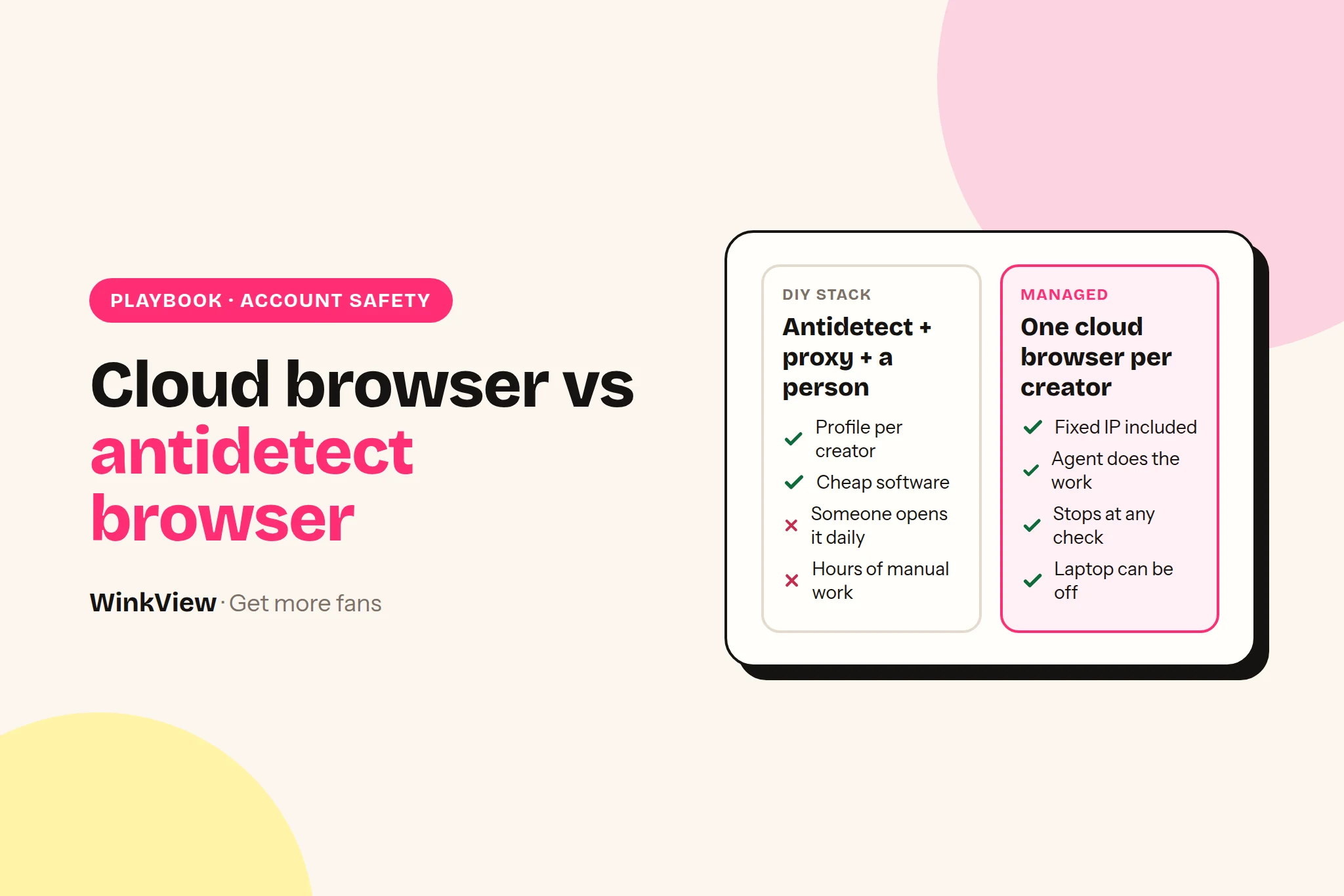
    Cloud browser profiles Multilogin cloud profiles, GoLogin cloud launch Keeps each login in a server-hosted profile on a fixed IP; the work is still done by people Web use of Instagram; staff logging in outside the profile Teams working from several laptops or countries
    Official API only WinkView for editing and posting; Inrō for DMs; Buffer, Later or Metricool for posting Posting, comment-to-DM, DM replies. No follows or likes Lowest of all; growth is slower without follows Risk-averse agencies and creators with existing audiences

    1. Manual phones (a DIY phone farm)

    Used phones, one SIM or eSIM each, one creator per phone, and an assistant doing the posting, replies and follows by hand. The cost is time; the hidden risk is several people logging in from several places.

    2. Phone farm software: ShadowPhone and Onimator

    ShadowPhone is worth describing precisely. Its site says it does not supply phones. You connect your own Android phones over USB to its Windows or macOS desktop app, and its supported full-isolation setup uses a compatible Google Pixel running GrapheneOS, whose profiles keep app data apart. The software then runs Instagram workflows in the native app, at a pace you configure, from one desktop console. It is Instagram only. Starter is $97 a month (1 phone connection, 5 device profiles, 25 Instagram accounts), Growth $247 (5 phones, 15 profiles, 75 accounts), Agency $497 (10 phones, 100 profiles, 500 accounts). Yearly billing lowers those to $77, $197 and $397 a month. It is prepaid, with a 7-day trial without a card and a 14-day money-back guarantee.

    Onimator runs on a Windows PC and drives Android 11+ “real phones, cloud phones or emulators” across Instagram, TikTok, Threads, Reddit, Snapchat, Tinder and Bumble, with unlimited accounts. It costs $45 a month for 3 devices up to $650 for 100 ($6.50 each), and its guide says “every account needs its own proxy”. Full comparison in WinkView vs Onimator.

    3. Hosted cloud phones: DeviceFarm and GeeLark

    DeviceFarm hosts “physical Android devices (Android 10-15) in our datacenter” streamed to your browser. It lists 20 phones for $39.99 a month, 50 for $49.99 and 100 for $59.99, and says “we recommend one Instagram account per phone”. Proxies are not bundled: you attach your own residential or mobile proxy (SOCKS5, HTTP or HTTPS) to each phone. It also lists scheduling, warm-up and engagement automation.

    GeeLark rents cloud Android phones with automation templates. Its pricing page did not render for us; a GoLogin review (a competitor) dated 24 September 2026 lists Base at $13 a month with 20 profiles and 60 minutes, extra minutes at 0.7 cents with a $1 daily cap per phone, or monthly rental at $24.90 per phone, and “No Built-in Proxies”. Treat those as unconfirmed.

    4 and 5. Emulators and multi-profile browsers

    Onimator’s guide lists emulators as “Free”; you need a strong PC and software to drive them. Real-phone vendors say emulators are the easiest to spot, and Conbersa calls PC emulators “heavily detected”, but we found no platform data on it. GoLogin, AdsPower and Multilogin keep each account in its own desktop browser profile with its own cookies and a proxy you buy. GoLogin is free for 3 profiles, paid from $9 a month; AdsPower is free for 2. They separate logins but do not post, reply or follow unless you build that. Which proxy to put behind each profile is covered in proxies for OnlyFans Instagram accounts.

    6. Cloud browser profiles: Multilogin and GoLogin in the cloud

    Same idea as a multi-profile browser, but the profile runs on the vendor’s server instead of your laptop. Multilogin supports cloud profiles on paid plans. GoLogin’s Professional plan allows 1 cloud launch at a time (Business 2, Enterprise 3). Each creator gets her own profile, with her own cookies and logins, on a fixed residential or ISP IP in her country, and anyone on your team opens the same profile instead of logging in from their own device. More in cloud browser for Instagram agencies.

    It does not post, reply or follow by itself, and someone still clears every Instagram check. It removes the hardware, not the work.

    7. Official API only: Inrō and schedulers

    Instagram, Facebook, TikTok and YouTube let approved tools post through official connections, and Meta lets approved tools handle Instagram messages. WinkView edits a creator’s raw phone clips into ready-to-post vertical videos and, once the manager approves them, posts them to Instagram Reels, Trial Reels and Stories, TikTok, YouTube Shorts, Facebook Reels, Threads and X through official connections, from €39 per creator a month. Inrō uses the official Meta API for Instagram DM automation: free for 100 active contacts a month, Pro from €12.99 a month. Buffer posts to Instagram (Business and Creator accounts), TikTok, YouTube Shorts, Facebook and Threads from $6 per channel a month billed monthly, or $5 billed yearly. Lowest risk, but no follows or likes, so a new account grows from content alone.

    What Instagram sees from each setup

    None of these is approved by Instagram for automated engagement. So the honest comparison is which signals each setup sends and what it does to keep them normal. Here are the three setups agencies compare most often.

    Question DIY phone farm ShadowPhone Cloud browser profile
    Device A real phone running the official app A real Pixel running the official app on GrapheneOS One isolated browser profile per creator, on a server
    Network The SIM’s mobile network, in the country where the SIM is from Not stated on their site; depends on the connection you give each phone The static residential IP you attach, ideally in the creator’s country, the same every day
    Who acts A person on your team The software, at a pace your operator sets A person on your team, inside the profile
    When Instagram asks for a check Whoever holds the phone deals with it Their FAQ tells operators to respond to account health signals Whoever opens the profile next clears it

    Two points owners often miss. First, a phone’s IP comes from its SIM. A phone farm in your office on local SIMs makes a creator who lives in Texas look like she lives in your city. That is fine if she really does, and a mismatch worth thinking about if she does not. Second, a real device is not the same as a normal pattern. ShadowPhone says it plainly: real-device execution reduces the signals linked to APIs, emulators and browser fingerprints, but “No tool can guarantee that an account will avoid restrictions or bans”. The same is true of every option here. Whichever you pick, the warm-up schedule and first-hour recovery steps in how to run multiple Instagram accounts for OnlyFans still apply.

    Be sceptical of detection claims. Most pages ranking for this topic come from phone-farm and cloud-phone vendors, each concluding its own category is safest, and none publishes platform data. Treat any vendor’s claims, ours included, as opinion.

    For posting, the risk picture is different. Publishing through the Instagram Content Publishing API is the route Meta built for scheduling tools. It needs a professional (creator or business) account and allows up to 100 API-published posts per account in a rolling 24 hours (checked 30 September 2026), far more than any creator needs. The connect screens are Meta’s own, which matters because the Meta Platform Terms forbid apps from separately collecting a user’s Meta login credentials. For posting, the creator approves access on Meta’s own screen, so no password changes hands.

    Platform rules

    Instagram’s Terms of Use say “You can’t attempt to create accounts or access or collect information in unauthorized ways. This includes creating accounts or collecting information in an automated way without our express permission.” They also say you can’t “buy, sell, or transfer any aspect of your account”, which matters if your farm buys aged accounts. Whatever you pick: one steady login location per account, low limits on new accounts, stop at every check, and nothing explicit in public posts or DMs.

    Phone farm vs cloud browser: what it costs

    Two views: cash out in year one, and the monthly total once staff time counts. Every input is a checked price or a labelled assumption.

    Year-one cash for 10 creators

    Inputs and assumptions

    • Phone (example price): a used, unlocked Google Pixel 7a, supported by GrapheneOS until May 2028 per the GrapheneOS FAQ. Lowest unlocked listing on Swappa on 28 September 2026: $206, an example, not a quote.
    • SIM (example price): Mint Mobile US, $15 a month on the 12-month term paid upfront ($180 per line), a new-customer offer.
    • ShadowPhone: monthly prepaid prices, Growth $247 and Agency $497.
    • Cloud browser profiles: Multilogin Pro 10, $11 a month (cloud profiles on paid plans), plus one IPRoyal static residential IP per creator at its “from” price of $2.70 per 30 days.
    • Not included: staff time (next table), chargers, hubs, the computer, tax. Currencies not converted.
    Option (10 creators) Upfront Monthly First 12 months
    DIY phone farm: 10 phones, 10 SIMs 10 x $206 = $2,060 phones + 10 x $180 SIM terms = $3,860 $0 software (SIMs prepaid) $3,860 plus staff time
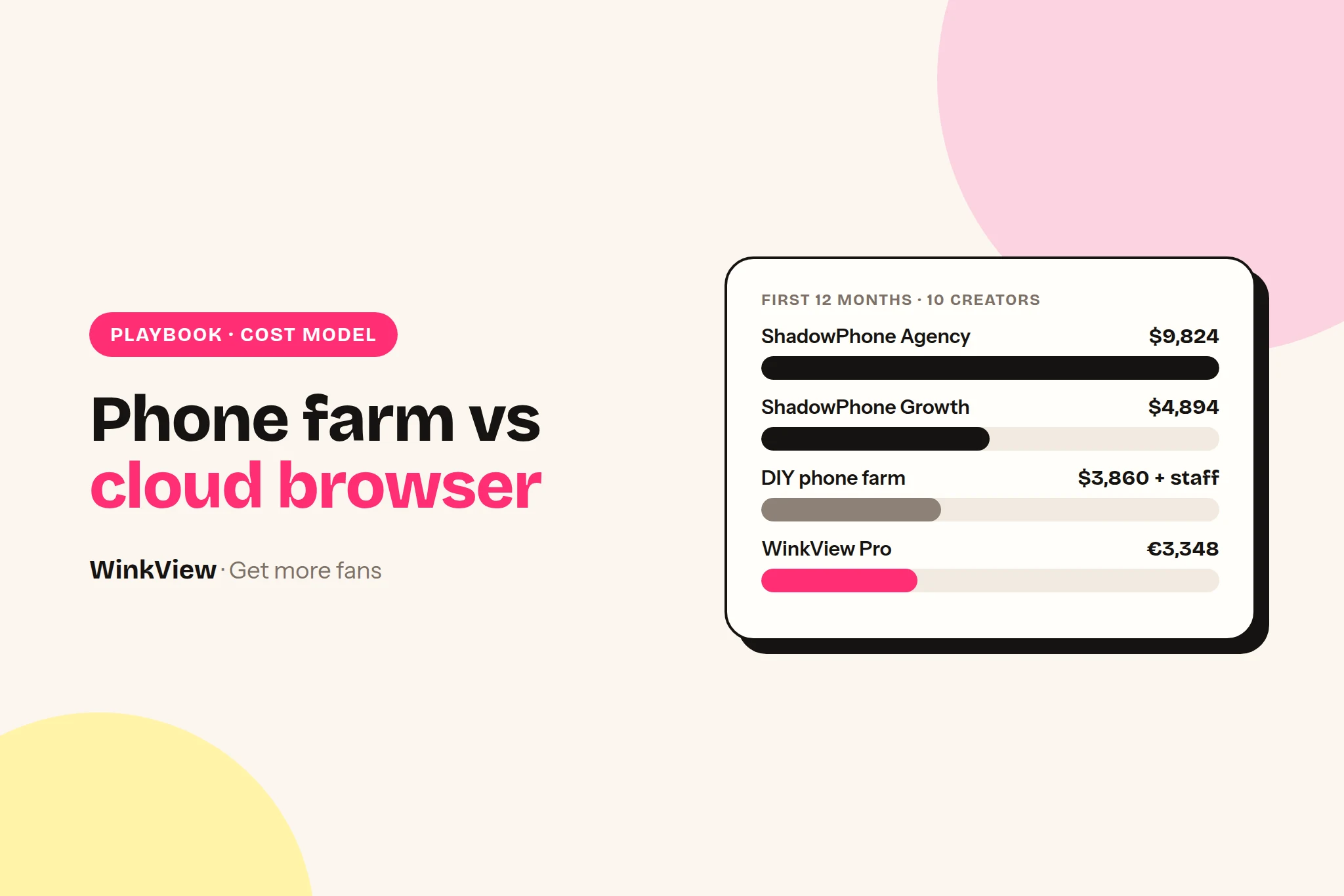
    ShadowPhone Agency: 10 phones, 10 SIMs $2,060 phones + $1,800 SIM terms = $3,860 $497 $3,860 + 12 x $497 = $9,824
    ShadowPhone Growth: 5 phones shared by 2 creators each, 5 SIMs 5 x $206 = $1,030 + 5 x $180 = $900, total $1,930 $247 $1,930 + 12 x $247 = $4,894
    Cloud browser profiles: Multilogin Pro 10 + 10 static IPs $0 $11 + $27 = $38 12 x $38 = $456 plus staff time

    Per creator per month, ignoring hardware: $15 for the DIY farm’s SIM, $49.70 plus SIM for ShadowPhone Agency, $3.80 for a cloud browser profile and its IP. The ShadowPhone Growth row puts two creators on one phone and one SIM, so they share a network identity, which undoes much of the reason to buy phones. And the DIY farm and the cloud browser profiles look cheapest only because a person is doing the work, which is what the next table prices in.

    Monthly total for 3, 6 and 10 creators, staff time included

    Worked example

    Assumptions (ours, labelled, change them): each creator has Instagram and TikTok and wants five platforms covered. Staff at €8 an hour. By hand, posting and engagement take 1.5 hours each per creator per day (30.4 days a month). Every automated option carries the same review time: 10 minutes per creator per day, 5.07 hours a month. Where a tool does not post to a platform, Buffer fills the gap at its monthly rates: $6 per channel up to 10 channels, $4 from 11 to 25, $3 from 26 to 50. Proxies: IPRoyal ISP “from” $2.70 per account a month where you need your own. Used Android phone €100, used Pixel €200, mini PC plus hub €290, all over 24 months; SIM data €10 a month. One phone per creator on owned devices, as the checklist below recommends. Upkeep: 40 minutes per owned device per week, 20 per rented cloud phone. Upload and Buffer scheduling time are left out, which flatters the Buffer rows. $1 = €0.8807 (ECB rate 1.1355, 29 September 2026).

    • Manual: phones n x €100 / 24 + SIMs n x €10; hours n x 3 x 30.4.
    • Onimator: licence ($45, $90, $180) + phones + €290 / 24 + 2n proxies + Buffer 3 channels per creator; upkeep n x 40 min x 52 / 12.
    • ShadowPhone: one Pixel with a SIM per creator, so Growth ($247) for 3 creators and Agency ($497) for 6 and 10; €290 / 24 for the computer and hub; Buffer 4 channels per creator (it is Instagram only).
    • DeviceFarm: 20 phones for $39.99 covers 2 phones per creator at all three sizes (one account per phone, as it recommends) + 2n proxies + Buffer 4 channels per creator.
    • GeeLark: $13 base + n x $24.90 rental + 2n proxies + Buffer 4 channels per creator.
    • Multi-profile browser: GoLogin $9 + 2n proxies + Buffer 5 channels; engagement by hand, 1.5 h a day per creator.
    • Inrō + Buffer: n x €12.99 + Buffer 5 channels; half the engagement time remains (no follows or likes), 0.75 h a day.
    Monthly: cash € / staff hours / total € at €8 an hour 3 creators 6 creators 10 creators
    Manual phones 43 / 274 h / 2,231 85 / 547 h / 4,463 142 / 912 h / 7,438
    Onimator phone farm 126 / 23.9 h / 317 226 / 47.7 h / 608 379 / 79.6 h / 1,015
    ShadowPhone, one Pixel per creator 345 / 23.9 h / 536 662 / 47.7 h / 1,044 778 / 79.6 h / 1,415
    DeviceFarm cloud phones (+ your proxies) 109 / 23.9 h / 300 166 / 47.7 h / 548 228 / 79.6 h / 865
    GeeLark cloud phones (unconfirmed prices) 151 / 19.5 h / 308 274 / 39.1 h / 586 424 / 65.1 h / 944
    Multi-profile browser + Buffer 93 / 152 h / 1,309 155 / 304 h / 2,587 227 / 507 h / 4,281
    Inrō + Buffer 109 / 84 h / 778 197 / 167 h / 1,534 302 / 279 h / 2,531

    Example, 6 creators on DeviceFarm: $39.99 for 20 phones, plus Buffer for 24 channels (10 x $6 + 14 x $4 = $116), plus 12 proxies at $2.70 ($32.40): $188.39 = €165.91 cash. Staff time: upkeep 12 phones x 20 min x 52 / 12 = 17.3 hours, plus review 6 x 5.07 = 30.4 hours, so 47.7 hours x €8 = €381.87. Total €547.78.

    What the numbers say. In cash, manual phones are cheapest, then a multi-profile browser with Buffer, because both leave the work to people. Cloud browser profiles land in that same row: cheap software, the same hours by hand. Among the automated options, DeviceFarm is cheapest in cash at every size (€109, €166, €228), and it keeps the lowest total once staff time counts, then GeeLark and Onimator. Device upkeep is a large share of every device row: if your team spends no time on phone upkeep, DeviceFarm’s 6-creator total drops to about €409. ShadowPhone is the most expensive here because one Pixel per creator pushes 6 creators onto the Agency plan; sharing Pixels through its device profiles cuts that to roughly €658 at 6 creators, at the price of several creators on one SIM. Change the hourly rate or upkeep minutes and the order among automated options can change; the gap to manual work does not. Manual at 10 creators is 912 hours a month, about 5.7 full-time people.

    Total monthly cost, 6 creators, cash plus staff time€, automated options only, same daily review time for every tool, from the worked example
    DeviceFarm + proxies + Buffer€548
    GeeLark + proxies + Buffer€586
    Onimator + phones + Buffer€608
    ShadowPhone + Pixels + Buffer€1,044

    Source: vendor pricing pages checked on 29 and 30 September 2026 (GeeLark via a GoLogin review of 24 September 2026); hardware, time and hourly rate are our labelled assumptions.

    At farm scale the picture flips, and this is the real case for a phone farm. 100 accounts on Onimator’s 100-device plan is $650 a month, about €5.72 per device. On DeviceFarm, 100 phones is $59.99, plus a proxy for each. ShadowPhone Agency covers 500 Instagram accounts for $497. Per-creator tools are the wrong product for 100 or 500 accounts. If that is your model, pick a phone farm or cloud phones. If you are comparing posting tools on their own, see our auto-posting tools comparison.

    Maintenance, operators and scaling from 5 to 50 accounts

    Staff time on a DIY farm. Two 15-minute Instagram sessions a day per account is 10 x 2 x 15 = 300 minutes, 5 hours a day for 10 creators, weekends included. Covering five platforms properly, our model uses 3 hours per creator per day. Either way the work scales one to one with accounts.

    Maintenance on any phone setup. OS and Instagram app updates that log accounts out, batteries that swell on permanent charge, prepaid SIMs that expire, phones that drop off USB overnight. With ShadowPhone the software does the tapping, but someone still owns the phones, the GrapheneOS installs and the computer they are plugged into. Cloud phones remove the hardware, but someone still builds and watches the routines and buys the proxies.

    Maintenance on cloud browser profiles. There is no device to update or charge. Your team logs each creator in once inside her profile, then deals with the exceptions: an Instagram check, a creator who changed her password, a proxy that needs renewing. Posting through official connections takes one more reason to log in off the list.

    At 5 accounts

    • DIY farm: 5 phones, one person
    • ShadowPhone: Growth covers 5 phone connections
    • Cloud browser profiles: Multilogin Pro 10 covers 10 profiles, plus 5 static IPs

    At 50 accounts

    • DIY farm: 50 phones and SIMs, shelving, several staff
    • ShadowPhone: Agency allows 10 phone connections and 500 accounts, so several accounts per phone or more than one plan (how they price that is not stated)
    • Cloud phones: DeviceFarm’s 50-phone tier, plus 50 proxies
    • Cloud browser profiles: 50 profiles (Multilogin Pro 50, $29), plus 50 static IPs and the people to work them

    Running a mix, and moving between setups

    Many agencies end up with main accounts in cloud browser profiles and a phone farm or cloud phones for promo accounts, Reddit or Snapchat. Three rules:

    1. One engagement system per account. Never let a phone farm and a person in a browser profile both follow and like on the same Instagram account.
    2. One login location per account. When you move an account, stop the old tool’s jobs and log it out first. Expect one login check afterwards and answer it by hand.
    3. One tracking link per platform per creator, so you can tell which setup brought subscribers. Our guide to managing social media for multiple models covers the tracker, naming and ownership rules.

    Which to choose: the decision rule

    Two filters first. If you will not accept any risk from engagement automation, stop here: use official-API tools only, a scheduler for posting and Inrō for DMs. If you need Reddit, Snapchat or dating apps automated, Onimator covers those accounts; decide Instagram separately. Then answer three questions in order and stop at the first yes.

    1. Do you run more than three Instagram accounts per creator, or create and warm accounts? Then price real-device software like ShadowPhone or Onimator first, or cloud phones such as DeviceFarm if nobody wants to own hardware. Per-creator tools are not built for that.
    2. Does your content plan depend on app-only features, or do chatters work the Instagram inbox live all day? Then you need phones. Keep a DIY farm small, one phone per creator, and follow the checklist below.
    3. Is it one main account per creator, with creators in different countries or time zones, and your team works from several laptops? Then give each creator a cloud browser profile on an IP in her country, and take posting out of it with an official-API tool.

    Where phones win

    • App-only features. Going live, for example, needs a phone in someone’s hand.
    • Live chatting. If chatters work the Instagram inbox all day, a phone per creator on the desk is a natural workstation.
    • Many accounts per creator. ShadowPhone’s plans are sized at 25, 75 and 500 Instagram accounts, built for agencies running backup and niche pages.
    • The creator runs her own phone. If she posts and replies herself, a second device adds nothing.

    Cloud browser profiles win on creators in several countries, logins that do not depend on one laptop, no hardware and a clear per-profile bill. Posting is better handled outside both: through official connections, so nobody logs in just to upload a Reel. The Instagram automation guide covers what is allowed on Instagram and what is not. Mixed setups work too: a browser profile for DMs and checks, an official-API tool for posting, plus one phone per creator kept for going live.

    Worked example (illustrative)

    “Quayside Management” is a fictional agency in Split with 10 creators, one Instagram account each: four in the US, three in the UK, three in Germany.

    • DIY farm: local SIMs put every creator on a Croatian mobile IP; matching her country means US, UK and German SIMs on roaming terms. At 5 hours a day it also needs most of one full-time person, seven days a week.
    • ShadowPhone Agency: removes the tapping, but the SIM question stays, plus $497 a month and an office computer running 10 phones.
    • Cloud browser profiles plus WinkView: one profile per creator on a static IP in her country, about $38 a month for all 10. The team works DMs from the profiles in each creator’s daytime. WinkView edits her raw clips and posts them through official connections, so nobody logs in to post.

    Rule applied: one account each, three countries, no live streaming. Question 3 is the first yes. If two creators start going live weekly, Quayside adds one phone each for that alone.

    Phone farm hygiene checklist

    If you go the phone route, pin this next to the shelf. It works for a DIY farm and for phones running automation software.

    Copy this checklist

    PHONE FARM HYGIENE CHECKLIST
    
    SETUP (once per phone)
    [ ] One phone = one creator. Never log two creators into one device.
    [ ] One SIM or eSIM per phone, from the creator's country where possible.
    [ ] Label phone, SIM and charger with the same ID (e.g. P07 / creator name).
    [ ] Record in the device sheet: ID, model, OS version, SIM number,
        SIM term end date, creator, Instagram handle, operator.
    [ ] Phone time zone and region set automatically from the network.
    [ ] Use mobile data only. No VPN or proxy on top of the SIM.
    [ ] Screen lock on. Only named staff know the code.
    [ ] Two-factor login with an authenticator app, not SMS alone.
        Backup codes stored in your password manager, one entry per creator.
    [ ] Creator's email and phone on the account are hers, and she can
        still get codes if the phone is lost.
    
    DAILY
    [ ] All phones on, charged, connected. Note any that dropped off.
    [ ] Check each account for "Was this you?" or security prompts.
        Answer them from the same phone, never from another device.
    [ ] Stay inside your own daily action limits. Lower them after any check.
    [ ] Log out nothing. Do not "just check" the account from a laptop.
    
    WEEKLY
    [ ] Install OS security updates in one batch, one phone first as a test.
    [ ] Update the Instagram app on one phone, confirm login and posting
        still work, then roll out to the rest.
    [ ] Look at every battery: swelling, heat, charge that will not hold.
        Replace, do not keep using.
    [ ] Check SIM term end dates. Renew 2 weeks before expiry.
    
    PHYSICAL SAFETY
    [ ] Phones charge on an open shelf with airflow, not in a closed drawer.
    [ ] Use certified chargers and powered USB hubs sized for the load.
    [ ] Phones never leave the office without a sign-out entry.
    
    WHEN A CREATOR LEAVES
    [ ] Hand over the account: her email, her phone number, new password,
        2FA moved to her device, backup codes given to her.
    [ ] Log out, factory reset the phone, cancel or reassign the SIM.
    [ ] Update the device sheet. Wait before reusing the phone for another
        creator, and never reuse the SIM number.

    Test it yourself before you commit

    Every vendor, us included, says its setup is safest. Run two options side by side for 14 days on 2 or 3 similar creators each and trust your own numbers.

    1Count accounts
    2List platforms
    3Set your risk line
    4Pick who runs it
    5Trial two options

    Copy this template

    SETUP COMPARISON: 14-DAY TEST
    Option A: ____________   Option B: ____________
    Creators per option (2 to 3, similar size): ____________
    
    ONE-OFF
    - Upfront cash (phones, Pixels, PC, hubs): A ____  B ____
    - Hours to first automated action:           A ____  B ____
    
    MONTHLY CASH
    - Licences / rental / plan:                  A ____  B ____
    - Proxies or SIMs:                           A ____  B ____
    - Schedulers for missing platforms:          A ____  B ____
    
    DAILY LOG (per creator)
    Date | Posts planned | Published | Failed | Login checks | Action blocks | Staff minutes
    
    END OF TEST (per creator)
    - Average views per post:                    A ____  B ____
    - Followers gained:                          A ____  B ____
    - Link clicks / tracked subscribers:         A ____  B ____
    - Warnings or removals:                      A ____  B ____
    
    TOTAL MONTHLY COST = cash + (staff hours x hourly rate)
    COST PER TRACKED SUBSCRIBER = total monthly cost / tracked subscribers
    Decision: ____________

    Testing an official-API tool for the posting side? WinkView’s 7-day free trial fits this test window.

    Who runs it

    WinkView edits and posts the videos for agencies such as Nyvia, at about €30,000 a month, and Estrella, at about €40,000 a month, as well as the agency behind our 440,000-view case study.

    Frequently asked questions

    Is a phone farm safer for Instagram than a cloud browser?

    Neither is approved by Instagram for automated engagement, so neither is safe in the sense of risk-free. A phone runs the real app on a real device, which removes emulator and browser signals. A well-run cloud browser keeps one creator on one isolated profile and one fixed IP in her country every day. In both cases pace, limits and how you respond to security checks matter more than the hardware, and no vendor publishes platform data proving otherwise.

    Does ShadowPhone include the phones?

    No. ShadowPhone’s site says it does not supply phones. You connect your own Android phones over USB to its Windows or macOS app, and its full-isolation setup uses a compatible Google Pixel running GrapheneOS. Plans start at $97 a month for one phone connection and 25 Instagram accounts. It offers a 7-day free trial with no card required and a 14-day money-back guarantee. Budget for the Pixels, a SIM or connection for each, and the computer they plug into.

    What is the difference between a phone farm and a cloud phone?

    A phone farm is physical Android phones you own, connected to a computer that runs automation software, with proxies or SIM cards for each. A cloud phone is an Android device, physical or virtual, hosted in someone else’s datacentre and streamed to your browser, rented by the month or minute. DeviceFarm hosts physical phones; GeeLark rents cloud phones. Cloud phones remove the hardware work, but you still buy proxies and build and watch the automation.

    Are emulators safe for Instagram accounts?

    Nobody outside Instagram can say for sure. Vendors of real phones and cloud phones argue emulators are easier to detect, and Conbersa calls PC emulators “heavily detected”, but none of them publishes platform data proving it. Emulators are free, so they are common for testing and low-value accounts. For a creator’s main account, most agencies prefer one steady login location, low activity limits and posting through official connections, whatever the device.

    Is WinkView a phone farm or an antidetect browser?

    Neither. WinkView is AI video editing and reposting software for OnlyFans, Fansly and Fanvue agencies. The AI Video Editor turns a creator’s raw phone clips into ready-to-post vertical videos, and Reposting posts the approved ones to Instagram, TikTok, YouTube Shorts, Facebook Reels, Threads and X through official platform connections. It does not create accounts, sell browsers, proxies or IPs, or run on phones.

    What is the lowest-risk way to run many creator accounts?

    Use only official connections: a scheduler such as Buffer, Later or Metricool for posting and an official-API DM tool such as Inrō for replies and comment-to-DM links. Give each account one steady login location, keep a named person responsible for each creator, and keep all public posts and DMs safe for work. The trade-off is slower growth, because official APIs do not allow follows or likes. Anything that automates engagement adds some risk.
  • How OFM agencies run 10+ Instagram accounts without losing them

    How OFM agencies run 10+ Instagram accounts without losing them

    To run multiple Instagram accounts as an OnlyFans agency without getting models banned, do three things: keep every public post and bio inside Instagram’s written rules, give each creator her own IP, browser profile and phone number, and warm new accounts up slowly instead of switching everything on at once. This page covers the rules, the risk factors, a 4-week warm-up schedule and what to do in the first hour after a restriction.

    The short answer

    • A “shadowban” is usually Instagram’s Recommendation Guidelines at work: her content still reaches followers but is not shown to non-followers. Check it in Account Status.
    • Disabled accounts mostly come from content (nudity, sexual solicitation, links in the bio) or from spam signals: very high action frequency, repetitive posts, automation.
    • Isolate every creator: one creator, one IP, one browser profile, one phone number. Never let one phone or one VA laptop log into several creators.
    • Warm up new or recovered accounts over 4 weeks with low daily action counts. Instagram publishes no official limits, so treat any number as a cautious guess.
    • No tool, including ours, can guarantee an account will not be restricted.

    Disclosure

    We make WinkView, AI video editing and reposting software for creator agencies. Everything about Instagram’s rules on this page is taken from Instagram’s and Meta’s own published pages, linked where they are quoted. Tool prices checked 28 September 2026.

    What actually gets OnlyFans creator accounts restricted on Instagram

    Instagram does not publish a list of “things that get OnlyFans models banned”. It publishes four documents that, together, explain almost every case agencies describe.

    1. The Community Standards (content that gets removed). Instagram’s Community Guidelines now point to Meta’s Community Standards, which cover Facebook, Instagram, Messenger and Threads. Two policies matter most for creators:

    • Adult nudity and sexual activity: removes imagery with visible genitalia, visible female nipples (with narrow exceptions) and close-ups of buttocks, among others.
    • Adult sexual solicitation: removes content that offers sex chats or nude imagery, and content that “asks for, offers or provides methods of contact to acquire pornographic material, or contains usernames or links to pornographic websites”. Mentioning availability, a price or “any signal of a transaction” alongside suggestive content also counts.

    That second policy is why the bio, the captions and the link matter as much as the photos. A safe photo with a caption that names a price or a paid-platform username can break it.

    2. The Spam policy (behaviour that gets restricted). Meta’s Spam policy does not allow “posting, sharing, engaging with content or creating accounts … either manually or automatically, at very high frequencies”. It adds that Meta “may place restrictions on accounts that are acting at lower frequencies when other indicators of spam (e.g. posting repetitive content) or signals of inauthenticity are present”. It also bans buying, selling or exchanging accounts and buying engagement such as likes, follows or views.

    3. The Terms of Use (automation and accounts). Instagram’s Terms of Use say you can’t create accounts or access or collect information “in an automated way without our express permission”. The same Terms say you can’t use Instagram if Instagram previously disabled your account for breaking the law or its policies. So opening a replacement account for a disabled creator is itself against the Terms.

    4. The Recommendation Guidelines (the real “shadowban”). Instagram’s Recommendations on Instagram page explains that it holds content shown to non-followers to a higher standard than the Community Standards. Content can stay up and still not be recommended in Explore, Reels or Feed suggestions. For creators, the lines that bite are:

    • “Content that may be sexually explicit or suggestive, such as pictures of people in see-through clothing.”
    • “Unoriginal content that is largely repurposed from another source with only minor, immaterial edits”.
    • “Long captions unrelated to the underlying content and coordinated comment networks intended to artificially drive engagement and distribution.”
    • At account level, Instagram tries not to recommend accounts that recently broke the Community Guidelines, that repeatedly or recently put non-recommendable content in the username, profile photo or bio, or that “repeatedly engaged in misleading practices to build followings, such as purchasing ‘likes’”.

    Read that list as an agency. Posting the same clip with the same caption on five creators’ accounts looks like unoriginal, repetitive content. Having your creators comment on each other’s Reels on a schedule looks like a coordinated comment network. A suggestive profile photo can make the whole account non-recommendable, not just one post.

    How to check if an Instagram account is shadowbanned: Account Status

    You do not need a third-party “shadowban checker”. Instagram shows it directly. According to Instagram’s Account Status announcement, you reach it through Settings, then Account, then Account Status. The menu has moved over the years, so if you cannot find it, type “Account Status” into the settings search.

    Account Status shows:

    • Whether the account is at risk of being disabled.
    • Whether her content may be recommended to non-followers in Explore, Reels, Feed recommendations, Search and Suggested Accounts.
    • Examples of posts or profile elements that break the Recommendation Guidelines.
    • Content removed under the Community Guidelines.

    If you think Instagram got it wrong, you can tap “Request a Review” from the same screen. Instagram’s creator guidance on reach says you can then fix the problem “by editing or deleting content”.

    Make checking Account Status part of your weekly routine for every creator, not something you open after reach drops. A single flagged profile photo or bio line can hold back every Reel she posts.

    Operational risk factors when you run multiple Instagram accounts

    Content rules explain removals. Operations explain why accounts get checkpoints, action blocks and disables even when the content is clean. Instagram does not publish how it detects spam or inauthentic behaviour, so the list below is a set of risk factors that match its published rules, not proven triggers or measured rates.

    Risk factor Why it looks wrong Do this instead
    Shared or jumping IPs (VA on a VPN, office Wi-Fi for every creator, rotating proxies) One network used by many unrelated accounts, or one account appearing from new countries daily, looks like an account farm or a takeover One fixed IP per creator, in her own country, used every day
    Many devices per login (creator, manager and two VAs all logged in) A private person rarely logs in from four devices in a week One device or browser profile works her account; others use it, not their own
    One phone logged into several creators Links unrelated accounts to one device; if one is disabled, the others sit next to it No shared phones. One creator per phone or per browser profile
    Action bursts on new accounts Meta’s Spam policy names “very high frequencies” of posting and engaging Warm up over 4 weeks; spread actions across the day
    Identical captions and clips across accounts “Repetitive content” and “unoriginal content” are both named in Meta’s rules A fresh caption per creator and platform; no reused watermarked clips
    Paid-platform link, username or prices in the bio The solicitation policy names usernames and links to pornographic websites and “any signal of a transaction” A safe-for-work link page; no prices or explicit words on Instagram

    On links: we cannot tell you how Meta classifies any particular paid platform or link page, and it does not say. What you control is the profile itself. Keep the bio, captions, highlights and pinned comments free of the patterns the solicitation policy lists, and send people to a neutral link page. The guide to promoting OnlyFans on Instagram covers profile set-up, the link page and Reels strategy in detail; this page stays on account safety.

    The per-creator isolation rule set

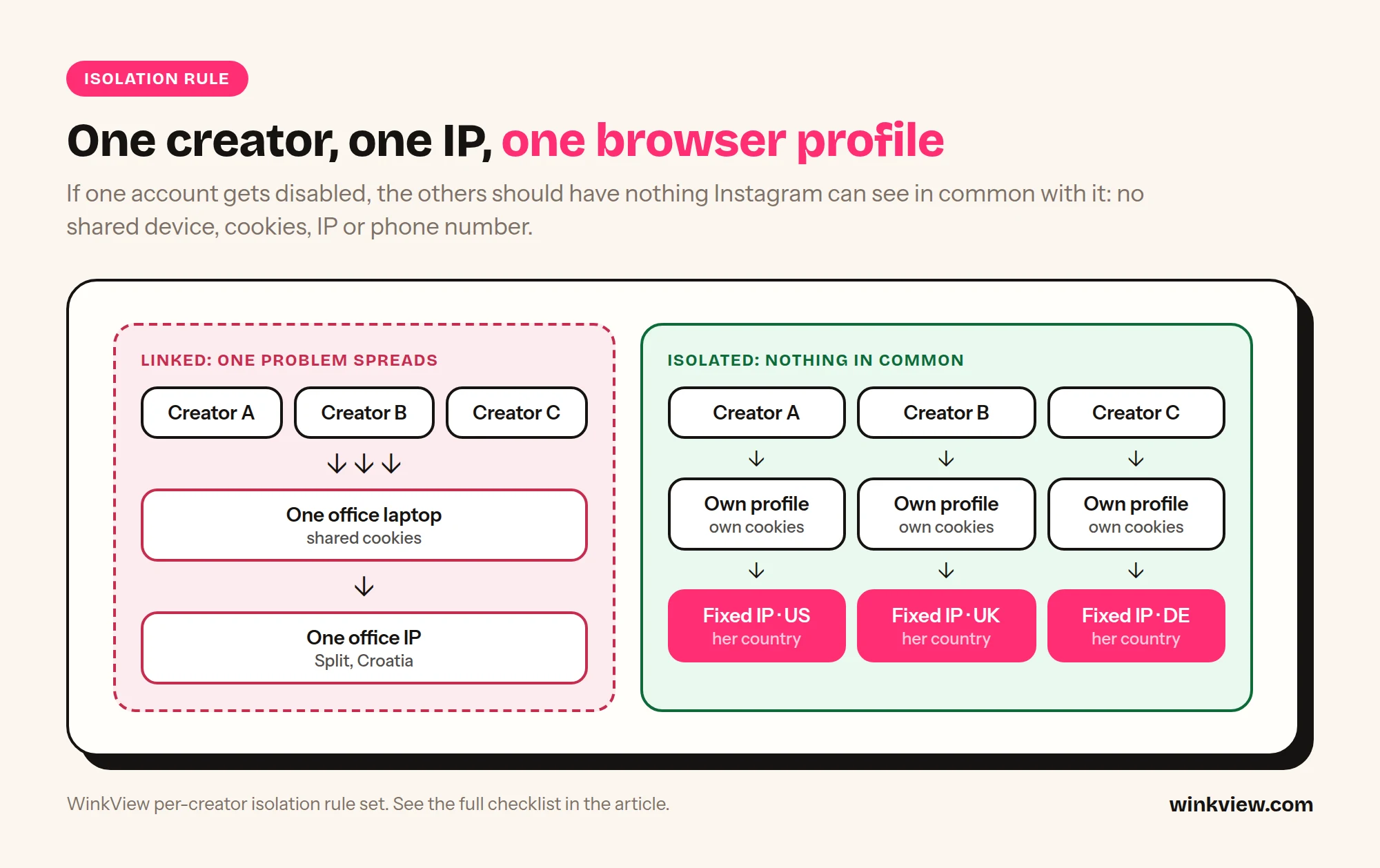
    If you remember one rule: one creator, one IP, one browser profile, one phone number. The goal is that nothing ties creator A to creator B except that both follow ordinary accounts in the same niche. If one account gets disabled, the others should have nothing in common with it that Instagram can see.

    Diagram comparing three creators on one shared laptop and office IP with three creators each on their own browser profile and fixed IP in her country
    Shared device and IP links accounts together. One profile and one fixed IP per creator keeps them apart.

    Copy this rule set

    PER-CREATOR ISOLATION RULES
    Creator: [name]   Instagram: [@handle]   Country: [country]
    
    1. ONE IP
       - A fixed residential or mobile IP in her country.
       - Same IP every session. No VPN hopping, no rotating proxies.
       - Never shared with another creator.
    
    2. ONE BROWSER PROFILE (or one phone)
       - Her own browser profile with its own cookies and logins.
       - Nobody logs into her Instagram from their personal phone.
       - No other creator is ever logged in on this profile or phone.
    
    3. ONE PHONE NUMBER AND ONE EMAIL
       - A number and email used only for her account.
       - Two-factor on. Codes go to one place the agency controls.
    
    4. ONE WORKING LOCATION FOR THE LOGIN
       - Team members work her account through that profile only.
       - If she also uses the app herself, agree who does what.
    
    5. NOTHING SHARED IN PUBLIC
       - No identical captions across creators.
       - Creators do not comment on each other on a schedule.
       - Each creator has her own link page, never a shared one.
    
    6. LOG IT
       - IP: [ ]  Profile ID: [ ]  Phone: [ ]  Email: [ ]
       - Who has access: [ ]  Last password change: [ ]

    Rule 5 matters more than most owners expect. Recommendation Guidelines name “coordinated comment networks”, and an agency engagement pod is exactly that. If you manage many creators, the guide to managing multiple creators’ social media has an access tracker you can combine with this sheet.

    A 4-week warm-up schedule for a new or recovered account

    Use this for a brand-new account, an account that has been dormant for months, or one that just came back from a restriction. The idea is simple: behave like a new real person for a month, then speed up slowly. Keep the isolation rules from day one; changing IPs mid-warm-up undoes the point.

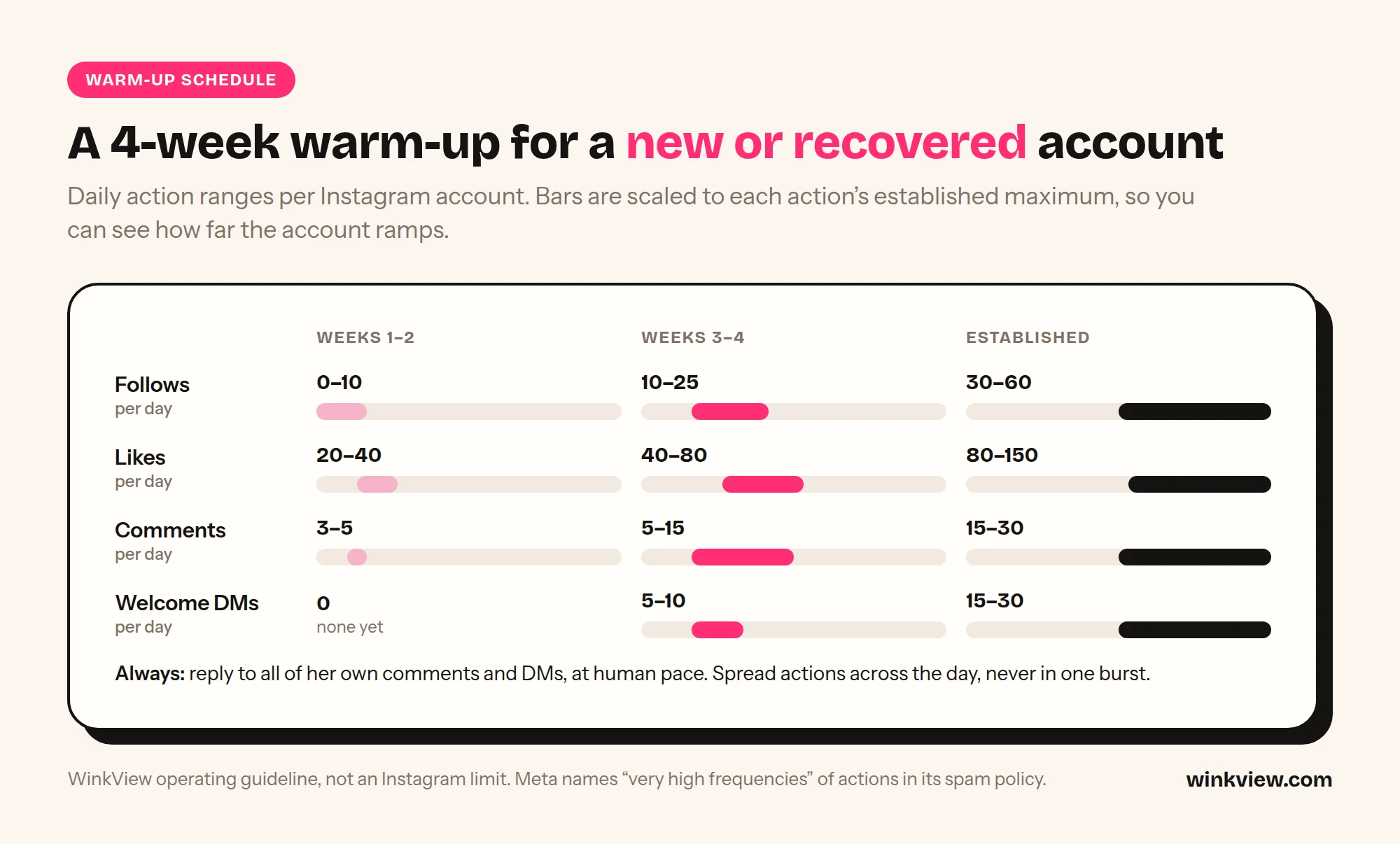
    Chart of daily follows, likes, comments and welcome DMs per Instagram account in weeks 1 to 2, weeks 3 to 4 and once established
    Daily action ranges for a new or recovered account over four weeks.

    Copy this 4-week schedule

    4-WEEK INSTAGRAM WARM-UP
    Creator: [ ]   Start date: [ ]   IP / profile set: [yes / no]
    
    WEEK 1: look like a person
    Post:     Profile photo, safe bio, no link yet. 3 feed posts or Reels
              across the week. 1 to 2 Stories a day from day 3.
    Engage:   By hand only. Scroll the feed and Reels 10 to 15 minutes
              twice a day. Like what she would actually like. Follow a
              handful of large niche and lifestyle accounts.
    Avoid:    Link in bio, DMs to strangers, any tool, following
              fans of other creators, login from a second device.
    
    WEEK 2: start a normal rhythm
    Post:     1 Reel a day or every other day. Daily Stories.
              Add the safe-for-work link page to the bio at the end
              of the week.
    Engage:   By hand or at the lowest tool setting. Reply to every
              comment and DM she receives. A few genuine comments
              on accounts in her niche.
    Avoid:    Mass follows, copy-paste comments, reused captions.
    
    WEEK 3: add outbound engagement
    Post:     1 Reel a day. Daily Stories. Trial Reels if available.
    Engage:   Tool can start following fans of similar creators at
              the low end of the ceiling table. Short welcome DMs
              to people who followed her, not cold DMs.
    Avoid:    Raising all limits at once. Change one thing per week.
    
    WEEK 4: settle
    Post:     Normal schedule.
    Engage:   Raise follows and likes towards the middle of the
              ceiling table if Account Status is clean.
    Check:    Account Status every 2 to 3 days. Any "try again
              later", code request or warning: drop back to week 2
              levels for 7 days.
    
    AFTER WEEK 4
    Raise limits by small steps no more than once a week.
    Review Account Status weekly, forever.

    Daily action ceilings

    Instagram publishes no official daily limits for follows, likes, comments or DMs. The numbers below are cautious operating ranges we suggest for staying well below “very high frequencies”. They are not Instagram’s numbers, not thresholds that are known to be safe, and not a guarantee. Older accounts with steady, real activity usually tolerate more than new ones; recovered accounts should be treated as new.

    Action per day Weeks 1 to 2 Weeks 3 to 4 Established account
    Follows 0 to 10 10 to 25 30 to 60
    Likes 20 to 40 40 to 80 80 to 150
    Comments on others’ posts 3 to 5 5 to 15 15 to 30
    Welcome DMs to new followers 0 5 to 10 15 to 30
    Replies to her own comments and DMs All, at human pace All, at human pace All, at human pace

    Spread each day’s actions over at least two sessions with pauses in between. 40 follows in five minutes is a different signal from 40 follows across a day, even though the total is the same.

    What to do in the first hour after a checkpoint, restriction or disabled account

    The first hour is where agencies turn a warning into a lost account: three people log in from three phones to “check”, a VA retries the blocked action, someone opens a replacement account. Do this instead.

    1. Stop everything on that account. Pause any engagement tool and scheduled activity for her. Tell the team nobody touches the login until you say so.
    2. Name what happened. A code or “confirm it’s you” screen is a checkpoint. “Try again later” is an action block. A reach drop with a note in Account Status is a recommendation restriction. A login screen that says the account is disabled is a disable. They need different responses.
    3. Clear checkpoints from her usual set-up. Complete the code or identity check from the same IP and browser profile or phone she normally uses, not from a VA’s phone in another country.
    4. Write down the last 24 hours. Screenshot the message. Note the time, the device and IP, and every action taken on the account the day before: posts, follows, DMs, logins, tools. You will need this to find the cause.
    5. Open Account Status. See what was removed or flagged. If Instagram got it wrong, tap “Request a Review” (how Account Status works). If it was right, edit or delete the item.
    6. If the account is disabled, follow Instagram’s disabled accounts page: log in and follow the on-screen instructions to ask for a review. If you see no disabled message and cannot log in, it may be a login issue or a takeover; use instagram.com/hacked.
    7. Do not open a replacement account. Instagram’s Terms of Use say you cannot use Instagram if it previously disabled your account for breaking its policies. A new account for the same creator on the same set-up is the fastest way to lose that one too.
    8. Check her neighbours. Did any other creator share a phone, IP, VA laptop or link page with her? Isolate them now, before anything else happens.
    9. Restart at week 2 levels. Once the account works again, run the warm-up from week 2 for at least 7 days before raising anything.

    Worked example (illustrative)

    Example, not a real customer: “Ferngate Talent” runs 8 creators with 2 VAs. Both VAs keep all 8 Instagram logins on their own phones, work from the same office Wi-Fi, and paste the same caption on every creator’s Reel. One creator gets a disable after a caption mentioned her paid page.

    What changes after the first hour: the disabled creator goes to review through the in-app flow; nobody opens a new account. The other 7 creators each get a fixed IP in their own country and one browser profile; the VAs log out of every creator on their phones. Captions are rewritten per creator. The 7 restart at week 2 of the warm-up, and Account Status is checked on Mondays for all of them.

    The point of the example is not the outcome, which nobody can promise, but that one shared set-up had put 8 accounts at risk for one caption.

    What isolation costs per creator

    You can build isolation yourself, and for accounts your team logs into by hand you should. The tools are cheap; the cost is the hours your team spends inside each profile. Here is the tooling floor using two published prices.

    • GoLogin (anti-detect browser profiles): Professional is $9 a month for 10 profiles on monthly billing, or $4.50 a month on annual billing (50% off); larger tiers cover 25 to 100 profiles. A free plan has 3 profiles.
    • IPRoyal static residential proxies: from $2.70 per IP for 30 days. “From” means some countries may cost more.
    Creators DIY tooling floor (monthly)
    1 $9 + 1 x $2.70 = $11.70
    5 $9 + 5 x $2.70 = $22.50 ($4.50 per creator)
    10 $9 + 10 x $2.70 = $36.00 ($3.60 per creator)

    The table assumes the smallest GoLogin Professional tier covers your profile count; check the tier for your number on their page. It excludes phone numbers and SIMs, and it includes no work: someone still has to open each profile, post, reply and clear checks by hand. Multiply your own daily minutes per creator by 30 and by your VA’s hourly cost to get the real number. For AdsPower and Multilogin next to GoLogin, with staff hours costed, see antidetect browsers for OnlyFans agencies; for choosing the IP itself, see which proxy each creator’s Instagram needs.

    Decision rule: if you have 1 or 2 creators and a VA with spare hours, DIY isolation plus manual work is fine. If you have 5 or more creators, or your VAs are the ones sharing phones today, cut the number of logins first: every task that can run through an official connection instead of a browser session is one less chance to break the rule set.

    Fewer logins: take posting out of the browser

    The safest login is the one nobody makes. Posting is the task that pulls most people into a creator’s account every day, and it does not need a browser session at all. WinkView takes it off your team’s plate.

    • Raw clips in, ready-to-post videos out. The AI Video Editor edits each raw phone clip into a vertical video: best moment first, dead air cut, hook text on screen, music.
    • Nothing posts until the manager ticks it, so every clip is checked against the content rules above before it goes out.
    • Posted everywhere, every day. Reposting posts every approved clip to Instagram Reels, Trial Reels and Stories, TikTok, YouTube Shorts, Facebook Reels, Threads and X, spread through the day in her time zone.
    • Official connections only. The creator approves access on each platform’s own connect screen, so no VA phone or laptop needs her login just to post.
    • A caption per platform written in her language, which addresses the identical-captions risk factor on the posting side.

    The honest limits. WinkView does not log in to her account, run engagement or manage IPs and browser profiles, so the isolation rules above still apply to every manual session: DMs, comments and checks. It cannot fix content problems: if her profile photo, bio or Reels break the Community Standards, no tool saves the account. It does not recover disabled accounts.

    For what is and is not allowed when you automate anything on Instagram, read the Instagram automation guide for OnlyFans agencies. For turning followers into paying fans, see how to convert followers into subscribers.

    Frequently asked questions

    Can an OnlyFans model get banned from Instagram just for having OnlyFans?

    Instagram’s rules target content and behaviour, not a creator’s job. What gets accounts removed is nudity, sexual solicitation (including usernames, links or prices that signal a paid transaction) and spam behaviour. Keep everything on Instagram safe-for-work, link to a neutral link page, and check Account Status weekly.

    How do I know if a creator’s Instagram is shadowbanned?

    Open Account Status in her settings. It shows whether her content can be recommended to non-followers in Explore, Reels, Search and Suggested Accounts, and gives examples of what is holding it back. If you think Instagram made a mistake, tap “Request a Review” from the same screen.

    How many Instagram accounts can one phone run safely?

    For agency work, treat the answer as one creator per phone or per browser profile. Instagram publishes no safe number for this. One phone logged into several unrelated creators ties them together, so a problem with one sits next to the others. If you are deciding between phones and browsers, see phone farm vs cloud browser.

    Should we open a new account after a creator is disabled?

    Not while the disable stands. Instagram’s Terms of Use say you cannot use Instagram if it previously disabled your account for breaking its policies. Ask for a review through the in-app flow first, fix the cause, and only then decide with the creator what to do next.

    Does using an engagement tool get accounts banned?

    It can. Instagram’s Terms prohibit automated access without its permission, and Meta’s Spam policy restricts very high frequencies of actions, manual or automated. Isolation, human pace and low starting limits reduce the risk; nothing removes it. Posting through official connections is the route Meta built for tools, so it is not the same risk as automated follows, likes or DMs.

  • Cloud browser for Instagram agencies: one private browser per creator, and what GoLogin, Multilogin and AdsPower really cost

    Cloud browser for Instagram agencies: one private browser per creator, and what GoLogin, Multilogin and AdsPower really cost

    A cloud browser for Instagram agencies gives every creator you manage her own private browser profile on a server, on a fixed residential IP in her country. Her Instagram is used from the same place every day, in her time zone, whichever laptop on your team opens it. This guide explains how that works, what Instagram actually sees when your team logs in, and what the usual setup (an antidetect browser such as GoLogin, Multilogin or AdsPower, plus proxies, plus a person) really costs for 1, 5 and 10 creators.

    The short answer

    • A cloud browser gives each creator one private browser profile on a server, on a fixed residential IP in her country. Logins and cookies stay isolated, so one creator’s problem does not spread to the rest of your roster.
    • When Instagram asks for a check, a person clears it. Isolation lowers avoidable risk; it does not make an account untouchable or automation approved by Instagram.
    • The usual setup is three things: an antidetect browser, one static residential proxy per creator and daily staff time. GoLogin, Multilogin and AdsPower all have a 10-profile plan between $9 and $11 a month. The software is cheap. The staff time is the real cost: up to 25 hours per creator per month if your team does the engagement by hand.
    • Cut the hours by cutting logins. WinkView’s AI Video Editor turns her raw clips into ready-to-post videos and Reposting posts them everywhere through official platform connections, so nobody opens a browser profile just to post.

    Disclosure

    We make WinkView, AI video editing and reposting software for agencies. WinkView is not a cloud or antidetect browser and does not sell browsers, proxies or IPs. GoLogin, Multilogin and AdsPower appear here as the tools agencies use for this job. We describe them and IPRoyal from their own pricing pages, not from our own testing. Prices checked 28 September 2026. Vendors change plans often, so confirm on their pages before you buy.

    How a cloud browser for Instagram agencies works

    A cloud browser is an ordinary web browser that runs on a server instead of on your computer, with its own saved logins and cookies. For an agency, the point is not the browser itself. It is that each creator’s account lives in one fixed place that nobody’s laptop, café Wi-Fi or holiday can move.

    1One profile per creator
    2Static residential IP in her country
    3Time zone and language match the IP
    4Team logs in only inside that profile
    5A person clears any Instagram check
    1. Each creator gets one private browser profile on the vendor’s servers, with its own logins and cookies, separate from everyone else you manage.
    2. The profile sits on a fixed residential IP in her country. It is the same IP every day and it is not shared with other creators. Some vendors include proxy traffic, others expect you to bring your own.
    3. Your team logs her in once inside that profile. After that, everyone works from the same saved session instead of logging in from their own device.
    4. Whoever works the account does it from that profile, ideally in her daytime rather than your office hours, so activity matches where she lives.
    5. Activity stays at human pace, with natural pauses, and starts low on new accounts.
    6. When Instagram asks for a check, a person clears it. Never try to get around a verification.

    Posting does not need a browser at all. In WinkView, the AI Video Editor turns her raw phone clips into ready-to-post vertical videos, and Reposting posts every approved clip to Instagram Reels, Trial Reels and Stories, TikTok, YouTube Shorts, Facebook Reels, Threads and X through each platform’s official connection, with captions written in her language. That is one less reason for anyone on your team to log in to her account.

    What Instagram sees, and why one stable location matters

    A typical complaint (a composite, not a real customer): “Her account gets a ‘was this you?’ every week and I don’t know why.” Then you map who logs in. The creator uses her phone in Oslo. The manager checks DMs from Zagreb. A virtual assistant covers nights from Manila. Someone else ran a tool from a laptop in a café on holiday. One account, four countries, several devices, every day.

    Every time someone opens a creator’s Instagram, the app or website receives a set of signals. Meta’s privacy policy describes collecting information about the devices and connections people use. For an agency, four of those signals matter most.

    • IP address. Where the connection comes from, which network owns it (a home broadband line, a mobile carrier or a data centre) and roughly which city it is in.
    • Device and browser fingerprint. Browser version, operating system, screen size, fonts, graphics details, language and time zone. Together these form something close to a device ID, even without cookies.
    • Cookies and session tokens. The small files that keep an account logged in. If one browser holds cookies for eight accounts, those accounts share a device.
    • Login location consistency. Meta’s help pages describe login alerts as a feature that sends “an alert each time someone logs into your account from a new place”. An account that keeps turning up in new places keeps triggering the same security machinery.

    Now picture the usual agency setup: one laptop, one office Wi-Fi, one Chrome window, eight creators switched in and out. To Instagram that is one device and one IP running eight accounts. If one account gets flagged, the others sit on the same device and network, which is exactly the link you do not want reviewed. And if engagement runs on a staff laptop, it stops when the laptop closes.

    This is not about hiding anything. It is about stability: one woman’s account, used from one steady place in the country where she lives and logs in herself. Isolation per creator means each account keeps its own IP, its own browser and its own cookies every day. It does not make an account untouchable. It stops one creator’s problem from spreading to the rest of your roster. The warm-up schedule and first-hour recovery steps are in how to run multiple Instagram accounts for OnlyFans creators. Instagram’s own account security page covers the basics you still need on top (strong passwords, two-factor authentication), and its page on disabled accounts explains why accounts get disabled and how to appeal.

    The type of IP matters. Here is how the common types differ, based on Oxylabs’ explainer, checked on 29 September 2026:

    IP type What it is Fit for a creator’s account
    Datacentre An address from a hosting company’s server Poor. It does not look like anyone’s home connection.
    Rotating residential Real household addresses, which change often by default Poor for logins. The location keeps moving.
    Static residential or ISP Registered with an internet provider and kept the same for long periods Good. One steady, home-style address.

    One trap catches many agencies on the DIY route: a browser profile whose time zone and language do not match its proxy. A profile that says “Berlin, German” on an IP in Texas is its own warning sign. Match all three to the creator’s real country.

    What it looks like in a week, and what it does not do

    Worked example

    Fictional creator and agency, illustrative numbers. Mia lives in Norway. Her agency is in Croatia.

    • Before: the manager logged in to Mia’s Instagram from Zagreb every afternoon, a night assistant from another country, and Mia from her phone in Oslo. Instagram asked “was this you?” three times in a month.
    • Monday: Mia gets her own cloud browser profile on a fixed residential IP in Norway. The manager stops logging in from her own laptop in Zagreb and opens Mia’s account only inside that profile. Mia keeps using her phone as normal.
    • Every day: the manager replies to new DMs and comments from the profile in Oslo daytime. Mia’s Reels and Stories go out through WinkView’s official connections, so nobody logs in to post.
    • Thursday: the manager’s laptop is in for repair. A colleague opens the same profile from another laptop. Instagram still sees one place.
    • Week three: Instagram asks Mia’s account to confirm a login. The manager pauses activity. Mia enters the code, and the account carries on.

    A cloud browser does

    • Give each creator her own browser profile
    • Keep her on a fixed residential IP in her country
    • Keep the profile available whichever laptop opens it
    • Isolate logins and cookies between creators
    • Give your team one place to log in per account
    • Make checks easier to trace to one cause

    A cloud browser does not

    • Get around Instagram checks or verifications
    • Do the account work: someone still has to
    • Edit or post her videos
    • Make automation approved by Instagram
    • Protect an account that is also logged in elsewhere
    • Promise an account will never be checked

    The same discipline applies on Threads and X. X’s automation rules restrict automated likes and replies, and X can limit or suspend accounts. For the wider trade-offs, read our guide to Instagram automation for OnlyFans creators.

    The DIY alternative: antidetect browser, proxies and a person

    If you would rather operate the setup yourself, the usual route is an antidetect browser. It creates separate browser profiles, each with its own fingerprint and cookie jar, and lets you attach a proxy to each one. It does not supply the IP (unless you buy the vendor’s proxy traffic), and it does nothing inside Instagram by itself. So the full DIY setup has three parts:

    1. The antidetect browser. One profile per creator account.
    2. A static residential proxy per creator. Also sold as “ISP proxy”, because it stays the same every day. Rotating residential traffic changes IP, which works against login consistency. We use IPRoyal’s static residential proxies as the example: from $2.70 per IP for 30 days, unlimited bandwidth, ISPs in more than 31 countries. Check your creators’ countries are on the list before you commit. Four providers, ISP vs mobile and the per-creator maths are in our guide to proxies for OnlyFans Instagram accounts.
    3. A person. Someone opens each profile, checks it is still logged in, clears any security check, keeps the account active and does the actual engagement: follows, likes, comment replies, DMs.

    Part three is the one agencies underestimate. The browser and the proxy keep accounts from looking linked. They do not grow anything.

    GoLogin vs Multilogin vs AdsPower for an OFM agency

    All three do the core job well enough for Instagram. The differences that matter to an agency are the billing unit, team seats, whether proxy traffic is included and where the browser runs. Prices below are monthly billing in US dollars.

    Browser Entry paid plan Team seats Proxies
    GoLogin Professional: 10 profiles $9, 25 for $19, 50 for $29, 100 for $39. Free plan: 3 profiles 1 member included, extra members $10 each per month. Free plan has no team members 2 GB of GoLogin residential traffic included, extra 10 GB for $15.90
    Multilogin Pro 10: $11. Pro 20: $19. Pro 50: $29. Business from 100 profiles: $40. Free plan: 5 cloud-only profiles Pro 10: 1 seat. Pro 20 and Pro 50: 2 seats. Business: unlimited 1 GB a month on Pro 10, rising to 5 GB on Business. Extra traffic from $2.275 per GB in bulk
    AdsPower Professional: 10 profiles $9, 20 for $12, 100 for $36, plus 2 free profiles. Free plan: 2 profiles 1 super-administrator. Its price calculator adds $5 a month per extra member Not included on its pricing page. Bring your own

    Where the browser runs. AdsPower is a desktop app that syncs profile data across computers, so a machine has to be on while a profile is in use. GoLogin is a desktop app with cloud browsing, but Professional allows 1 cloud launch at a time (Business 2, Enterprise 3). Multilogin supports local and cloud profiles on paid plans, and also sells Android cloud phones with mobile minutes.

    Yearly billing. GoLogin and AdsPower show 50% off for annual billing, Multilogin 35% (Pro 10 is $85 a year).

    Which one for Instagram only? For 10 or fewer creator accounts the software price barely differs. Pick on seats: if two or three people share the work, Multilogin Pro 20 includes 2 seats, and AdsPower’s extra members cost less than GoLogin’s. If you want profiles running without a laptop on, Multilogin’s cloud profiles come closest, but you still run every session yourself.

    Total cost for 1, 5 and 10 creators

    The monthly cost of each route, with every assumption stated so you can swap in your own numbers.

    Assumptions

    • One Instagram account per creator, so one antidetect profile and one proxy per creator.
    • Antidetect browsers on monthly billing, smallest plan that fits, one team seat. 1 creator uses each vendor’s free plan.
    • Proxies: IPRoyal static residential at its listed “starting from” price of $2.70 per IP per 30 days. Unlimited bandwidth, so no GB estimate is needed. Small orders or some countries may cost more.
    • Staff time, illustrative: 10 minutes per creator per day to open the profile, confirm the login and clear checks (“upkeep”). Doing the engagement by hand adds two 20-minute sessions per creator per day. 30 days a month.
    • Dollar prices are shown as listed. We have not converted them.
    Monthly cost 1 creator 5 creators 10 creators
    GoLogin + IPRoyal IPs $0 + $2.70 = $2.70 $9 + $13.50 = $22.50 $9 + $27.00 = $36.00
    Multilogin + IPRoyal IPs $0 + $2.70 = $2.70 $11 + $13.50 = $24.50 $11 + $27.00 = $38.00
    AdsPower + IPRoyal IPs $0 + $2.70 = $2.70 $9 + $13.50 = $22.50 $9 + $27.00 = $36.00
    DIY staff time: upkeep only 5 hours 25 hours 50 hours
    DIY staff time: upkeep + manual engagement 25 hours 125 hours 250 hours

    The maths for the staff lines: 10 minutes × 30 days = 300 minutes, or 5 hours per creator per month. Two 20-minute engagement sessions add 40 minutes a day, or 20 hours a month. So 25 hours per creator when your team does everything, and 250 hours for 10 creators. That is more than one full-time person.

    Read the table honestly. On cash alone the stack is cheap: about $3.60 per creator at 10 creators. The hours are the real bill. If you already pay a chatter or assistant who has spare hours, that may be fine. If not, take every task off the list that does not need someone inside her account. What those hours cost at published VA rates is worked out in what an OnlyFans social media manager costs.

    If you buy per-GB proxy traffic instead. IPRoyal’s rotating residential traffic costs $7.00 per GB for 1 GB and $5.25 per GB at 10 GB on subscription. Assume 2 GB per Instagram account per month (our assumption, not a vendor figure; image and video browsing uses more). Five creators then need 10 GB, or $52.50 a month, more than five static IPs, and its sticky sessions last up to 7 days rather than holding one IP for good.

    Posting is the easiest task to take off the list. WinkView does not replace the browser or the account work. It takes the videos off your team’s plate: the AI Video Editor turns her raw phone clips into ready-to-post vertical videos, nothing posts until the manager ticks it, and Reposting posts every approved clip to Instagram, TikTok, YouTube Shorts, Facebook Reels, Threads and X through official connections. Unlimited posts, no per-post fees. From €39 per creator a month, with a 7-day free trial.

    Decision rule: which route fits your agency

    The rule turns on what the account work is, not on price. If you are also weighing real phones, see phone farm vs cloud browser for Instagram.

    • Choose a desktop antidetect browser (AdsPower, or GoLogin on your own machines) if your team works from fixed computers and also runs non-Instagram accounts (Reddit, OnlyFans logins, email, many throwaway accounts), or you want your own proxy provider per profile.
    • Choose cloud profiles (Multilogin’s cloud profiles, or GoLogin’s cloud launch) if your team works from different laptops and you want each creator’s profile to live on a server, not on someone’s desk.
    • Take posting out of the browser either way. WinkView edits her raw clips and posts them through official connections, so nobody opens a profile just to upload a Reel.

    One rule whichever route you pick: give each Instagram account one home. Do not log the same creator’s Instagram into a second browser or tool on a different IP. Two devices in two places for one account undoes the consistency you are paying for.

    Worked example

    Fictional agency, illustrative numbers. “Kestrel Management” runs 6 creators. Each has Instagram, a Reddit account and an X account, and the team logs in to each creator’s OnlyFans to manage her page.

    • Reddit, X, OnlyFans and Instagram logins: 24 profiles in an antidetect browser, one per account. That needs GoLogin Professional 25 at $19 a month, or AdsPower’s 100-profile tier at $36, plus one static IP per creator: 6 × $2.70 = $16.20.
    • Videos: WinkView edits each creator’s raw clips and posts the approved ones to Instagram, TikTok and the rest through official connections.
    • Staff time: the team still posts on Reddit by hand. On Instagram they open each profile for DMs and checks, not to upload videos.

    Each account has one home, and nobody uploads videos to six Instagram accounts every morning.

    Checks, travel and platform rules

    Platform rules

    Instagram does not approve third-party engagement automation, and its Terms of Use restrict automated access. A stable location, isolated profiles, human pace and low starting limits keep the risk low. They do not make it zero. Treat every check as a signal to slow down: clear it calmly and do not raise activity afterwards. Keep the rest of the team off her account from other countries, or the stable location stops being stable.

    When the creator travels. This is the question owners ask next. Her cloud browser stays on its fixed residential IP in her home country while she is away. Her phone does not. When Mia (fictional) opens Instagram on holiday in Spain, that is a login from a new place, and Meta’s login alerts may fire. A real person travelling is normal account behaviour, so one check is not a crisis. What makes it worse is stacking more new places on top.

    1. Ask for her travel dates and country before she goes. The account manager notes them, so a check during the trip is expected, not a surprise.
    2. Keep staff off her account while she is away. Her phone abroad plus the cloud browser at home is two places. A manager logging in from a third country makes it three.
    3. Expect a check early in the trip. If one comes, pause activity on her account. She or your team clears it, usually with a code sent to her phone or email.
    4. If her account is checked more than once, lower her activity until she is home. Losing a few days of follows costs less than a locked account.
    5. Posting carries on. With WinkView, Reels, Stories and TikToks go out through official connections, not the browser, so her feed does not go quiet while she is away.

    Setup checklist for either route

    Copy the half that matches your route into your team’s notes and tick it off per creator.

    Copy this template

    ACCOUNT SAFETY SETUP, PER CREATOR
    Creator: [name]   Country: [ ]   Time zone: [ ]
    
    ROUTE A: CLOUD BROWSER PROFILE (ON THE VENDOR'S SERVER)
    [ ] Profile created; time zone, language and IP all in her country
    [ ] Instagram logged in once inside the profile
    [ ] Instagram NOT also logged in on another browser or IP
    [ ] Two-factor authentication on; backup codes stored safely
    [ ] Team members with access to the profile: [names]
    [ ] Person who clears Instagram checks: [name]
    [ ] Her travel dates noted: [ ]
    
    ROUTE B: ANTIDETECT BROWSER (DIY)
    [ ] One profile per account. Name it: [creator] / [platform]
    [ ] One static residential IP per creator, in HER country
    [ ] Proxy country covered by provider? [yes / no]
    [ ] Profile time zone, language and geolocation match the IP
    [ ] Log in to Instagram only inside this profile, never elsewhere
    [ ] Two-factor authentication on; backup codes stored safely
    [ ] Owner of the daily check: [person]   Time: [ ]
    [ ] Daily: open profile, confirm login, clear any check
    [ ] Engagement owner and daily limit written down: [ ]
    [ ] Proxy renewal date in calendar: [date]
    [ ] Seat count matches people who need access: [ ]
    
    BOTH ROUTES
    [ ] Written list: which tool owns which account
    [ ] Instagram email and phone belong to the creator or agency, not a VA
    [ ] Videos posted through official connections (WinkView), not from the browser
    [ ] Raw clips left this week: [ ]

    Who runs it

    WinkView edits and posts the videos for agencies such as Nyvia, at about €30,000 a month, and Estrella, at about €40,000 a month, as well as the agency behind our 440,000-view case study.

    Frequently asked questions

    What is a cloud browser for Instagram agencies?

    It is a web browser that runs on a server instead of on your computer, with its own saved logins and cookies. For an agency, each creator gets one profile, on a fixed residential IP in her country. Her Instagram is always used from the same place, whichever laptop on your team opens it, and each creator’s profile is kept separate from the others. Multilogin’s cloud profiles and GoLogin’s cloud launch are examples.

    Is WinkView a cloud or antidetect browser?

    No, and we do not sell one. WinkView is AI video editing and reposting software for agencies: raw clips in, ready-to-post videos out, posted everywhere every day. Posting runs through each platform’s official connection, so it does not need a browser profile at all. For the logins your team still does by hand, cloud and antidetect browsers such as GoLogin are a separate category.

    Do I need an antidetect browser to run OnlyFans creators’ Instagram accounts?

    You need isolation: each creator’s account on its own IP, browser and cookies. An antidetect browser plus a static residential proxy, operated by your team, is one way to get it. Cloud profiles from the same vendors are another, where the profile lives on a server instead of a laptop. Logging several creators into one normal browser on office Wi-Fi is the setup to avoid.

    Can I use the proxy traffic that comes with an antidetect browser?

    You can, but check what it is. GoLogin includes 2 GB of residential traffic and Multilogin 1 GB a month on Pro 10. That is metered traffic, and residential traffic typically changes IP, while Instagram accounts do best on the same IP every day. For creator accounts on the DIY route, a static residential IP per creator in her own country is the safer default.

    What happens when Instagram asks for a security check?

    Whoever opens the profile next clears it, which is why someone has to check every profile daily. Never try to get around a verification. Your team, usually with the creator’s code, clears it. If the same account is checked twice in a short period, lower its activity for a while.

    Do I still need GoLogin or AdsPower if I use WinkView?

    If your team still logs in to her accounts by hand, yes, a separate profile per account is still the safe way to do it. WinkView does not replace the browser. It takes posting out of it: her videos are edited and posted through official connections, so fewer people need to open her Instagram at all. WinkView does not log in to OnlyFans, Fansly or Fanvue and does not post to Reddit.

  • How to get more relevant visitors to your OnlyFans: three situations and a first-week plan

    How to get more relevant visitors to your OnlyFans: three situations and a first-week plan

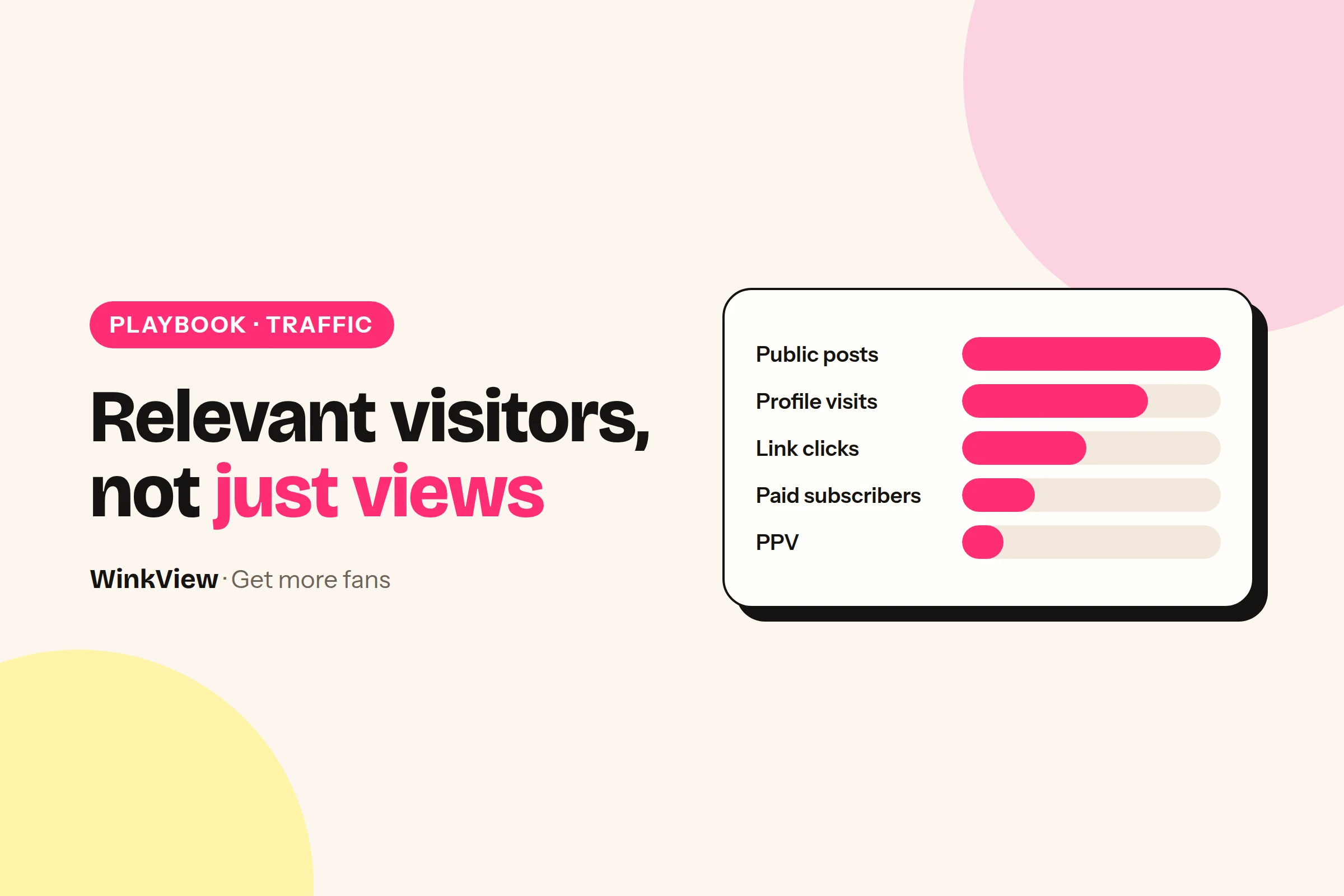
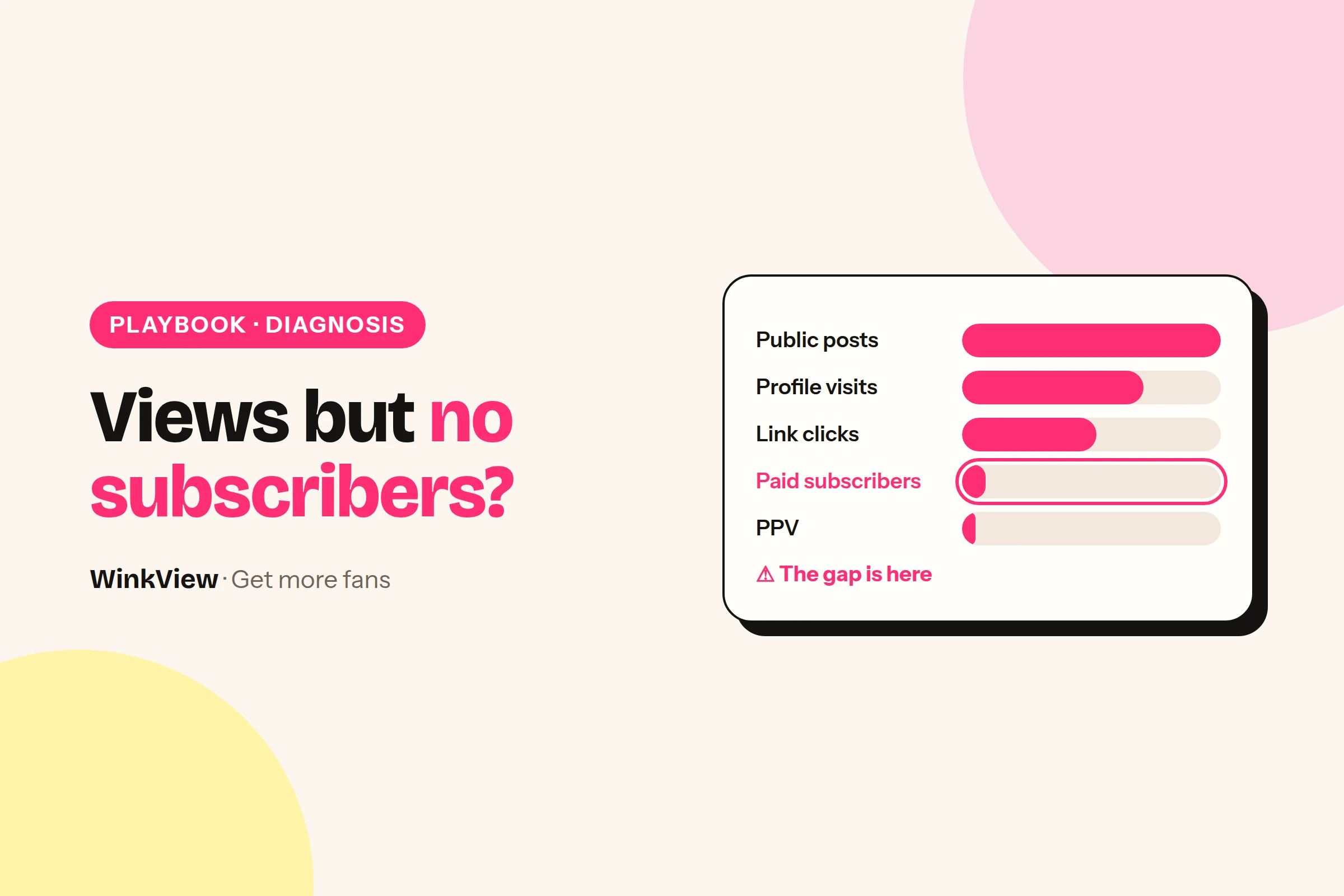
    To get more relevant visitors to your OnlyFans, fix the step where people currently drop off instead of adding more channels. Most creators are in one of three situations: no consistent public posting, views that do not become profile visits, or offer visits that do not become paid subscribers. Find yours below, take the next action, and start the first-week plan today.

    The short answer

    • A relevant visitor is someone who could become a paid subscriber and later buy PPV, not just someone who watched a clip.
    • If you do not post publicly every day, consistent distribution is your first job.
    • If you get views but few profile visits, your posts need a recognisable theme and your profile needs a clearer bio.
    • If people reach your offer but do not subscribe, more traffic will not help: rewrite the offer first.
    • Pick one main channel, run the seven-day plan below, and compare the same numbers every week.

    Relevant visitors and the money chain

    Traffic only pays when it moves along a chain. A public post earns a profile visit, the profile earns a link click, the offer page earns a paid subscriber, and that subscriber later buys PPV messages.

    1Public post
    2Profile visit
    3Link click
    4Paid subscriber
    5Later PPV purchase

    Each step has a different job, so each needs a different fix. A relevant visitor arrives because they like the creator: her personality, her humour or a recurring theme they want more of.

    That is why ten thousand views on a random joke clip can bring fewer paying subscribers than a few hundred views on a series people follow. WinkView works on the public steps at the start of the chain. The subscription, checkout and PPV all happen on OnlyFans, Fansly or Fanvue.

    Find your situation first

    Look at the last 14 days and pick the line that fits best. Each situation has a different first move and a different guide.

    Situation Sign Next action
    1. No consistent posting Gaps of two days or more Prepare 14 clips, post one a day
    2. Views, few profile visits Clips reach people, visits stay flat Give posts a theme, fix the bio
    3. Offer visits, few subscribers Clicks arrive, subscriptions do not Rewrite price, inclusions and PPV terms

    Situation 1: you are not posting consistently

    The sign is gaps of two days or more between public posts, or bursts of five posts followed by a quiet week. Platforms keep showing clips from accounts that keep appearing, so every gap costs you reach.

    Next action: choose one main channel, collect 14 clips the creator already has, and publish one a day. The same clips can also go to TikTok, YouTube Shorts and Facebook Reels without new filming. The guide to automatically reposting creator content shows the folder-to-post process step by step.

    Situation 2: you get views but few profile visits

    The sign is clips that reach thousands of people while profile visits barely move. Usually the post was fun to watch but did not say who made it or why anyone should see more.

    Next action: pick one recurring theme and give it a name, for example “20-minute Tuesday workout, part 4”. Then rewrite the bio so it continues that theme in one line. The Instagram profile and content guide has a full bio makeover and five Reel ideas you can adapt.

    Situation 3: people reach your offer but do not subscribe

    The sign is link clicks or OnlyFans profile visits arriving while new paid subscribers stay low. More traffic here only sends more people to a page that does not convince them.

    Next action: rewrite the offer so it states the monthly price, what is included and what costs extra as PPV. Use the fill-in template in the guide to converting followers into subscribers. If you are not sure which step fails, run the views but no subscribers diagnosis first.

    Your first-week plan

    This plan is for one creator and one main channel. Each day has one task and a clear sign that it is done.

    Day Task Done when
    1 Pick your situation and one main channel. Write a one-line content promise. The promise fits in one sentence
    2 Put 14 clips that fit the promise into one folder. Two weeks of posts are ready
    3 Rewrite the bio, pin three posts, test the link on a phone inside the app. A stranger could explain the account
    4 Start daily posting. Reply to comments within the first hour. The first post is live
    5 Answer every DM. Write down any question asked twice. The inbox is clear
    6 Read the offer page as a stranger: price, inclusions, what costs extra. All three are stated plainly
    7 Fill in the weekly check below and choose one change. One change is written down

    Worked example

    Example: Lena, a home cooking creator. Her content promise is “Quick dinners in a tiny flat kitchen, with running commentary on my day.”

    It works because viewers who enjoy her humour while she cooks want more of her day, which is what her subscription page offers. A promise like “easy recipes” would attract recipe collectors who have no reason to pay for more of Lena.

    Copy this template

    WEEKLY TRAFFIC CHECK
    Week of: [date]
    Main channel: [channel]
    Posts published: [number] of 7 days
    Views: [number]
    Profile visits: [number]
    Link clicks: [number]
    New paid subscribers: [number]
    PPV purchases from new subscribers: [number]
    Question asked more than once: [question]
    My situation this week: [1, 2 or 3]
    One change for next week: [change]

    Where WinkView fits

    WinkView is software for the public social steps, and it has two parts that work together. Each one matches a different situation.

    The Reposting part takes every approved clip, writes captions in her language, and posts every day to Instagram Reels, Trial Reels, a daily Story, TikTok, YouTube Shorts, Facebook Reels, Threads and X, spread through the day in her time zone. It solves situation 1 directly.

    The Video Editor takes her raw phone clips and turns each one into a ready-to-post vertical video: best moment first, dead air cut, hook text on screen, music. A clear hook and a strong opening tell viewers who she is and why they should see more, which supports situation 2. Nothing posts until you tick it.

    WinkView does

    • Posts a clip every day from the creator’s folder to each connected destination
    • Writes captions in her language and voice
    • Edits her raw clips: best moment first, dead air cut, hook text, music
    • Posts her best clips again, so they keep bringing visitors

    You do

    • Supply the clips and choose the theme
    • Write the bio and choose the pinned posts
    • Set the price and write the offer page
    • Send paid-platform messages and PPV
    • Read the weekly check and decide the next change

    WinkView does not touch situation 3. It does not post to OnlyFans, send PPV or handle checkout, so an unclear offer stays unclear until you rewrite it.

    Platform rules

    Posting uses each platform’s official connection. WinkView edits and posts; its Automated DMs send her link to anyone who writes “link” on Instagram. It does not follow or like, so real conversations stay with her or her team.

    Channel comparison for reference

    Once one channel works, add a second that can reuse the same clips. Use this table to choose it.

    Channel Best role You supply WinkView
    Instagram Main home: Reels, Stories, DMs Clips, bio, pinned posts Editing and posting
    TikTok Reach new viewers Clips that stand alone Posting
    YouTube Shorts Clips found by topic later Clips with a clear topic Posting
    Facebook Reels Extra reach, same clips Same clips Posting
    Threads Personality in text Short opinions Posting
    X Conversation Posts and profile Posting
    Reddit Niche communities Community research None
    Telegram Updates for existing fans A reason to join None

    Platform rules

    TikTok restricts sexual content and directions to adult sites, and YouTube does not allow links that send viewers to pornography. Keep every public post safe-for-work and do not use a link page to get around a platform’s rules. Check TikTok’s sensitive and mature themes guidelines and YouTube’s external links policy before you add those channels.

    When to build the full weekly system

    After two weeks in which every step of the chain is moving, the work becomes repetition across channels and, for agencies, across a group of creators. The complete guide to getting more OnlyFans subscribers covers that full weekly system, so this page stops at the starting decision.

    Keep filling in the weekly check. Your situation will change, for example from 1 to 3 once posting is steady, and your focus should change with it. A weekly social media content calendar helps you plan the clips once daily posting is running.

    Channel by channel: the Reddit playbook shows how to choose communities without removals, the X playbook gives you a pinned post and a five-post week, and the Telegram guide keeps existing fans updated.

    Frequently asked questions

    What is the best traffic source for OnlyFans?

    There is no single best source for every creator. Instagram is a common main home because Reels, Stories, a bio link and DMs sit in one place, while TikTok, YouTube Shorts and Facebook Reels can reach new viewers with the same clips. Pick the channel where your existing clips fit, post there daily for two weeks, and judge it on new paid subscribers rather than views.

    How many posts a day do I need to get OnlyFans traffic?

    One good post a day on your main channel is a sensible starting point, because steady posting matters more than bursts. No platform publishes an official number. If you have enough suitable clips, the same clip can also go to TikTok, YouTube Shorts and Facebook Reels. Increase volume only once your profile and offer are turning visits into paid subscribers.

    Why do I get traffic but no subscribers?

    Usually the offer page does not answer the visitor’s questions: what the monthly price covers, what is included and what costs extra as PPV. Sometimes the traffic is not relevant, because a viral clip attracted people who have no interest in the creator. Check which step loses people before you post more, starting with the offer page viewed on a phone.

    Can WinkView bring subscribers to my OnlyFans directly?

    No. WinkView works on the public social steps: it edits the creator’s raw clips into ready-to-post videos and posts them everywhere, every day, which brings profile visits and link clicks. Whether a visitor becomes a paid subscriber and later buys PPV depends on your offer and your paid-platform messages, which WinkView does not handle. You can test it with a 7-day free trial.

  • OnlyFans views but no subscribers? Find the failing step and fix it first

    OnlyFans views but no subscribers? Find the failing step and fix it first

    When your content gets views but no subscribers, one step between the view and the payment is failing, and the fix depends on which step it is. Find your symptom in the table below, run the check, and apply the first fix before you post more. A complete example diagnosis follows the table.

    The short answer

    • “Views” can mean views of your social posts or views of your OnlyFans profile, and they point to different problems.
    • Social views without profile visits usually mean the posts do not show who you are or why to follow.
    • OnlyFans profile views without subscribers usually mean the offer is unclear: price, inclusions or what costs extra as PPV.
    • More traffic only helps when posting is inconsistent; otherwise it sends more people to the same problem.
    • Change one thing at a time and compare the same numbers a week or two later.

    Symptom, check, first fix

    First decide which views you mean: views on your Reels, TikToks and Shorts point to the top rows of this table, while views of your OnlyFans profile point to the lower rows.

    Symptom Check First fix
    Posts go out some days, not others Count public posts in the last 14 days Post one clip a day from a prepared folder
    Social views, few profile visits Does each clip show who you are and a recurring theme? Name a series and say who you are in the first line
    Profile visits, few link taps Open your profile on a phone as a stranger would One clearly labelled link that works inside the app
    Link page visits, few OnlyFans visits Which buttons are on the page, and in what order? Put the official OnlyFans button first
    OnlyFans profile views, few subscribers Price, inclusions, what costs extra, purchase on a phone Rewrite the offer with a clear inclusions line
    Questions in comments and DMs left unanswered Count unanswered messages from the last 7 days Answer daily, using the same accurate facts
    Subscribers, but no later PPV purchases Does the offer say what costs extra? State PPV terms before people subscribe

    If several rows match, fix broken links and unclear offers first, because more traffic cannot repair them. Then work from the top of the table down.

    For the second and third rows, the Instagram profile makeover for OnlyFans creators shows a finished bio, pinned posts and Reel ideas. For the fourth row, a free link page that lists only official accounts keeps the right button first and helps fans avoid fakes.

    Where to find each number

    You need one number for each step of the chain from public post to paid subscriber. Later PPV purchases are the last step, and they depend on the subscriber getting what the offer promised.

    1Social views
    2Profile visits
    3Link taps
    4Offer page views
    5New subscribers
    • Social views and profile visits: the insights for each post and for the account on Instagram, TikTok or YouTube.
    • Link taps: your link page’s statistics, or the link taps figure in Instagram’s account insights.
    • Offer page views, new subscribers and PPV purchases: the statistics pages on OnlyFans, Fansly or Fanvue.

    Use the same seven days for every number. A clip’s lifetime views next to yesterday’s subscribers tell you nothing.

    Compare each step with your own previous weeks, not with a percentage from another creator. A step is broken when you look at it and find a concrete problem, such as a dead link or a vague inclusions line, not because a ratio looks low.

    A complete example diagnosis

    Worked example

    Example: Ana, a cosplay and gaming creator (fictional, with made-up numbers). In one week her Reels and TikToks got 18,000 views, Instagram showed 350 profile visits and 60 link taps, her link page sent 52 people to her OnlyFans page, and she gained 1 new paid subscriber.

    1. Posting: she posted every day that week, so the first row does not apply.
    2. Views to profile visits: 350 is in line with her previous three weeks, and every Reel belongs to her named “costume in a week” series. Nothing to fix here yet.
    3. Profile to link taps: on a phone, the bio link opens inside Instagram and is labelled “Official links”. Nothing broken.
    4. Link page to OnlyFans: 52 of 60 went through, and the official button is first. Nothing broken.
    5. OnlyFans page to subscriber: 1 of 52. Opened as a new visitor on a phone, her page bio reads “Welcome to my world, everything is here”. It shows the price but not what the price includes, and two DMs that week asked “is it the cosplay stuff?” and “do I pay extra for everything?”.

    Conclusion: the failing step is the offer page. The visitors are relevant, because they came through a series about her costumes, but the page does not tell them what they get.

    Chosen action: rewrite the page bio with a clear inclusions line and one sentence on what costs extra as PPV, pin a welcome post that shows the kind of costume sets subscribers get, and change nothing else for 14 days. She does not add channels or post more, because extra traffic would reach the same unclear page.

    Example: how many moved on at each stepAna’s week from the worked example above (made-up numbers). The short bar at the end is the step to fix first.
    Views → profile visits1.9%
    Profile → link taps17.1%
    Link page → OnlyFans page86.7%
    OnlyFans page → subscriber1.9%

    The replacement wording, with a fill-in offer template and a before and after for a vague inclusions line, is in the guide to converting followers into OnlyFans subscribers.

    Where WinkView helps, and where it does not

    WinkView fits two rows of the table: inconsistent posting, and social views with few profile visits. For the other rows it would only send more people to the same problem, so fix those yourself first.

    Inconsistent posting: Reposting

    Reposting takes every approved clip, writes captions in her language, and posts every day to Instagram Reels, Trial Reels, a daily Story, TikTok, YouTube Shorts, Facebook Reels, Threads and X, spread through the day in her time zone, and posts her best clips again. Posting uses each platform’s official connection, and the posting history shows what went out. The guide to automatically reposting creator content walks through the setup.

    Views without profile visits: the Video Editor

    The Video Editor turns her raw phone clips into ready-to-post vertical videos: best moment first, dead air cut, hook text on screen, music. Put the series name and who she is in the hook text, and every clip tells viewers why to visit her profile. Nothing posts until you tick it. WinkView’s Automated DMs send her link to anyone who writes “link”; every other comment and DM stays with you.

    WinkView does

    • Posts one clip a day from the creator’s folder to each connected destination
    • Writes the captions in her voice and language
    • Edits her raw clips: best moment first, hook text on screen, music
    • Posts her best clips again and flags when clips run low

    You do

    • Choose which row of the table applies each week
    • Fix the bio, the link and the link page order
    • Write the offer page, price and inclusions
    • Send paid-platform messages and PPV

    WinkView does not post to OnlyFans, send PPV or handle checkout. If Ana’s problem is the offer page, as in the example, WinkView is not the fix.

    Change one thing, then compare

    Make one change, write down the date, and keep everything else as stable as you can for 7 to 14 days. If you change the offer, the posting schedule and the price in the same week, you will not know which change worked.

    Copy this template

    DIAGNOSIS LOG
    Week: [dates]
    Which views: [social posts / OnlyFans profile]
    Numbers: views [ ] → profile visits [ ] → link taps [ ]
             → offer page views [ ] → new subscribers [ ] → PPV purchases [ ]
    Matching row: [symptom from the table]
    What I checked: [what you looked at, on a phone]
    What I found: [the concrete problem]
    One change: [what you changed]
    Date changed: [date]
    Compare on: [date plus 7 or 14 days]
    Result: [same numbers, same number of days]

    Fill it in before and after the change. Record anything unusual in the same week, such as a collaboration or a discount, so you do not credit the wrong change.

    Fixes that usually waste a week

    • Cutting the price first. If visitors do not know what they get, a lower price does not tell them. Clarify the offer, then test the price; this explanation of how subscriptions and PPV work for fans shows what visitors expect to see.
    • Posting more when the offer is unclear. Extra views multiply the visitors who leave the same page.
    • Chasing one viral clip. A clip outside your theme brings viewers who have no interest in you, and the numbers below it stay flat.
    • Adding channels before one works. Get one channel through the whole chain first; the guide to getting more relevant visitors shows where to start.
    • Changing everything at once. You lose the ability to see which change helped.

    If the numbers look fine but the week felt chaotic, your first 7 days on autopilot has a simple daily tracker. The full system is in how to get more OnlyFans subscribers.

    Frequently asked questions

    Why does my OnlyFans get views but no subscribers?

    Profile views without subscribers usually mean the page does not convince visitors: the price is shown but not what it includes, what costs extra as PPV is unclear, or the page does not match the posts that brought people there. Open your page on a phone as a new visitor, read last week’s DMs for repeated questions, and fix the first concrete problem you find.

    What is a good conversion rate from views to subscribers?

    There is no reliable universal benchmark, because platforms count views differently and creators have very different audiences and prices. Compare each step with your own previous weeks over the same number of days instead. A step needs work when you look at it and find a concrete problem, such as a broken link or a vague inclusions line, not when a percentage looks low.

    Should I post more to get more subscribers?

    Only if your posting is inconsistent, with gaps of several days between posts. If you already post daily and visitors reach your offer but do not subscribe, more posts send more people to the same unclear page. Fix the offer or the broken step first, then increase distribution once the page is turning visits into paid subscribers.

    Can WinkView fix low OnlyFans conversion?

    Only in two cases: when posting is inconsistent, where Reposting posts the creator’s clips every day, and when views do not turn into profile visits, where the Video Editor puts the best moment first and hook text on screen. Beyond sending her link to anyone who writes “link”, it does not answer comments or DMs, and it does not change your offer page, price or PPV, because those live on the paid platform, which WinkView does not touch.

  • How to promote OnlyFans on Instagram: a profile makeover, Reel ideas and captions

    How to promote OnlyFans on Instagram: a profile makeover, Reel ideas and captions

    To promote OnlyFans on Instagram, make your profile explain who you are within a few seconds and post Reels that attract people who would want more of you. Below is a complete makeover for an example fitness creator: a vague bio rewritten, three pinned posts, five Reel ideas and one caption before and after, each with the reason it fits her audience.

    The short answer

    • Instagram’s job is to earn a profile visit and a link tap; the subscription and PPV sales happen on the paid platform.
    • A clear bio says what you post, why to follow and what is behind the link, in plain words.
    • Pin three posts with different jobs: who you are, your signature series and answers to common questions.
    • Build Reels around one recurring theme, so viewers know what they get by following.
    • Keep every public post safe-for-work; Instagram is where people meet you, not where you sell.

    How Instagram leads to paid subscribers

    Instagram does not sell your subscription. It moves a stranger along a chain: a Reel earns a profile visit, the profile earns a tap on the link, the offer page earns a paid subscriber, and a happy subscriber later buys PPV.

    1Reel
    2Profile visit
    3Link tap
    4Paid subscriber
    5Later PPV purchase

    Every example below serves one of the first three steps. The people you want are those who like the creator herself, because they are the ones who keep paying after the first month.

    Platform rules

    Instagram does not allow nudity or sexual content, and it can limit accounts that push adult promotion. Keep every post, caption and bio line safe-for-work, and read Instagram’s Community Guidelines before you change your bio link. A link page makes your official links easy to find; it does not change what Instagram allows.

    Meet the example creator

    Worked example

    Example: Nika, a fitness creator (fictional). She trains five days a week, mostly at home with a mat and two dumbbells, and posts whatever she happened to film that day.

    Her Instagram has a vague bio, three random pinned posts and no recurring theme. Her subscription page offers full-length workout videos, a weekly training diary and more personal updates from her day.

    Her best-fit audience is people who like her energy and want to train alongside someone relatable, not elite athletes. They want more of her routine and her personality, which is exactly what the subscription offers, so every change below points there.

    Rewrite the bio

    Before

    Just a girl who loves the gym. Living my best life. New stuff every day, link below.

    After

    Nika | Home workouts
    20-minute routines with two dumbbells, for busy days
    New session every Tuesday and Friday
    My training diary and full-length sessions: link below

    The name field “Nika | Home workouts” helps her appear when people search for home workouts. The second and third lines tell a visitor what they get by following and when, which is a reason to tap Follow now rather than later.

    The last line says plainly what sits behind the link, so the tap is expected rather than a surprise. Before you write that line, decide what your offer page actually includes: the guide to converting followers into subscribers has a fill-in offer template.

    Copy this template

    [Name] | [What you post, 2 to 4 words]
    [Why follow: the promise in one line]
    [When: how often or which days]
    [What is behind the link, in plain words]: link below

    Point the bio link at a page that lists only your official accounts, such as the free link page for adult creators. Fans who arrive there find your real links rather than a copycat.

    Pin three posts with different jobs

    1. Who I am in 20 seconds. Nika packs her gym bag and says her name, what she posts and on which days. A visitor from a random Reel meets the person, and the person is what subscribers pay for.
    2. The routine people save. Her most-saved 20-minute session, with the series name on screen. It proves the promise in the bio and shows what following gets you.
    3. Your questions answered. Where her official accounts are, how often she posts, and what the link in her bio leads to. It removes the doubts that stop a tap and helps fans spot the fake accounts that copy creators.

    Three pins that all say “link in bio” would repeat one message three times. Three different jobs answer three different questions a new visitor has.

    Five Reel ideas and why they fit

    All five stay inside one theme, home training with a relatable person, but each shows a different side of her. Variety within one theme keeps the account recognisable without repeating the same post.

    Reel idea What happens Why it fits her audience
    20-minute Tuesday, part 4 A full routine, sped up, moves named on screen A numbered series gives a reason to follow and come back
    What is in my gym bag She unpacks it and rates each item out of 10 Light and personal, shows her humour
    Training day dinner She cooks a quick post-workout meal at home Shows her day beyond the mat, which the diary continues
    Which set for leg day? She holds up two outfits and asks viewers to vote in the comments Comments start conversations she can reply to
    Rest day, real version Groceries, stretching, a nap, a short chat Followers get to know her, not just her workouts

    Try ideas 2 and 5 as Trial Reels, which Instagram shows to non-followers first. Post them when her fans are awake: the free best time to post Reels checker works it out from where her fans live. You can test personality clips on new people without filling your current followers’ feeds.

    One training session a week can supply several of these clips. The weekly plan for turning them into daily posts is in the weekly social media content calendar.

    One caption, before and after

    Before

    Leg day done. Link in bio.

    After

    20-minute Tuesday, part 4: legs, two dumbbells, no jumping, so your neighbours stay happy. Save it for next week. Parts 1 to 3 are pinned, and my full training diary is in my highlights.

    The first words name the series, so returning viewers recognise it at once. “No jumping, so your neighbours stay happy” speaks to people training in a flat, which is her audience, and adds her humour.

    “Save it for next week” gives a practical reason to save the post and come back to it. Pointing to the pins and highlights sends people to the profile, where the link does the rest without a hard sell in the caption.

    Let WinkView edit and post

    Once the plan is set, Nika’s weekly Instagram work becomes one task: drop the week’s raw clips into her folder in WinkView. WinkView handles the editing and the posting.

    The Video Editor turns each raw clip into a ready-to-post vertical video: best moment first, dead air cut, hook text on screen, music. Nothing posts until Nika ticks it. Reposting then writes each caption in her language and posts every day to Instagram Reels, Trial Reels and a daily Story, plus TikTok, YouTube Shorts, Facebook Reels, Threads and X if she connects them, spread through the day in her time zone. Replies to comments such as the leg-day vote, and her DMs, stay with her.

    WinkView does

    • Posts one clip a day from her folder to Reels, Trial Reels and a daily Story
    • Writes captions in her voice and language
    • Edits each raw clip: best moment first, dead air cut, hook text, music
    • Posts her best clips again, so a strong Reel keeps working
    • Shows a posting history, with optional approvals before posts go out

    You do

    • Film the clips and tick which edits go out
    • Write the bio and choose the three pins, once
    • Decide the series and the theme
    • Run the subscription page, PPV and paid-platform messages
    • Reply to comments and DMs, and check the posting history

    Posting uses Instagram’s official connection. WinkView edits and posts, and its Automated DMs send her link to anyone who writes “link”. It does not like or follow. Connection steps, approvals and posting times are covered in the Instagram automation guide for OnlyFans.

    Posting the same clips on TikTok? The TikTok content ideas and routine guide shows how to turn them into a series. The full weekly system is in how to get more OnlyFans subscribers.

    Frequently asked questions

    Can I put my OnlyFans link in my Instagram bio?

    Many creators put a link page in their bio that lists their official accounts, but Instagram restricts adult content and can limit accounts that promote it. Keep your bio wording and every post safe-for-work, read Instagram’s current guidelines, and judge the risk for your own account. A link page also helps fans tell your real accounts from impersonators.

    How often should I post Reels to promote OnlyFans?

    One Reel a day is a sensible target if you have enough suitable clips, with a daily Story to keep your profile active in between. Steady posting over several weeks matters more than the exact number. Start with a folder of 14 clips around one theme, so two full weeks of posting are ready before you begin.

    What should I post on Instagram as an OnlyFans creator?

    Post safe-for-work Reels around one recurring theme that shows your personality: a numbered routine series, everyday moments, outfit choices, food, pets or a normal day behind the scenes. The goal is that viewers understand what they get by following you. Keep paid content on your paid page and do not describe it in captions. To test which opening works before it reaches her followers, use Instagram Trial Reels.

    Does WinkView create my Instagram content?

    It does not film for you: filming stays with her. The WinkView Video Editor turns her raw clips into ready-to-post videos, and Reposting writes captions in your language and posts them to Instagram and other destinations every day. Its Automated DMs send your link to anyone who writes “link”; other comment replies and DMs stay with you. It comes with a 7-day free trial.